ChatGPT’s Voice Mode Is Now Seamlessly Integrated
▼ Summary
– ChatGPT Voice is now integrated directly into the chat interface, eliminating the need to switch to a separate mode.
– Users can converse with the chatbot and see its responses, including shared images and text, in real time during voice conversations.
– Previously, voice mode required a separate screen with limited interaction and no visible text responses during the conversation.
– The updated voice mode is the new default and is rolling out to all users on web and mobile apps.
– Users who prefer the original separate voice mode can revert to it through the settings by enabling “Separate mode.”
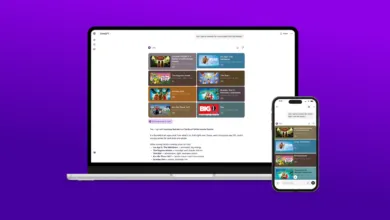
The latest update to ChatGPT Voice brings a more fluid and integrated conversational experience directly within the chat interface. OpenAI has eliminated the need to switch to a separate screen, allowing users to engage in voice conversations while simultaneously viewing text responses, shared images, and other visual content. This enhancement makes interactions feel more natural and continuous, bridging the gap between spoken dialogue and on-screen information.
Previously, using voice mode meant navigating to a dedicated screen featuring an animated blue circle, along with controls for muting, recording live video, and exiting back to text chat. A significant drawback was the inability to see ChatGPT’s replies as text while listening, which often forced users to exit voice mode if they missed part of the response. Now, everything happens in one place: you speak, and responses appear in real time alongside your conversation history and any visuals like maps or pictures.
This integrated approach supports a smoother transition between voice and text, though you still need to tap an “end” button to conclude a voice session before returning to typed messages. The updated voice interface is now the default setting and is being rolled out to all users on both web and mobile platforms. Simply updating your app should provide access to the new feature.
For those who preferred the older, isolated voice experience, OpenAI has included an option to revert. Within the “Settings” menu, under “Voice Mode,” a new toggle labeled “Separate mode” restores the previous standalone interface. This ensures that while the platform moves toward a unified design, user choice and flexibility remain a priority.
(Source: TechCrunch)