Free AI Tools for ‘Small Business Saturday’ Marketing Materials
▼ Summary
– Small Business Saturday helps independent businesses boost visibility and sales the day after Black Friday when competing with larger retailers.
– Free AI tools like ChatGPT, Canva, Gemini, and Google Pomelli enable small businesses to create professional marketing materials at minimal cost.
– You can design an 18×24 poster by connecting ChatGPT to Canva and using prompts to generate and customize templates for printing or digital use.
– Gemini allows creation of A5 flyers and social slides through text prompts, with options to refine designs and export to Google Slides for further editing.
– Google Pomelli generates tailored ad campaigns by analyzing your website’s brand identity, providing ready-to-use digital assets for social media and online advertising.
For small business owners, Small Business Saturday offers a vital opportunity to stand out during the busy holiday shopping season. While major retailers dominate Black Friday, this dedicated day shifts attention to local shops and independent sellers. Creating eye-catching marketing materials like posters, flyers, and social media ads is essential for drawing customers, but hiring a designer can be costly. Thankfully, a range of free AI tools now makes professional design accessible to businesses of any size, enabling them to produce high-quality promotional assets quickly and affordably.
To get started with these tools, you will need free accounts for ChatGPT, Canva, and Gemini. Google’s Pomelli is also useful for ad creation. While paid subscriptions unlock advanced features, the free versions are fully capable of handling most design tasks for a typical Small Business Saturday campaign.
Design and Print a Poster with ChatGPT and Canva
Canva serves as a powerful design platform that simplifies creating visuals. Its Magic Studio includes tools like background removal and image editing, though some features require a Canva Pro subscription. The free plan still offers substantial functionality, including templates and export options.
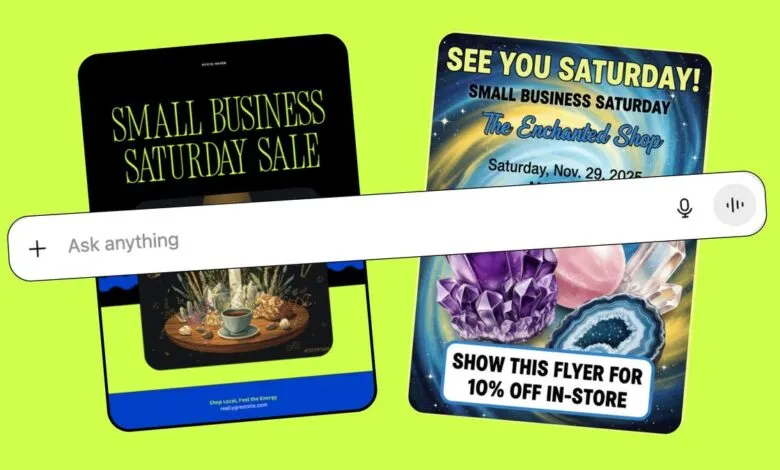
OpenAI has integrated Canva directly into ChatGPT for all users. Begin by linking your Canva account in ChatGPT under Settings > Apps and Connectors. Then, input a detailed prompt such as, “Design an 18×24 poster for Small Business Saturday for a metaphysical shop called The Enchanted Shop. We sell crystals, herbs, and books, and are offering a crystal sale. Use brand colors and include the event date.”
ChatGPT will generate several template options. Select one and open it in Canva to customize text, colors, and images. You can upload your logo and use the color picker to align the design with your branding. If the initial output isn’t perfect, refine your prompt with more specifics, like requesting hyper-realistic product images or including a special promotion code.
Once satisfied, download the poster as a PDF for printing. Canva also offers printing services, with an unframed 18×24 poster starting around $69 including delivery.
Create a Flyer or Social Slides with Gemini
Google’s Gemini provides another straightforward way to design marketing materials. It can produce A5 flyers for in-store distribution or social media slides without requiring external app connections.
In the Gemini app or on the website, choose “Create Images” from the tools menu. Enter a clear prompt: “Make an A5 flyer for Small Business Saturday at The Enchanted Shop. Use bold text saying ‘See you Saturday!’, include the date, location, and a 10% discount offer. Apply brand colors #cfff4b, #003fc6, #000000, and #ffffff, with hyper-realistic crystal images.”
Gemini will generate a layout instantly. If it doesn’t match your vision, adjust the prompt and regenerate. For social slides, use Gemini’s Canvas mode. Describe the slides you need, and Gemini will create a draft which you can then export to Google Slides for fine-tuning. Though the slide size isn’t A5, you can easily adapt it for digital sharing. Export the final design as a PDF for professional printing or as a PNG for online use.
Generate Ad Creatives with Google Pomelli
To round out your campaign, use Pomelli, Google’s AI marketing assistant, to create targeted ad graphics. It scans your website to build a “Business DNA”, capturing colors, fonts, and tone, then generates branded banners and social ads.
Visit labs.google.com/pomelli and sign up with your Google account. Enter your website URL so Pomelli can extract your brand elements. You can review and edit the suggested colors, logo placement, and brand voice. Once your Business DNA is set, Pomelli suggests campaign designs. Duplicate any design to resize it for different formats, such as Instagram stories or Facebook feeds. Click into a design to adjust text, calls to action, or images. Finally, download the ad creative to use in your preferred advertising platform.
Maximizing Your Small Business Saturday Impact
Using these AI tools, you can produce a complete set of marketing materials, posters, flyers, social slides, and digital ads, at little to no cost. Display posters in your storefront, hand out flyers to customers, share slides on social media, and launch targeted ad campaigns. This multi-channel approach can significantly increase foot traffic and sales.
Most tasks, from initial concept to final design, can be accomplished in about an hour. While you have full control to customize every element, the AI handles the heavy lifting, saving time and money. Whether you stick to free tools or invest in a premium subscription, these resources make it feasible for any small business to create professional, engaging promotions for Small Business Saturday.
(Source: ZDNET)