Gemini Live’s New Floating Pill Design Hits Android
▼ Summary
– Google is rolling out a redesigned Gemini Live interface on Android, replacing the fullscreen experience with a floating pill-shaped indicator.
– The new pill can be accessed via the Gemini overlay or app and allows users to share their camera/screen, mute the microphone, and end the session.
– When not in use, the pill collapses into a movable circle on the screen, which can be tapped to expand or swiped down to close.
– The redesign retains the fullscreen interface within the app and displays a live transcription with a waveform in the pill’s background.
– This update is appearing with the stable Google app and likely accompanies an upcoming major Gemini Live model update.
Google is introducing a new floating pill design for its Gemini Live feature on Android devices, moving away from the previous fullscreen-only experience. This update provides a more flexible and integrated interface that aligns with the existing Gemini overlay for text interactions, allowing users to maintain access to the assistant while using other applications on their phone.
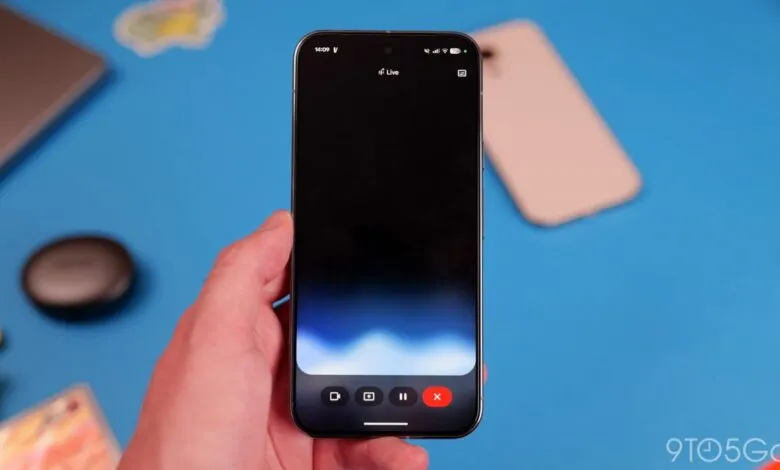
The new design presents a floating pill-shaped indicator that appears after you exit the fullscreen Gemini Live interface. This visual element matches the style of the standard Gemini overlay, creating a consistent user experience. You can activate it through two primary methods: by tapping the Live icon within the standard Gemini overlay or by launching the fullscreen Live UI from the main Gemini app and then returning to your home screen.
This floating control pill grants quick access to core Live functions. With it, you can begin sharing your camera feed or screen, mute your microphone, and end the Live session. If you haven’t started a voice conversation, a keyboard icon allows you to switch over to the text-based Gemini overlay. Once a conversation is active, the same action will stop the Live session and open a text transcript of your interaction.
The interface itself displays a dynamic Gemini Live waveform in the background, with the real-time text transcription appearing above it. Controls in the top-right corner let you toggle the visibility of both the waveform and the transcription as needed. A key feature of this redesign is its adaptability; if you switch to another task on your device, the pill conveniently collapses into a small, movable circle on your screen, functioning much like a chat head. A simple tap expands it again, while a swipe down gesture closes the interface entirely.
It’s important to note that this update does not remove the original fullscreen interface, which remains accessible by opening the Gemini app. Video sharing sessions will still utilize the complete fullscreen UI. Currently, this redesign appears to be in a limited rollout, observed on the stable version 17.3 of the Google app. This interface refresh is likely part of a broader upcoming update for Gemini Live. The compact, movable circle is particularly suited for multitasking scenarios, such as when interacting with a computer, and bears a visual resemblance to the interface demonstrated previously for Google’s Project Astra.
(Source: 9to5 Google)