Gmail’s AI Update: New Features Replace Gemini Side Panel

▼ Summary
– Google is removing the Gemini side panel for AI Pro and Ultra subscribers in the US, replacing it with new in-line AI features in Gmail.
– The side panel previously offered a chatbot interface for tasks like summarizing emails, drafting responses, and accessing Drive or Calendar information.
– Core functionality is now integrated via tools like Help Me Write, Proofread, and context-aware Suggested Replies.
– New AI Overviews can summarize long email threads and appear in search for a more seamless user experience.
– The side panel is already gone on the web for some users but remains on mobile, and Workspace plans are unaffected by this change.
Google is rolling out a significant change to how users interact with its AI within Gmail, shifting from a dedicated side panel to integrated tools directly within the email interface. This update, which removes the Gemini side panel for AI Pro and Ultra subscribers in the United States, aims to make artificial intelligence assistance more seamless and contextually relevant. The move represents a strategic pivot towards embedding these powerful features where users already work, rather than in a separate, isolated window.
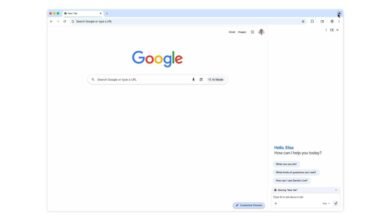
Previously, accessing the AI required clicking a small Gemini spark icon near the profile picture in the web version. This opened a side panel that functioned as a traditional chatbot, offering a suite of helpful actions. Users could leverage it to summarize lengthy email threads, get suggestions for crafting replies, or compose a new email from scratch. It also served as a powerful search tool, capable of finding specific information buried in past emails or within connected Google Drive files. For calendar management, the panel could retrieve details about upcoming events or even create new ones directly in Google Calendar.
Google’s announcement frames this shift as an effort to simplify the user experience. The company states that making it “easier to use AI directly in Gmail” means US-based AI Pro and AI Ultra subscribers will likely no longer encounter the “Ask Gemini” option or be able to open the dedicated side panel. The core capabilities are not disappearing; instead, they are being redistributed into new, inline tools. The popular Help Me Write feature remains, while Proofread has been enhanced to offer more robust checks for spelling, grammar, and writing style. Another key improvement is an upgrade to Suggested Replies, which now intelligently considers the full context of the email conversation to generate more appropriate responses.
A major component of this integration is the introduction of AI Overviews. This feature can automatically provide concise summaries of particularly long or complex email threads. Furthermore, new AI Overviews within search deliver information in a more natural, integrated manner, appearing precisely when and where a user might need them during their workflow. On a practical note, the side panel has already disappeared from personal Gmail accounts that have received the new feature set, though it reportedly remains accessible on the Android mobile app for the time being. It is important to note that this change currently only affects individual AI subscription plans; there are no announced alterations to the availability of the Gemini side panel for accounts on Google Workspace business plans.
(Source: 9to5 Google)