Googlebook brings true desktop with app icons and widgets to Google laptops
▼ Summary
– ChromeOS desktops have lacked functionality for over a decade, but the new Googlebook introduces a proper desktop experience with app shortcuts and folders.
– Users can right-click to create folders or drag native Android apps to the desktop, bridging mobile and traditional desktop computing.
– The desktop includes custom widgets powered by Gemini, allowing users to generate personalized at-a-glance dashboards from data like Gmail or weather.
– The minimalist, distraction-free desktop option will remain available for those who prefer it.
– The addition of a functional desktop transforms the Googlebook into a more mature operating system, offering utility for complex workflows.
For over a decade, the ChromeOS desktop has served as little more than a backdrop for wallpaper. While the minimalist, distraction-free approach certainly has its appeal, users migrating from Windows or macOS have consistently requested a traditional space for organizing their workflows. With the arrival of the new Googlebook, Google is finally delivering a proper, functional desktop experience.
A functional space for your apps
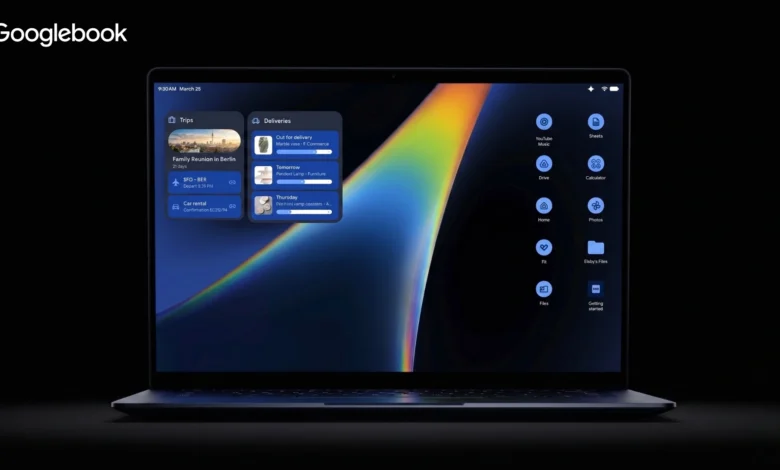
Let me be clear: I have always appreciated the clean, simple desktop of the Chromebook experience. There is something calming about closing all your windows and simply seeing a beautiful piece of wallpaper without a sea of cluttered icons staring back at you. But as workflows grow more complex, having the option to drop a few essential app shortcuts or temporary files directly on the desktop represents a massive quality-of-life upgrade. Based on early looks at the new Android-based desktop environment powering Googlebooks, we are getting a true workspace. The ability to right-click to create folders or drag a native Android app directly to the desktop fundamentally changes how we will interact with these laptops. It bridges the gap between the mobile app ecosystem and traditional desktop computing in a way we have been hoping to see for years.
Custom widgets powered by Gemini
Beyond app shortcuts, the most exciting addition to the desktop is the introduction of widgets. We caught a glimpse of this during the official Googlebook announcement with the incredibly cool “Create My Widget” feature. Instead of simply picking from a pre-set list of static squares, you can actually use Gemini to generate custom, at-a-glance dashboards. Whether it is a personalized travel itinerary countdown pulled from your Gmail or a highly specific weather readout for an upcoming golf trip, these intelligent widgets will live right on your desktop. This transforms that previously empty space into a highly personalized command center.
The best of both worlds
It is a seemingly small addition compared to the massive AI features or the premium hardware announcements, but it is one of those foundational shifts that will make the Googlebook feel like a truly mature operating system. For those who want to keep their desktop completely bare and minimalist, that will of course remain an option. But for the rest of us who want a bit more utility and quick access to our most important tools, the era of the functional Google desktop is finally here.
(Source: Chrome Unboxed)