Master SEO agent skills that drive real results
▼ Summary
– Single-prompt AI SEO agents fail due to three key issues: they lack tools to actually check websites, their outputs are never verified, and they have no memory, leading to inconsistent and often incorrect results.
– The author built reliable agents using a structured workspace containing separate files for instructions (AGENTS.md), personality (SOUL.md), tools (scripts/), reference criteria, memory logs, and output templates.
– A crawler agent was iterated through five versions in one day, evolving from a blocked bare curl script to a stable system with Playwright, rate limiting, JavaScript rendering, and consistent output via templates and memory logs.
– Key failure modes include agents hallucinating unverified data, output format drifting between runs, and agents confidently reporting false positives; these are mitigated by strict templates and a dedicated reviewer agent.
– The reviewer agent, built first, verifies every finding against evidence and severity, resulting in a 99.6% human approval rate on 270 internal linking recommendations across two sites.
I’ve built more than 10 SEO agent skills over 34 days. Six of them worked on the very first try. The other four? They taught me everything LinkedIn posts about AI SEO skills conveniently leave out , especially the folder structure that separates real results from guesswork.
What makes these agents reliable isn’t clever prompting. It’s the underlying architecture. Here’s exactly how to build an agent from scratch, test it, fix it, and ship it with confidence.
Why most AI SEO skills fail
Here’s what a typical “AI SEO prompt” looks like on LinkedIn:
“You are an SEO expert. Analyze the following website and provide a comprehensive audit with recommendations.”
That’s it. One prompt, maybe with some formatting instructions. The person posts a screenshot, gets 500 likes, and moves on. The output looks professional. It reads well. It’s also 40% wrong.
I know because I tried this exact approach. Early on, I pointed an agent at a website and said, “find SEO issues.” It returned 20 findings. Eight didn’t exist. The agent had never even visited some of the URLs it was reporting on.
Three problems kill single-prompt skills:
- No tools: The agent has no way to actually check the website. It’s working from training data and guessing. When you ask, “Does this site have canonical tags?” the agent imagines what the site probably looks like rather than fetching the HTML and parsing it.If your skill is a prompt in a single file, you don’t have a skill. You have a coin flip.
Build SEO agent skills as workspaces
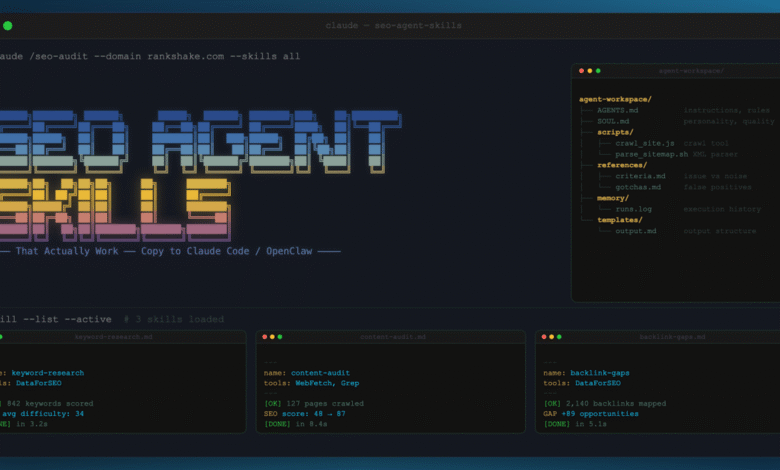
Every agent in our system has a workspace. Think of it like a new hire’s desk, stocked with everything they need. Here’s what the workspace looks like for the agent that crawls websites and maps their architecture:
“` agent-workspace/ AGENTS.md instructions, rules, output format SOUL.md personality, principles, quality bar scripts/ crawl_site.js tool the agent calls to crawl parse_sitemap.sh tool to read XML sitemaps references/ criteria.md what counts as an issue vs noise gotchas.md known false positives to watch for memory/ runs.log past execution history templates/ output.md expected output structure “`
Six components. One prompt file would cover maybe 20% of this.
AGENTS.md is the instruction manual. I wrote thousands of words of methodology into AGENTS.md. Instead of “crawl the site,” I laid out the steps: “Start with the sitemap. If no sitemap exists, check /sitemap.xml, /sitemap_index.xml, and robots.txt for sitemap references. Respect crawl-delay. Use a browser user-agent string, never a bare request. If you get 403s, note the pattern and try with different headers before reporting it as a block.”
The agent calls `node crawl_site.js –url` to analyze website data. It doesn’t write curl commands from scratch every time. That’s the difference between giving someone a toolbox and telling them to forge their own wrench.
References are the judgment calls. This contains criteria for what counts as an issue. Known false positives to watch for. Edge cases that took me 20 years to learn. The agent reads these when it encounters something ambiguous.
Memory is institutional knowledge. Here I keep a log of past runs: what it found last time, how long the crawl took, what broke. The next execution benefits from the last.
Templates enforce consistency. This is where I get specific about the output I want: “Use this exact structure. These exact fields. This severity scale.” Output templates are the difference between getting the same quality in run 14 as you did in run 1.
Walkthrough: Building the crawler from scratch
Let me show you exactly how I built the crawler. It maps a site’s architecture, discovers every page, and reports what it finds.
Version 1: The naive approach. I provided the instruction: “Crawl this website and list all pages.” The agent wrote its own HTTP requests, used bare curl, and got blocked by the first site it touched. Every modern CDN blocks requests without a browser user-agent string, so it was dead on arrival.
Version 2: Added a script. I built crawl_site.js using Playwright. This version used a headless browser and a real user-agent. The agent calls the script instead of writing its own requests. This worked on small sites, but it crashed on anything over 200 pages. Because there was no rate limiting and no resume capability, it hammered servers until they blocked us.
Version 3: Introducing rate limiting and resume. I added throttling with a two requests per second default and never every two seconds for CDN-protected sites. The agent reads robots.txt and adjusts its speed without asking permission. I also added checkpoint files so a crashed crawl can resume from where it stopped. This worked on most sites, but it failed on sites that require JavaScript rendering.
Version 4: JavaScript rendering. This time, I added a browser rendering mode. The agent detects whether a site is a single-page app (React, Next.js, Angular) and automatically switches to full browser rendering. It also compares rendered HTML against source HTML, and I found real issues this way: Sites where the source HTML was an empty shell but the rendered page was full of content. Google might or might not render it properly. Now we check both. This version worked on everything, but the output was inconsistent between runs.
Version 5: Time for templates and memory. For this version, I added templates/output.md with exact fields: URL count, sitemap coverage, blocked paths, response code distribution, render mode used, and issues found. This way every run produces the same structure. I also added memory/runs.log. The agent appends a summary after every execution. Next time it runs, it reads the log and can compare results, like “Last crawl found 485 pages. This crawl found 487. Two new pages added.”
Version 5 is what we run today. Five iterations in one day of building.
The pattern is always the same: Start small, hit a wall, fix the wall, hit the next wall. Five versions in one day doesn’t mean five failures. It means five lessons that are now permanently encoded. I’ve rebuilt delivery systems four times over 20 years. The process doesn’t change. You start with what’s elegant, then reality hits, and you end up with what works.
Tip: Don’t try to build the perfect skill on the first attempt. Build the simplest thing that could possibly work. Run it on real data and watch it fail. The failures tell you exactly what to add next. Every version of our crawler was a direct response to a specific failure. Not a feature we imagined. A problem we hit.
The tool vs. instruction distinction
This is the most important architectural decision I made.
When you write “use curl to fetch the sitemap” in your instructions, the agent generates a curl command from scratch every time. Sometimes it adds the right headers. Sometimes it doesn’t. Sometimes it follows redirects. Sometimes it forgets.
When you give the agent a script called parse_sitemap.sh, it calls the script. The script always has the right headers, always follows redirects, and always handles edge cases. The agent’s judgment goes into WHEN to call the tool and WHAT to do with the results. The tool handles HOW.
Our agents have tools for everything:
- crawl_site.js: Playwright-based crawler with rate limiting, resume, and rendering
- parse_sitemap.sh: Fetches and parses XML sitemaps, counts URLs, detects nested indexes
- check_status.sh: Tests HTTP response codes with proper user-agent strings
- extract_links.sh: Pulls internal and external links from page HTML
The agent decides which tools to use and what parameters to set. The crawler chooses its own crawl speed based on what it encounters. It reads robots.txt and adjusts. It has judgment within guardrails.
Think of it this way: You give a new hire a CRM, not instructions on how to build a database. The tools are the CRM. The instructions are the process for using them.
Progressive disclosure: Don’t dump everything at once
Here’s a mistake I made early: I put everything in AGENTS.md. Every rule. Every edge case. Every gotcha. Thousands of words.
The agent got confused. It had too much context and it started prioritizing obscure edge cases over common tasks. It would spend time checking for hash routing issues on a WordPress blog.
The fix: progressive disclosure.
Core rules that affect the 80% case go in AGENTS.md. This is what the agent needs to know for every single run.
Edge cases go in references/gotchas.md. The agent reads this file when it encounters something ambiguous. Not before every task. Only when it needs it.
Criteria for severity scoring go in references/criteria.md. The agent checks this when it finds an issue and needs to decide how bad it is. Not upfront.
This is the same way a skilled employee operates. They know the core process by heart. They check the handbook when something weird comes up. They don’t re-read the entire handbook before answering every email.
If your agent output is inconsistent but your instructions are detailed, the problem is usually too much context. Agents, like new hires, perform better with clear priorities and a reference shelf than with a 50-page manual they have to digest before every task.
The 10 gotchas: Failure modes that will burn you
Every one of these lessons cost me hours. They’re now encoded in our agents’ references/gotchas.md files so they can’t happen again.
- Agents hallucinate data they can’t verify. I asked the research agent to find law firms and count their attorneys. It made every number up. It had never visited any of their websites. Only ask agents to produce data they can actually fetch and verify. Separate what they know (training data) from what they can prove (fetched data).
- Knowledge doesn’t transfer between agents. This fix I figured out on day one (use a browser user-agent string to avoid CDN blocks) had to be re-taught to every new agent. Day 34, a brand new agent hit the exact same problem. Agents don’t share memories. Encode shared lessons in a common gotchas file that multiple agents can reference.
- Output format drifts between runs. The same prompt can result in different field names: “note” vs. “assessment.” “leadscore” vs. “qualificationrating.” If you run it twice, get two different schemas. The fix: Create strict output templates with exact field names. Not “write a report.” “Use this exact template with these exact fields.”
- Agents confidently report issues that don’t exist. The first three audits delivered false positives with total confidence. The fix wasn’t a better prompt. It was a better boss. A dedicated reviewer agent whose only job is to verify everyone else’s work. The same reason code review exists for human developers.
- Bare HTTP requests get blocked everywhere. Every modern CDN blocks requests without a browser user-agent string. The crawler learned this on audit number two when an entire site returned 403s. All it required was a one-line fix, and now it’s in the gotchas file. Every new agent reads it on day one.
- Don’t guess URL paths. Agents love to construct URLs they think should exist: /about-us, /blog, /contact. Half the time, those URLs 404. My rule is: Fetch the homepage first, read the navigation, follow real links. Never guess.
- ‘Done’ vs. ‘in review’ matters. Agents marked tasks as “done” when posting their findings. Wrong. “Done” means approved. “In review” means waiting for human verification. This small distinction has a huge impact on workflow clarity when you have 10 agents posting work simultaneously.
- Categories must be hyper-specific. “Fintech” is useless for prospecting because it’s too broad. “PI law firms in Houston” works. Every company in a category should directly compete with every other company. My first attempt at sales categories was “Personal finance & fintech.” A crypto exchange doesn’t compete with a budgeting app. Lesson learned in 20 minutes.
- Never ask an LLM to compile data. Unless you want fabricated results. I asked an agent to summarize findings from five separate reports into one document. It invented findings that weren’t in any of the source reports. Always build data compilations programmatically. Script it. Never prompt it.
- Agents will try things you never planned. The research agent tried to call an API we never set up. It assumed we had access because it knew the API existed. The fix: Be explicit about what tools are available. If a script doesn’t exist in the scripts folder, the agent can’t use it. Boundaries prevent creative failures.
Build the reviewer first
This is counterintuitive. When you’re excited about building, you want to build the workers. The crawler. The analyzers. The fun parts.
Build the reviewer first. Without a review layer, you have no way to measure quality. You ship the first audit and it looks great. But 40% of the findings are wrong. You don’t know that until a client or a colleague spots it.
Our review agent reads every finding from every specialist agent. It checks:
- Does the evidence support the claim?
- Is the severity appropriate for the actual impact?
- Are there duplicates across different specialists?
- Did the agent check what it says it checked?
That single agent was the biggest quality improvement I made. Bigger than any prompt tweak. Bigger than any new tool.
The human approval rate across 270 internal linking recommendations: 99.6%. That number exists because a reviewer verifies every single one.
I’ve seen the same pattern with human SEO teams for 20 years. The teams that produce great work aren’t the ones with the best analysts. They’re the ones with the best review process. The analysis is table stakes. The review is the product.
Tip: If you’re building multiple agents, the reviewer should be the first agent you build. Define what “good output” looks like before you build the thing that produces output. Otherwise, you’re shipping hallucinations with formatting. I learned this across three audits that were embarrassing in hindsight.
The validation standard (Our unfair advantage)
The reviewer catches technical errors. But there’s a higher bar than “technically correct.”
We have a real SEO agency with real clients and a team with 50 years of combined experience. Every agent finding gets validated against one question: “Would we stake our reputation on this?”
Would we actually send this to a client, put our name on the report, and tell the developer to build it?
Below are four tests we use for every finding:
- The Google engineer test: If this client’s cousin works at Google, would they read this finding and nod? Would they say, “Yes, this is a real issue, this makes sense”? If the answer is no, it doesn’t ship.This is our unfair advantage. We’re not building agents in a vacuum. Most people building AI SEO tools have never run a real audit. They don’t know what “good” looks like. We do. We’ve been delivering it for 20 years with real clients. That’s why our approval rate is 99.6%.
Sandbox testing: Train on planted bugs
You don’t train an agent on real client sites. You build a test environment where you KNOW the answers. We built two sandbox websites with SEO issues we planted on purpose:
- A WordPress-style site with 27+ planted issues: missing canonicals, redirect chains, orphan pages, duplicate content, broken schema markup.The training loop:
- Run agent against sandbox.
- Compare agent’s findings to known issues.
- Agent missed something? Fix the instructions.
- Agent reported a false positive? Add it to gotchas.md.
- Re-run. Compare again.
- Only when it passes the sandbox consistently does it touch real data.Think of it like a driving test course. Every accident on real roads becomes a new obstacle on the course. New drivers face every known challenge before they hit the highway.The sandbox is a living test suite. Every verified issue from a real audit gets baked back in. It only gets harder. The agents only get better.
Consistency: The unsexy secret
Nobody writes about this because it’s boring. But consistency is what separates a demo from a product.
Three things that make output consistent:
- Templates: Every agent has an output template in templates/output.md: Exact fields, structure, and severity scale. If the output looks different every run, you don’t need a better prompt. You need a template file.If your agent output looks different every run, you need a template file, not a better prompt. I cannot stress this enough. The single fastest way to improve quality for any agent is a strict output template.
The stack that makes it work
A quick note on infrastructure, because the tools matter.
Our agents run on OpenClaw. It’s the runtime that handles wake-ups, sessions, memory, and tool routing. Think of it as the operating system the agents run on. When an agent finishes one task and needs to pick up the next, OpenClaw handles that transition. When an agent needs to remember what it did last session, OpenClaw provides that memory.
Paperclip is the company OS. Org charts, goals, issue tracking, task assignments. It’s where agents coordinate. When the crawler finishes mapping a site and needs to hand off to the specialist agents, Paperclip manages that handoff through its issue system. Agents create tasks for each other. Auto-wake on assignment.
Claude Code is the builder. Every script, every agent instruction file, every tool was built with Claude Code running Opus 4.6. I’m a vibe coder with 20 years of SEO expertise and zero traditional programming training. Claude Code turns domain knowledge into working software.
The combination: OpenClaw runs the agents. Paperclip coordinates them. Claude Code builds everything.
The result
This process resulted in 14+ audits completed with 12 to 20 developer-ready tickets per audit, including exact URLs and fix instructions. All produced in hours, not weeks.
We have a 99.6% approval rate on internal linking recommendations on 270 links across two sites, verified by a dedicated review process.
We completed more than 80 SEO checks mapped across seven specialist agents. Each check has expected outcomes, evidence requirements, and false positive rules. Every finding is specific (i.e., “the main app JavaScript bundle is 78% unused. Here are the exact files to fix”).
That level of specificity comes from the skill architecture. The folder structure. The tools. The references. The templates. The review layer. Not the prompt.
If you want to build SEO agent skills that actually work, stop writing prompts and start building workspaces. Give your agents tools, not instructions. Test on sandboxes, not clients.
Build the reviewer first. Enforce templates. Log everything. The first version will fail. The fifth version will surprise you.
This is how you turn agent output into something repeatable. The same system produces the same quality , whether it’s the first audit or the 14th , because every step is structured, verified, and encoded.
Not because the AI is smarter. Because the architecture is.
(Source: Search Engine Land)