Xbox Full Screen Experience Launches on Windows Handhelds
▼ Summary
– Microsoft is launching its Xbox Full Screen Experience (FSE) for Windows-based handhelds on November 21st, after initially debuting it on Xbox Ally devices last month.
– The Xbox FSE provides a console-like navigation experience on Windows 11 by not loading the full Windows desktop or background processes, freeing up about 2GB of memory for games.
– This feature is now generally available for all Windows-based handhelds and is being expanded to more Windows 11 PC form factors through Insider programs.
– When enabled, Xbox FSE boots directly into the Xbox PC app, which includes games from multiple storefronts like Microsoft Store, Battle.net, and Steam.
– Users can activate Xbox FSE on compatible handhelds by going to Settings > Gaming > Full screen experience and selecting Xbox as their home app.
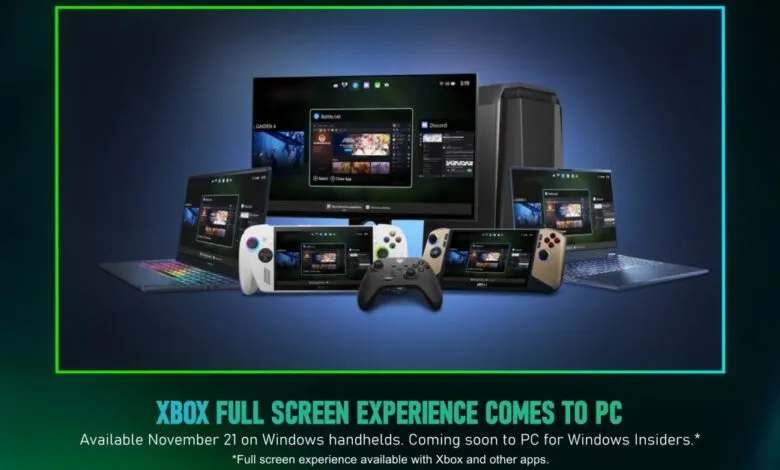
Microsoft is expanding its gaming ecosystem with the official rollout of the Xbox Full Screen Experience (FSE) for Windows handheld devices, set to begin on November 21st. This feature, which initially launched on Xbox Ally devices last month, delivers a console-style interface layered over Windows 11, offering a more immersive and streamlined way to access your game library.
Originally previewed on MSI Claw models, the Xbox Full Screen Experience is now becoming available to all Windows-based handhelds. Microsoft has also confirmed plans to extend FSE compatibility to additional Windows 11 PC form factors via the Xbox and Windows Insider programs. This expansion signals the company’s commitment to unifying the gaming experience across different hardware.
A key advantage of the Xbox Full Screen Experience is its efficiency. Instead of loading the full Windows desktop and numerous background processes, FSE bypasses the Explorer shell entirely. This design frees up approximately 2GB of memory by suppressing non-essential parts of the operating system, leaving more system resources available for your games to run smoothly.
When you enable Xbox FSE on a compatible handheld or PC, the system boots directly into the Xbox PC app. This interface consolidates your entire game collection, including titles from the Microsoft Store, Battle.net, Steam, and other digital storefronts. Navigation is handled through an integrated Game Bar for switching between games and launchers, along with a task view specifically optimized for handheld device controls.
Activating the Xbox Full Screen Experience is straightforward. On a supported handheld, navigate to Settings, then select Gaming, followed by Full screen experience. From there, simply choose Xbox as your designated home app to start enjoying the console-like interface from the moment you power on your device.
(Source: The Verge)