Razer HyperFlux V2 Review: Is Wireless Charging Worth It?
▼ Summary
– The Razer HyperFlux V2 is a wireless charging mouse pad that keeps compatible mice charged automatically without cables.
– It features a premium design with a built-in wireless receiver, eliminating the need for a separate dongle and USB port.
– The system is very expensive at $120 and has a limited list of compatible Razer mice, restricting user choice.
– Potential drawbacks include non-replaceable surfaces affecting longevity and possible interference with metal desks or cables.
– While it performs well for cable-free charging, the high cost may not justify the convenience for most users compared to manual charging.
The Razer HyperFlux V2 wireless charging mouse pad delivers a truly cable-free experience for compatible gaming mice, keeping them powered effortlessly while offering premium build quality and integrated wireless connectivity. This elegant solution eliminates the need to manually plug in your mouse, though its high price and limited compatibility may give budget-conscious gamers pause.
We appear to be living in a time when everyone is obsessed with removing every last wire from their setup for the cleanest look imaginable. The technology to achieve this seamlessly still comes at a significant cost, however. While we’ve moved beyond desks buried in cable spaghetti, we haven’t reached the point of truly invisible tech. The Razer HyperFlux V2 Wireless Charging System perfectly illustrates this transitional phase.
It represents a sophisticated effort to banish charging cables from your workspace. Still, the underlying technology hasn’t yet matured to a point where it’s accessible for an average budget. The HyperFlux V2 certainly impresses with its look and feel, performing its intended function admirably, but its $120 price tag places it firmly in the premium category.
So, what exactly does it do? Razer markets it as a ‘wireless charging system,’ but in practical terms, it’s a mouse pad that charges your compatible wireless mouse, much like the Logitech G PowerPlay. You simply place your mouse on the pad, and it maintains the battery level without any cables. This is accomplished using a small receiver puck that fits into the mouse’s underside, drawing power from an electromagnetic field generated across the pad’s surface.
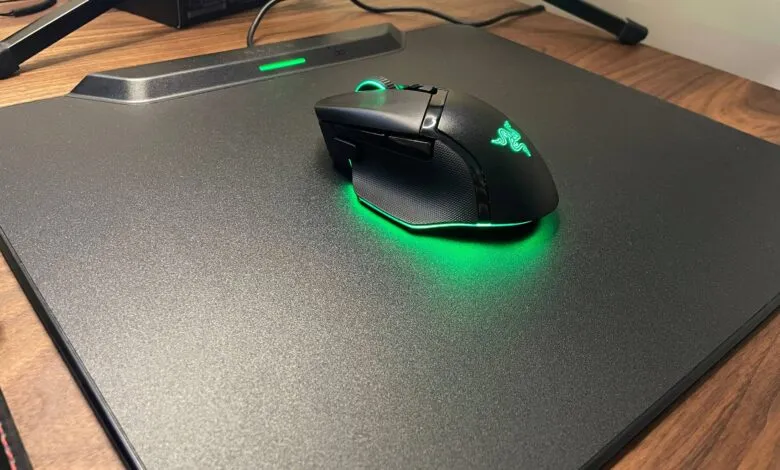
Razer’s implementation has some distinct advantages over the competition. For starters, the overall aesthetic and construction feel decidedly high-end. Its subtly beveled glossy edges and the slim, raised module housing a single LED give it a sleek presence on any desk.
Secondly, that raised module cleverly integrates the system’s wireless receiver. This means you don’t need to occupy a precious USB port on your computer with a separate dongle. While an earlier version of a competing product included this feature, the newer model removed it, forcing users to manage an extra dongle. Razer’s decision to keep the receiver built into the pad is a significant usability win.
Performance-wise, the HyperFlux V2 excels at its core task. Paired with a Razer Basilisk V3 Pro, the experience was flawless. The mouse remained consistently charged, and the wireless connection was perfectly stable. Any odd behavior with the mouse’s RGB lighting seemed related to the mouse firmware or Razer’s Synapse software, not the charging pad itself.
Thanks to a feature called ‘seamless auto pairing,’ which can be enabled in the software, the mouse connects instantly when the puck is inserted. An optional ‘battery health optimizer’ allows you to set a maximum charge level between 50% and 80%, which helps prolong the battery’s overall lifespan.
It’s worth noting that some users report issues when these charging pads are placed on metal desks, so a wooden or other non-metallic surface is recommended. On a wooden desk, performance was perfect. A minor bit of interference was noticeable with wired headphones if their cable lay directly on the pad, but this was easily avoided by routing the cable elsewhere.
The review unit featured a hard surface, which provides an exceptionally smooth, low-friction glide, even for a heavier mouse like the Basilisk. A cloth surface version is also available. The rubber base offers excellent grip, ensuring the pad stays firmly in place during intense gaming sessions.
The most significant limitation is the very short list of compatible mice. The pad only works with the same models supported by Razer’s separate charging dock: the Basilisk V3 Pro (both standard and 35K DPI versions), the Cobra Pro, Cobra HyperSpeed, and the Naga V2 Pro.
A potential concern for long-term use is that the pad’s surface is permanently attached to the charging unit. You cannot remove the cloth or hard top to replace it when it eventually wears out. For a $120 accessory that also serves as a critical wireless receiver, this could impact its overall value over time.
The attached cable includes an electromagnetic choke, a bulky component that might make it difficult to thread through some tight cable management routes.
The primary obstacle, however, is the cost, especially when you consider how essential a charging mouse pad really is. The competing Logitech model was already considered expensive at $100, and the Razer version adds another $20. While the Razer pad’s quality is superior, it remains a very pricey peripheral.
What you are ultimately paying for is the convenience of never plugging in your mouse. After extended use, many may find that this luxury isn’t as crucial as it first seems. Manually charging a mouse every so often is a minor inconvenience for most people.
Consider buying the Razer HyperFlux V2 if… ✅ You have an intense dislike for manual charging: If searching for a cable and plugging in your mouse feels like a major hassle, this pad offers the most elegant, set-and-forget charging solution available.
You may want to reconsider if… ❌ You value freedom of choice in your gear: Committing to this system locks you into using this specific pad and a very limited selection of Razer mice.
The restricted compatibility cannot be overstated. If popular models like the DeathAdder V4 Pro were included, the value proposition would be stronger. As it stands, the list is confined to a few Basilisk, Cobra, and Naga models.
In the end, you are investing $120 to tie yourself to one specific mouse pad and a narrow range of mice for the long haul, at least until the pad wears out. At a lower price point, perhaps $50 or $60, the HyperFlux V2’s quality and functionality would be much easier to recommend. For its current price, you could purchase a brand-new, high-performance gaming mouse of your choice instead.
If the promise of a perpetually charged mouse is your ultimate dream, the Razer HyperFlux V2 delivers that experience flawlessly and is the best product of its kind. For the vast majority of gamers, however, saving the $120 and selecting your preferred mouse and standard pad is the more practical and flexible decision.
(Source: PCGAMER)