Dell’s $700 XPS 13 Takes on MacBook Neo at Computex
▼ Summary
– Dell announced a new budget-friendly XPS 13 laptop at Computex with a starting price of $699.99, directly competing with the Apple MacBook Neo.
– The new XPS 13 retains key design elements like a thin aluminum frame, backlit keyboard, and high-resolution InfinityEdge display, but omits premium features like the invisible touchpad and 4K webcam.
– It will launch with Intel’s entry-level Core Series 3 “Wildcat Lake” processors, with an upgrade option to Core Ultra Series 3 “Panther Lake” chips available later.
– The XPS 13 features a 13.4-inch touchscreen with a 1600p resolution and a 30Hz–120Hz refresh rate, while the MacBook Neo lacks touch capability and key backlighting.
– Dell is offering a $100 student discount on the XPS 13 during the back-to-school season, similar to Apple’s pricing strategy for the MacBook Neo.
At the Computex trade show in Taipei, Dell unveiled a new iteration of its XPS 13, but this time the focus isn’t just on size,it’s on price. The company has managed to launch this version with a starting price of $699.99, bringing it into direct competition with Apple’s MacBook Neo.
Historically, Dell’s XPS lineup has catered to high-end consumers and “prosumers” seeking powerful, feature-rich laptops that come with a premium price tag. (For context, the latest Dell XPS 14 starts at $1,889.99, while the XPS 16 begins at $2,039.99.) Breaking from that tradition, the PC maker has reimagined the XPS 13,previously a high-end ultraportable,as an entry-level option that retains the core elements of the XPS design.
This budget-friendly XPS 13 will run on Intel’s new entry-grade Core Series 3 “Wildcat Lake” processors, a move that helps keep costs down. For those seeking more power, an upgrade to Core Ultra Series 3 “Panther Lake” chips will be available later this year.
The MacBook Neo shook up the budget laptop market earlier this year with its aggressive $599 starting price, setting new expectations for what affordable laptops can offer. Following Apple’s lead, Dell will offer students a $100 discount on the XPS 13 during the back-to-school season.
While the new XPS 13 incorporates much of the iconic XPS design language and features, it naturally omits some of the more premium touches found in its pricier siblings. Here’s a closer look at what we know so far about this revamped, affordable XPS 13.
Dell Streamlines the XPS Design
Our reviews praised the redesigns of the larger XPS models, but the XPS 13 doesn’t share that same overhaul. Instead, this affordable model blends elements from past and present XPS laptops, prioritizing essential features over flashy extras.
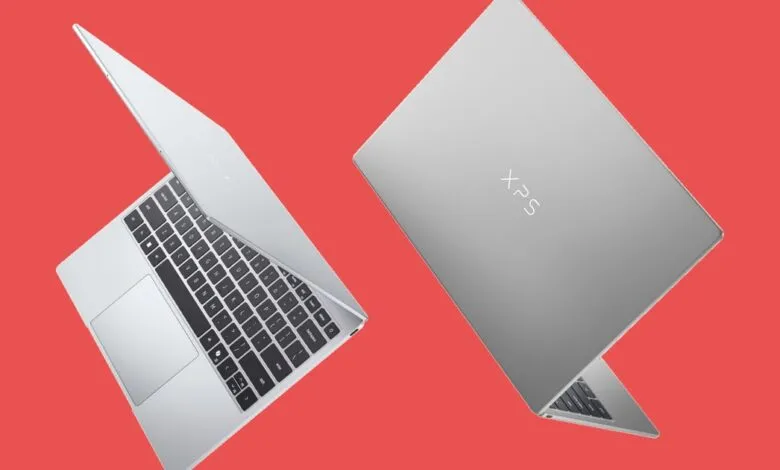
Notably, this XPS 13 lacks the seamless invisible touchpad and flush keyboard found on its more expensive counterparts, along with other subtle upgrades like a 4K webcam (this one is standard 1080p). Still, Dell delivered on the most crucial XPS design elements: the laptop boasts a thin, portable, all-aluminum frame, a backlit keyboard, and a high-resolution InfinityEdge display,an impressive package for $699.99.
During a pre-launch briefing, Dell directly compared its new machine to the MacBook Neo. The company praised the Neo as a product and acknowledged its role in validating the low-cost market, but the team was quick to highlight the XPS 13’s advantages.
The XPS 13 is slightly smaller and half a pound lighter than the MacBook Neo, measuring just 0.5 by 11.7 by 7.9 inches and weighing only 2.2 pounds. Despite its compact size, it features a slightly larger 13.4-inch display (compared to the Neo’s 13-inch screen). Its all-metal construction is a key differentiator, competing directly with the Neo while maintaining the XPS brand’s reputation for build quality. The laptop comes in “Sky” and “Storm” color options,lighter and darker silver variants.
While a backlit keyboard might seem standard in 2026, it’s worth noting that the MacBook Neo lacks key lighting entirely. This was one of the compromises Apple made to hit its low price point, but for many users, backlighting is a near-essential feature.
The XPS 13’s keyboard uses a more traditional chiclet layout, a departure from the lattice-free, edge-to-edge keys on larger XPS models. The touchpad is also a standard hinge mechanism. How these perform in daily use will require hands-on testing, but given that the more advanced designs can be polarizing, some users might actually prefer this simpler approach.
Specs and Components: Intel Wildcat Lake Makes a Surprise Entry
The XPS 13’s display is a sharp 2,560-by-1,600-pixel (1600p) touch panel. This resolution is comparable to the Neo’s 2,408-by-1,506-pixel screen, but the touch capability gives the XPS 13 an edge the Neo lacks. The display also supports a variable refresh rate between 30Hz and 120Hz, which can help conserve battery life by lowering the refresh rate when not displaying video content. (The Neo remains fixed at 60Hz.)
Powering the XPS 13 are Intel’s Wildcat Lake or Panther Lake processors. The Core Series 3 Wildcat Lake chips, announced just weeks ago, are designed as a budget-friendly alternative to the Core Ultra Series 3 Panther Lake silicon. Both use Intel’s updated 18A manufacturing process, but the Wildcat Lake chips are less powerful, making them ideal for this price range.
The base model comes with a Core 5 320 (Wildcat Lake), but buyers can upgrade to a Core Ultra 7 355 (Panther Lake). However, the Core Ultra option won’t be available at launch, and Dell hasn’t yet revealed the price difference.
The Intel Core version offers 8GB or 16GB of single-channel DDR5 memory and 256GB or 512GB of solid-state storage. (The launch model will include a 512GB SSD for the $699 price.) The Core Ultra model, by contrast, features 16GB or 32GB of dual-channel memory and storage options up to 1TB.
We haven’t tested any Wildcat Lake systems yet, so it’s unclear how these chips will perform compared to the MacBook Neo’s A18 Pro processor,let alone Qualcomm’s new Snapdragon C budget chips. We’re eager to put the XPS 13 through its paces once it’s available for review.
For connectivity, the Intel Core version includes two USB Type-C ports with support for DisplayPort 2.1 and Power Delivery. The Core Ultra model’s USB-C ports support the Thunderbolt 4 standard. Both versions also include Wi-Fi 7 for fast wireless connectivity (BE213 for Intel Core, BE211 for Core Ultra), a welcome addition for a budget machine. (The MacBook Neo, by comparison, relies on Wi-Fi 6E.)
A Promising Contender in the Budget Arena
This is an exciting development for the PC market. The MacBook Neo raised the bar for budget laptops, making many existing PCs seem overpriced in this tier. The fact that Dell’s traditionally premium XPS brand is leading the charge from the PC camp is both unexpected and intriguing.
Like Apple, Dell’s system-level expertise allows it to focus on what matters most to budget-conscious shoppers. Whether it’s the trimmer design, high-refresh touch panel, key backlighting, or Wi-Fi 7, it’s easy to see where the extra $100 over the MacBook Neo goes. Only time,and thorough testing,will tell if Dell has hit a budget home run here.
(Source: PCMag.com)