Pomera’s compact, distraction-free writing machine is too small
▼ Summary
– Pomera released the DM250US, its first device tailored for US writers, featuring a US English keyboard and native software.
– The reviewer finds the device aesthetically pleasing and highly portable but ultimately unsuitable for personal use due to usability tradeoffs.
– Compared to competitors like the Freewrite Traveler, the Pomera offers a sleeker matte black design and superior battery life.
– The device includes complex software features such as customization options, spell check, and a calendar app linked to text files.
– Despite its appeal to distraction-free writing enthusiasts, the physical compactness of the device makes it difficult to type on comfortably.
– topics
Distraction-free writing devices have long held a niche appeal, particularly in Japan where dedicated word processors found a foothold that US markets never quite matched. While American alternatives like the AlphaSmart Neo existed, they lacked the sleek portability of Pomera’s compact, foldable machines. Until recently, these Japanese imports were the only option for Western enthusiasts, forcing users to navigate software designed for non-English speakers. The release of the $549 Pomera DM250US marked a significant shift, offering native English support and a standard US keyboard layout. For writers seeking refuge from digital distractions such as social media feeds or endless web browsing, this launch promised a sanctuary for focused creativity.
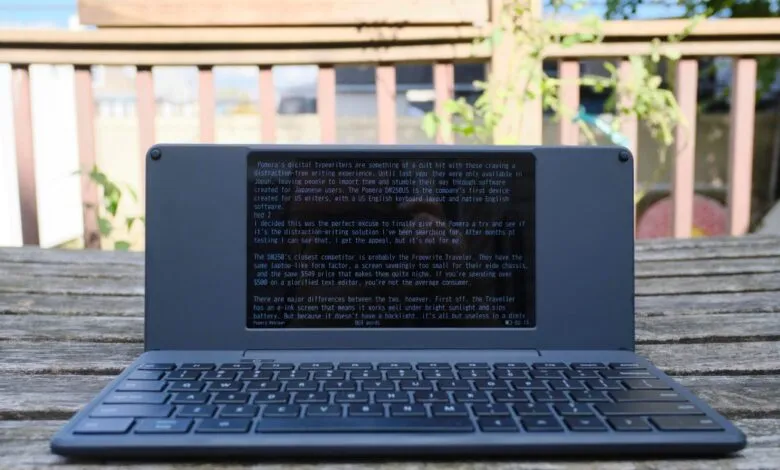
Despite the excitement surrounding its arrival, extensive testing reveals that the device’s extreme miniaturization comes at a steep ergonomic cost. The DM250 is undeniably stylish, featuring a matte black clamshell design and a 7-inch LCD screen housed within chassis dimensions of just 10.3 inches wide, 4.7 inches deep, and 0.7 inches thick. This form factor allows it to slip easily into small bags alongside other essentials like e-readers and headphones. Its primary competitor, the Freewrite Traveler, offers a similar laptop-like silhouette but is physically larger and constructed from glossier plastic that feels less premium. However, the Traveler utilizes an E Ink display, which preserves battery life but renders the screen invisible in low-light conditions, a limitation the Pomera’s backlit LCD avoids.
Battery performance on the Pomera is robust, rated for 24 hours of continuous operation. In practical use, the device demonstrates exceptional efficiency; after sporadic usage over three months, a single charge lasted well beyond expectations, retaining approximately half its power after weeks of intermittent use. This longevity supports its role as a reliable companion for writers who prioritize mobility without constant access to power outlets.
Software Features and Interface Customization
The software ecosystem within the Pomera defies the typical “no-frills” approach seen in many competitors. It includes a comprehensive suite of tools, including a basic calendar application that associates text files with specific dates. This feature allows users to quickly jot down appointments or journal entries via a sidebar without interrupting their primary document. The interface also offers extensive customization options. Users can invert the color scheme to reduce eye strain during long sessions, toggle full-screen modes to hide status bars displaying word counts and battery levels, and even add ruled lines or frames to constrain text placement.
Editing capabilities are notably advanced for this category. Writers can insert markers to build outlines, place timestamps, perform find-and-replace operations, and compare two documents side by side. The ability to open the same file twice facilitates checking multiple sections of a text simultaneously. These features create a flexible environment that remains unobtrusive while providing powerful organizational tools. The inclusion of a full set of function keys and cursor controls on the tiny keyboard further enhances navigation, distinguishing it from simpler devices that strip away such functionality.
Connectivity Frustrations and Syncing Issues
Despite its thoughtful interface, the Pomera struggles significantly with data transfer. The two wireless syncing methods provided are cumbersome and unintuitive. The email-based system requires users to log into a Gmail account directly on the device. Text appears in the body of the email rather than as an attachment, complicating workflow. Users without Gmail must manually configure SMTP settings, adding another layer of friction. Alternatively, the Pomera Link mobile app requires scanning a QR code displayed on the device. Once synced to the phone, the text cannot be saved directly within the app; users must manually copy and paste the content into external applications like Google Docs. This convoluted process undermines the device’s promise of seamless productivity.
For those willing to deal with wired connections, a USB-C port allows direct file transfer to computers, functioning similarly to a standard USB drive. The device includes over 1GB of internal storage, sufficient for hundreds of thousands of pages of plain text. An SD card slot provides additional flexibility for organizing manuscripts across different devices. However, the reliance on manual transfers for wireless workflows remains a significant drawback for users expecting modern convenience.
Ergonomic Challenges and Keyboard Design
The ultimate failure of the Pomera lies in its physical design, specifically the keyboard. While the device’s compactness is its main selling point, the trade-off results in a typing experience that proves painful for extended use. The keys are small and shallow, requiring precise finger placement. Although the tactile feedback is not unpleasant, the cramped layout leads to rapid hand cramping and wrist pain. For individuals with carpal tunnel or larger hands, the experience is particularly aggravating. During testing, breaks were necessary every few hundred words to alleviate discomfort, and the error rate increased due to the tight spacing.
The comparison with the Freewrite Traveler highlights this disparity. The Traveler uses a full-size scissor-switch keyboard, sacrificing some compactness for comfort. The Pomera attempts to fit all function and cursor keys into a smaller area, resulting in a layout that feels more like a compromise than a solution. Additionally, the Bluetooth menu option does not allow connecting external keyboards; instead, it turns the Pomera itself into a peripheral for other devices. This limitation means users seeking a comfortable typing experience must look elsewhere, such as the BYOK (Bring Your Own Keyboard) concept, which offers a cheaper alternative despite having fewer editing features.
Final Verdict on Portability vs. Comfort
The Pomera DM250US succeeds in creating a durable, premium-feeling device that stands out against flimsier competitors. Its sturdiness and aesthetic appeal make it attractive for travelers who prioritize space-saving design. However, the core purpose of a distraction-free writer is to enable long, uninterrupted sessions of serious work. The ergonomic flaws of the Pomera actively work against this goal. The physical discomfort caused by the tiny keyboard becomes a distraction in itself, forcing users to reach for wrist braces or stretch their fingers frequently. While the software is sophisticated and the battery life impressive, the inability to type comfortably for extended periods renders the device unsuitable for many professional writers. Ultimately, the Pomera sacrifices too much human comfort for the sake of miniaturization.
(Source: The Verge)