Google Pixel’s voice typing is so good, a fix is coming for other phones
▼ Summary
– Gboard’s voice-to-text is significantly faster and more accurate on Pixel phones than on other Android devices, with features like automatic punctuation that are absent elsewhere.
– Wispr Flow offers an AI-powered voice-to-text solution that works as a floating button over any app, providing near-Pixel-level accuracy on non-Pixel devices like the Galaxy Z Fold 7.
– Wispr Flow requires extra permissions and shows a persistent notification, which can be manually disabled but is a drawback that leads to inconsistent use.
– Nothing’s “Essential Voice” integrates similar AI voice-to-text natively into Nothing Phones, removing extra costs and improving the user experience over third-party apps.
– The article predicts more Android brands will adopt improved AI voice-to-text features, as the technology effectively enhances a commonly used function.
There are plenty of reasons to love a Google Pixel phone, but the voice-to-text feature might be the most underappreciated upgrade of all. Every time I pick up a Pixel, I inevitably struggle to switch back to any other Android device, largely because the voice typing experience is dramatically worse elsewhere. The good news? A fix is finally on the way.
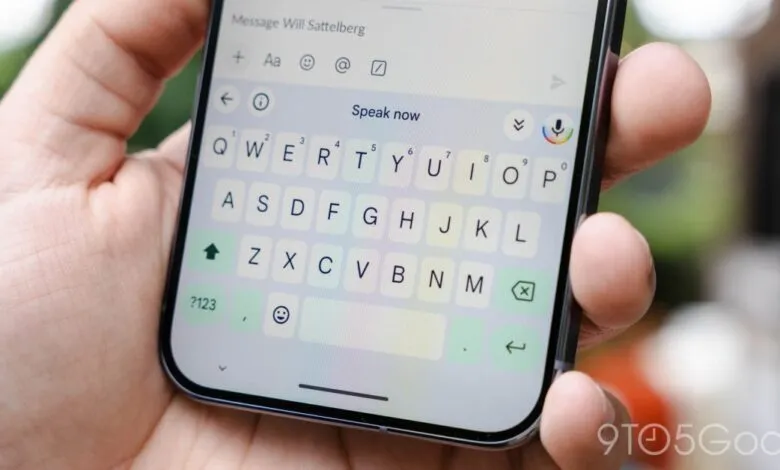
Gboard is Android’s default keyboard, and it includes built-in voice-to-text dictation. It works reasonably well, but on a Pixel, it becomes something entirely different. Google introduced this enhanced experience more than five years ago, and the difference is stark. On a Pixel, voice typing is not only significantly faster but also far more accurate. It nails the words, adds punctuation automatically, and makes dictation feel seamless. On any other Android phone, it’s a completely different story.
That disparity holds true no matter which keyboard you use. Gboard on a Pixel versus Gboard on a Samsung Galaxy are two radically different tools. On non-Pixel devices, the voice typing doesn’t support punctuation unless you speak it aloud, takes longer to load, and is noticeably less accurate. To be fair, it could be worse , Samsung Keyboard’s voice-to-text is genuinely awful , but the gap has always been frustrating.
The solution appears to be right around the corner, and it’s driven by AI.
I remain skeptical about many AI applications, but large language models excel at handling text , it’s literally in their name. Voice-to-text has become a natural and popular use case for AI, and it’s one of the most practical benefits for everyday users. Google was technically ahead of the curve here, as the improved voice typing on Pixel was already powered by machine learning. Newer models have only supercharged that capability.
One of the first places I truly appreciated this was with Wispr Flow, an AI-powered voice-to-text dictation service that launched on Android earlier this year. I’ve been using it regularly since.
Flow has two main strengths.
First, it doesn’t replace Gboard or any other keyboard. Instead, it appears as a floating button or pop-up that sits on top of whatever app you’re using. It takes some muscle memory to stop tapping Gboard’s microphone icon and use Flow’s instead, but it’s a smart workaround. Gboard is one of Google’s best software offerings on Android, and I wouldn’t want to give it up. The floating button doesn’t show up constantly; it appears somewhat intelligently based on the app and what you’re doing. I say “somewhat” because I’ve seen it pop up when I didn’t need it. Flow seems to prioritize detecting the app rather than simply triggering when the keyboard appears.
Still, it’s one of the better implementations I’ve tried. Tapping the button starts dictation, and hitting the checkmark processes the text and pastes it into your active text box. I wish it showed a preview of the text, but it works well enough.
There are trade-offs, of course. Flow requires extra permissions, including the ability to display over other apps and accessibility access. As a result, it leaves a persistent notification in the tray. There’s no status bar icon, and notifications are muted by default, but you’ll need to manually disable them through Android settings if you want them gone entirely. I quickly turned off the persistent notification, but it’s frustrating that a constant notification is necessary when apps can already display over others. I understand why , it prevents abuse , but it drags down the overall experience. That’s the main reason Flow has become a “come-and-go” app for me. I still use it occasionally, but I’ve turned it off frequently because it feels intrusive.
You’ll also need to trust Wispr on privacy. The app does offer a “Private Mode,” which it says keeps data stored only on your device.
The actual performance, however, more than makes up for these drawbacks.
I’ve been using Flow on my Galaxy Z Fold 7, my daily driver and the very phone that constantly reminds me how inferior Gboard’s voice typing is outside a Pixel. I’m genuinely amazed at how well it works. The voice-to-text model is incredibly accurate, perfectly transcribing what I say regardless of context. Whether I’m in a quiet room or surrounded by loud music, it picks up my voice and nails the text. It’s not infallible , there are occasional misspellings or misunderstandings , but it feels nearly as accurate as the Pixel experience. It handles punctuation fairly well too. I think Google’s Pixel implementation is still slightly better, but Flow does an excellent job.
Where Flow actually beats Gboard on Pixel is in understanding context. Pixel dictation might leave words like “cuz” in places where that’s inappropriate, but Flow automatically corrects such phrases. The app will eventually support a custom dictionary and other ways to tailor output, but I already like it as is.
Still, Flow’s biggest problem is that it’s not native.
That’s where the next step comes in. I can easily see more Android brands adopting this kind of technology. Nothing started the ball rolling this week with the launch of “Essential Voice,” essentially a native version of Wispr Flow for Nothing Phones. It removes the added cost and integrates voice typing more naturally into the experience, working through both the physical Essential Key and the keyboard.
It feels almost inevitable that more Android manufacturers will follow. As everyone tries to inject AI into everything, voice-to-text improvements are a clear home run. It’s a feature nearly everyone uses, and one that AI is genuinely good at.
(Source: 9to5google.com)