Google Phone and Messages Add ‘Urgent’ and ‘Unknown’ Alerts
▼ Summary
– Google is rolling out a “Call Reason” feature for its Phone app that lets users mark outgoing calls as urgent, which displays a prominent alert on the recipient’s screen.
– The Google Messages app is introducing a new alert for group chats added by unknown numbers, providing clear options to leave the group and block or report the sender.
– When leaving a group chat in Messages, users can block the number that added them and report it as spam directly from the alert interface.
– Circle to Search will be updated to allow users to highlight suspicious messages within any chat app to get AI-powered scam analysis without switching applications.
– The AI Overview for flagged messages will provide safety advice, such as warning about common scam tactics and advising against sharing personal information or clicking links.
Google is introducing new safety and communication features to its core Phone and Messages apps, designed to give users more control over their incoming calls and group chat interactions. These updates focus on providing clearer context and actionable options when dealing with potentially urgent or unknown contacts, aiming to streamline digital communication and reduce unwanted disruptions.
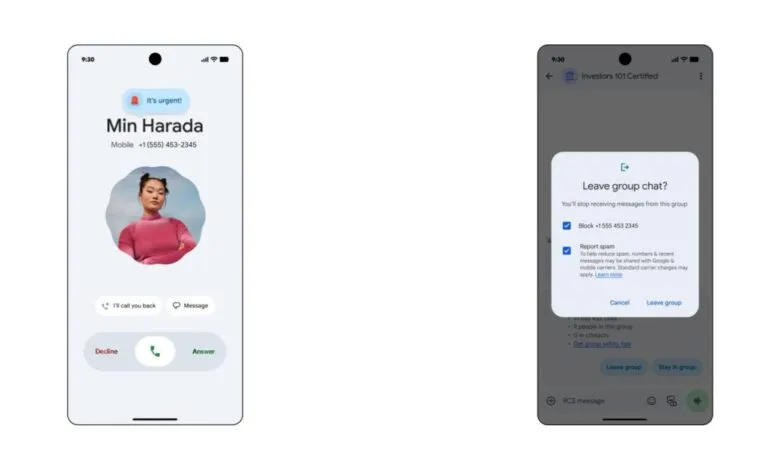
The Phone app is gaining a “Call Reason” feature, currently entering beta testing. This allows a caller to mark an outgoing call to a saved contact as urgent. When placing the call, a prompt asks, “Mark call as urgent?” with a “Notify” button. Once sent, the status updates to “Notified.” This function is ideal for time-sensitive situations, whether it’s a logistical emergency or a fleeting opportunity. For the recipient, the incoming call screen displays a prominent “It’s urgent!” alert above the caller’s name, accompanied by an animated siren emoji. This urgent flag will also be visible in the call log for future reference. Google has confirmed this capability is officially “coming soon” to users.
Simultaneously, Google Messages is adding protections for unexpected group chat invites. If an unknown number adds you to a group, a clear alert card appears above the message composition field. This notification states “Unknown sender added you,” displays the inviting number, and shows the total number of participants. The app will helpfully indicate if any of your known contacts are already in the conversation and provide a link to “group safety tips.” Users are then presented with two straightforward choices: “Stay in group” or “Leave group.” Opting to leave offers the additional steps to Block the number that added you and Report it as spam before exiting the chat entirely.
These updates are part of a broader initiative to integrate safety checks directly into the user experience. In a related development, the Circle to Search function will be expanded to work within messaging apps. This will allow users to highlight suspicious messages directly in any chat service to instantly trigger a safety check. An AI Overview will then scan information from across the web to assess the content. For example, it might identify phrases promising “guaranteed high returns” as significant investment red flags. The system will also generate practical advice, such as warnings to avoid sharing personal information, sending money, or clicking on links contained in the questionable message. The core idea is to empower users to vet potentially dangerous content without ever needing to switch to a different application.
(Source: 9to5 Google)