Windows 11 Update: Dark Mode Gets a Mixed Upgrade
▼ Summary
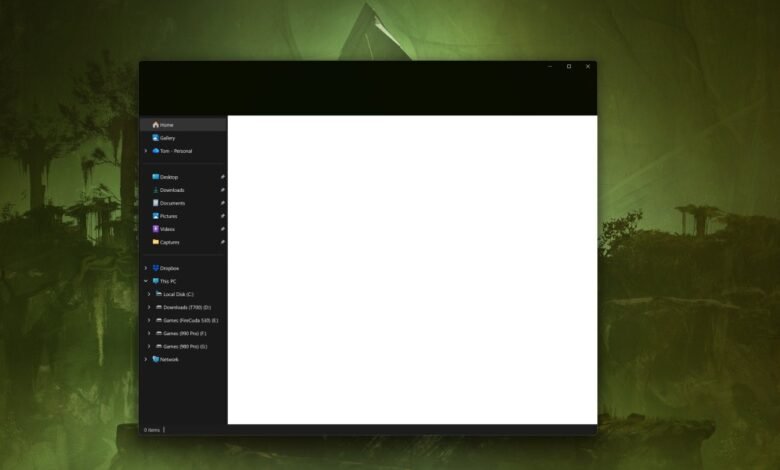
– A recent Windows 11 update (KB5070311) introduced a dark mode for File Explorer dialogs but also causes a disruptive white flash when opening File Explorer.
– Microsoft acknowledges the issue, stating the window may briefly show a blank white screen before loading content in dark mode.
– The bright flash is particularly jarring for users working in dark environments with dark mode enabled.
– Microsoft is working on an official fix, but users can apply a third-party Windhawk mod as an immediate workaround.
– The bug is notable as Microsoft is actively promoting a more consistent dark mode experience across Windows 11, with other UI elements also slated for dark mode improvements.
The latest Windows 11 update aimed to refine the dark mode experience, but it has introduced a jarring visual bug that many users find disruptive. Microsoft’s KB5070311 update delivers on its promise to bring a more uniform dark theme to system elements, including critical File Explorer dialog boxes for operations like copying or deleting files. However, this improvement comes with a significant caveat: a glaring white flash now appears every time a user opens File Explorer while dark mode is active.
Microsoft has officially acknowledged the problem in the update’s known issues log. The company states that after installing the update, opening File Explorer in dark mode may cause the window to display a brief, blank white screen before it properly loads the files and folders. For anyone working in a dimly lit environment, this sudden bright flash can be startling and counterproductive, effectively undermining the comfort dark mode is supposed to provide. The software giant has confirmed it is developing an official patch to resolve this visual glitch.
For those unwilling to tolerate the bright interruption until a fix is released, there is a community-driven workaround. Users can employ a third-party utility like a Windhawk mod to manually restore File Explorer’s dark mode to its previous, flash-free state. This situation raises questions about Microsoft’s quality assurance process, as such a conspicuous flaw managed to slip through testing. This is particularly puzzling given the company’s public commitment to delivering a more “consistent dark mode experience” throughout the Windows 11 operating system.
Beyond this specific issue, the broader update continues Microsoft’s push to darken more of the Windows interface. Upcoming changes are slated to include a dark mode for the Run dialog box, alongside visual enhancements for progress bars, chart views, and various system confirmation and error messages. The incident highlights the challenges of rolling out widespread UI changes, where a fix for one set of problems can inadvertently create new and obvious annoyances for the user base.
(Source: The Verge)