Microsoft’s Faster, Cleaner File Explorer for Windows 11
▼ Summary
– Microsoft is introducing File Explorer preloading in Windows 11 to improve launch speed, especially on less powerful devices.
– Users can disable the preloading feature to prevent File Explorer from always running in the background.
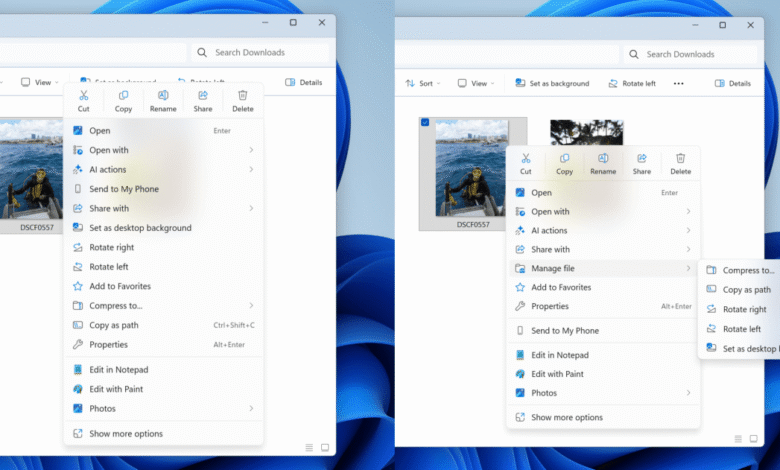
– The context menu has been decluttered by moving rarely used actions into sub-menus for a cleaner appearance.
– New sub-menus include options like compressing files, copying paths, and cloud provider actions such as Send to My Phone.
– These changes are currently in testing in Dev preview builds and are expected to roll out to all Windows 11 users by early 2026.
Microsoft is rolling out significant updates to the File Explorer in Windows 11, focusing on enhanced speed and a more streamlined user interface. These improvements are designed to make navigating and managing files a smoother experience, especially on devices where performance has been a concern. The latest preview builds introduce features like preloading and a refined context menu, both aimed at boosting efficiency.
One of the key enhancements is File Explorer preloading, which aims to cut down launch times, particularly on systems with limited resources. While modern computers already open File Explorer almost instantly, users of less powerful devices, such as Windows tablets or handhelds, have often faced noticeable delays. This preloading feature runs in the background to prepare the tool for quicker access. For those who prefer not to have it active constantly, Microsoft includes an option to disable preloading, similar to the approach taken earlier with Office applications to speed up Word and other programs.
Alongside performance tweaks, the context menu has undergone a visual cleanup. Microsoft has reorganized the menu by relocating infrequently used commands into sub-menus, reducing on-screen clutter. A new “manage file” flyout now houses actions like compressing files into a ZIP folder, copying file paths, setting images as desktop backgrounds, and rotating images. Cloud-related options, including “Send to My Phone,” have been grouped into a separate cloud provider flyout. These adjustments make it easier to locate everyday functions without scrolling through a lengthy list.
Currently, these updates are available in the Windows 11 Dev preview builds. Barring any major issues during testing, the refined File Explorer is expected to reach all Windows 11 users by early 2026.
(Source: The Verge)


