16 Game-Changing Gadgets Under $50 That Are Already on Sale
▼ Summary
– The article recommends affordable tech products under $50 that can enhance daily tech life, with many available for under $25 during Black Friday sales.
– Rosewill’s M.2 SSD Cloner simplifies drive cloning with offline support and a 20 Gbps USB-C interface, making it easy to upgrade storage without complex setups.
– The Olight Imini 2 flashlight is a compact, magnetic, and rechargeable tool ideal for PC building and everyday tasks, featuring a keychain-friendly design.
– Anker’s PowerConf C200 2K webcam offers excellent image quality and portability for video calls, providing a balanced alternative to pricier 4K models.
– Various accessories like USB hubs, charging cables, and adapters are highlighted for improving connectivity, power management, and convenience in tech setups.
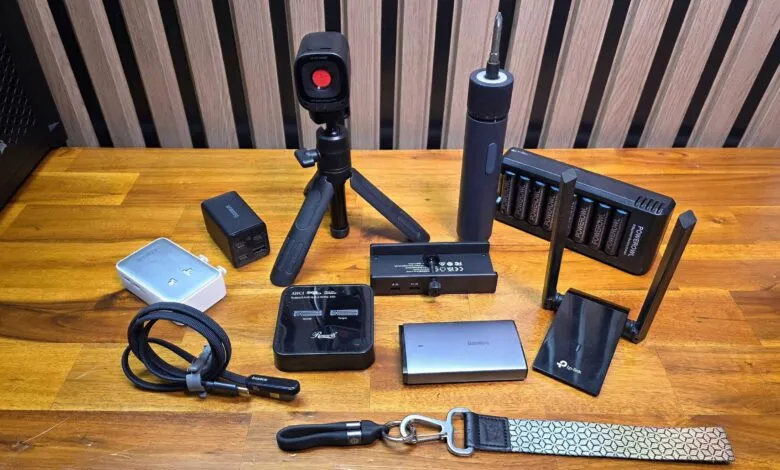
Finding high-quality tech gadgets that don’t break the bank can feel like a challenge, but this Black Friday brings an impressive selection of useful devices all priced under fifty dollars. Many of these items are even available for less than twenty-five dollars, offering substantial value for anyone looking to enhance their daily tech experience or find thoughtful gifts for friends and family. I personally use every product listed here, and each one has genuinely improved some aspect of my technology-filled life.
My Top Picks for Under Fifty Dollars
Transform into a tech support hero with the Rosewill M.2 SSD Cloner.
A relative recently asked me to help with an older computer struggling on a tiny 110 GB SSD. My initial plan involved cloning the boot drive to a larger one, but the idea of juggling multiple USB enclosures seemed like a tedious, hours-long ordeal. I was pleasantly surprised to discover that dedicated M.2 SSD cloners exist and can be purchased for as little as forty-nine dollars.
Rosewill NVMe SSD Cloner: was $59 now $39 at Newegg This device supports NVMe M.2 SSDs and offers offline cloning, making it incredibly simple to transfer your operating system or files between drives. Its 20 Gbps USB-C interface also ensures speedy performance if you choose to use cloning software.
Although the Rosewill model features a glossy plastic shell I’m not fond of, its affordability is a major plus. It works with both modern NVMe and older AHCI M.2 drives. Operation is straightforward: connect the included power adapter, insert your source drive in the left slot and the destination drive in the right, press the power button, and then hit the clone button on top. The process begins automatically, provided your destination drive has equal or greater capacity.
I needed to resize a partition during my clone, so I connected the cloner to my laptop using the second USB-C cable. Both drives were instantly recognized in Windows. Using free DiskGenius software, I cloned the partition and expanded it to fill the new drive in just a few minutes, thanks to the fast 20 Gbps USB support. The entire task, which I had braced for a multi-hour commitment, was finished in under thirty minutes. While you might not use a drive cloner daily, it’s an incredibly handy tool to own. It can even help you save money by upgrading a laptop’s storage yourself, assuming the drive isn’t soldered to the motherboard.
The cloner is also useful for checking the contents of old M.2 drives lying around, though a simple NVMe enclosure would suffice for that single task. I also own a similar model from Suitok that costs around twenty dollars.
This tiny, magnetic, USB-rechargeable flashlight is perfect for PC building and everyday tasks.
I bought the OLIGHT IMINI 2 on a whim a few months ago, attracted by its clever design and twenty-dollar price tag. Now it’s dropped to just under eleven dollars. Its intuitive design includes a built-in USB-A plug for charging; you simply pull the back off to turn it on. A strong magnet on the back lets you stick it to any steel surface, which I’ve found invaluable for illuminating the inside of a PC case while connecting RGB wiring.
Olight Imini 2 EDC Rechargeable Keychain Flashlight: was $20 now $12 at Amazon Measuring just 2.17 inches long, this flashlight outputs 50 lumens. The magnetic back doubles as the charging connector, and pulling it off activates the light. It’s small enough for a keychain and comes with two silicone port covers and a carabiner clip.
My only minor concern is that the flashlight head is only magnetically attached to the charging base, so for someone like me, it feels like it could easily get lost. Despite that, its utility far outweighs this small risk.
I’ve assembled dozens of PCs using the HOTO NEX O1 PRO 3.6V Screwdriver Set.
As someone who builds many computers and tackles home projects, a cordless screwdriver is essential. I own a slimmer Wowstick model, but I find the HOTO NEX O1 Pro more practical due to its greater and adjustable torque. It’s excellent for loosening stubborn factory-installed screws on PC cases and is equally good for assembling furniture.
The HOTO won’t replace my heavy-duty DeWalt drill for major jobs, but for everyday tasks, it has plenty of power, charges conveniently via USB-C, and even looks stylish sitting on my workbench.
This travel-friendly 2K webcam is all most people need for work calls and video chats.
After using several bulky 4K webcams, I switched to this Anker model in 2022 and haven’t looked back. It’s compact, features a detachable cable for easy packing, and its 2K sensor delivers excellent video quality in both bright and dim lighting. While I usually use a headset, the built-in microphones have worked perfectly fine on numerous occasions when I needed them.
Anker PowerConf C200 2K Webcam: was $59 now $47 at Amazon Anker’s webcam includes an adjustable foot for mounting on a screen, a tripod socket on the base, a detachable USB-C cable, and delivers outstanding image quality for its price. For the vast majority of users, there’s no compelling reason to pay more for 4K resolution or higher frame rates.
You could spend less on a basic 720p webcam or much more on a feature-packed 4K model, but the PowerConf C200 strikes a perfect balance, especially now that it’s on sale. I use it daily and like it so much that I own two, one for my treadmill desk and another for my main living room setup.
A budget-friendly USB media controller puts volume and track controls at your fingertips.
For anyone who appreciates tactile controls, Vaydeer’s USB media box delivers a satisfying chunky volume knob and physical buttons. I have the previous version and love using it to control and mute music at my treadmill desk while working.
I use its buttons to play/pause audio and video and skip tracks. It’s completely plug-and-play, requiring no additional drivers.
Never worry about available ports again with this premium 60W 11-port hub.
Because I test technology for a living, I constantly need more USB ports for external storage, peripheral dongles, or charging devices. This metal-clad hub from Ikuai has solved that problem by adding eleven extra ports to my desk.
One USB-C port on the end is for charging only, offering 20W Power Delivery. The other ten are data ports: seven 5 Gbps USB-A and three 10 Gbps ports (two USB-C, one USB-A). What makes this hub exceptional is that every single data port has its own physical power switch on the side.
This allows you to use spare ports for storing infrequently used devices like flash drives or wireless dongles, turning them on only when needed. It’s a far better solution than digging through a messy drawer for a tiny accessory.
Ikuai 11-in-1 Hybrid USB Hub: now $39 at Amazon (was $49) With eleven ports, speeds up to 10 Gbps, a solid aluminum shell, and individual power switches, this hub is a fantastic desk addition. It uses an external power adapter for stability and includes a 20W USB-C PD charging port.
Add recessed power and USB ports directly into your desk for only sixteen dollars.
This product is for the DIY enthusiast, as it requires cutting a hole in your desk or nightstand. Jgstkcity’s recessed power strip lets you install two AC outlets and two USB charging ports (one a 30W USB-C) flush with your furniture’s surface.
While it’s wise to be cautious with unbranded power products, I’ve used the older non-PD version of this strip for over two years without any issues. I installed it in a custom stand behind my sofa, creating a super-convenient charging spot for guests.
Jgstkcity Recessed Power Strip: was $29 now $16 at Amazon You’ll need basic tools like a drill and saw for installation, but having power and USB-C PD built directly into your desk surface is incredibly convenient.
Charge your handheld gaming device or phone comfortably with Baseus’s flat, angled USB-C cable.
Whether it’s a Steam Deck, Nintendo Switch, or your smartphone, we’ve all had a device die at an inconvenient time. Baseus’s 100W charging cable makes simultaneous charging and use more comfortable, thanks to its flat-topped, angled USB-C connector, flat braided cable, and support for 100W, 5A charging.
Baseus MVP 3 flat-top USB-C charging cable: was $15 now $10 at Amazon This cable allows you to hold and use your mobile device while it’s charging without your fingers bumping into the cable. It supports up to 100W and comes in 3.3-foot or 6.6-foot lengths.
The shorter cable is ideal for use with a nearby battery pack, while the longer one is better for wall outlets. Be aware that the large connector head can block adjacent ports or vents on some gaming handhelds, so check your device’s layout before purchasing. Also, while it technically supports data transfer, speeds are limited to USB 2.0.
Stay powered and save luggage space with Anker’s slim Nano Travel Adapter
When traveling internationally, saving space is crucial, but you still need an adapter for foreign outlets. Anker’s Nano Travel Adapter addresses both needs, as it’s about half the thickness of standard adapters and works in over 200 countries.
It also includes four USB ports for charging, which I find extremely convenient for powering my phone, e-reader, and earbuds without carrying a separate charger. There are two USB-A ports on the bottom and two USB-C on the side, with the latter providing up to 20W. It comes in black or white; I chose white for better visibility in a cluttered drawer.
Anker Nano Travel Adapter: was $25 now $20 at Amazon This slim adapter is 43% smaller than many competitors, with fold-down plugs for over 200 countries. It features two USB-C and two USB-A ports delivering up to 20W.
The main limitation is that it doesn’t support three-prong grounded plugs. I’ve never found this to be a problem, as I typically only charge laptops and small electronics while traveling, not high-power appliances.
Powerowl’s rechargeable batteries are reliable and surprisingly affordable.
My first experience with rechargeable batteries in the 1990s was disappointing; they held little charge and didn’t last long. Modern options, however, are excellent. While Panasonic’s Eneloops are famous, PowerOwl’s batteries are much more budget-friendly, and I haven’t had a single failure in over three years of use in remotes, smart locks, and other gadgets.
PowerOwl 8 AA Rechargeable Batteries With Charger: was $28 now $20 at Amazon These PowerOwl Pro AA batteries are rated for 2800mAh and can retain 60% of their charge for two years. The included USB-powered charger is slow but functional.
The Baseus 65W Flat GaN wall charger is ideal for travel and commuting.
Almost everyone could use an extra compact, high-speed charger. The Baseus 65W Flat Wall Charger has become my favorite. It’s perfect for travel, delivering 45W via USB-C for a laptop and up to 20W via USB-A for a phone, all while folding down to a slender 0.66 inches thick. It’s smaller than a deck of cards and fits easily into any bag.
Its slim profile helps it stay securely in loose power outlets. The build quality feels solid despite the plastic shell, and it includes a 3.3-foot USB-C cable. You’ll need to supply your own USB-A cable for the second port, but at this sale price, that’s a minor point.
This travel-ready 100W USB charger includes a handy mini power strip.
If you need more power or ports than the slim charger offers, Baseus makes this 100W model with four USB ports. I own the 65W version, and it’s fantastic because it includes a detachable power strip with two AC outlets. I often use the power strip as a permanent dock on my workbench and take the compact GaN charger with me when I’m mobile.
Baseus Charging Station 100W: was $59 now $35 at Amazon With a total output of 100W, capable of delivering that full power to a single USB-C port, this is a great charger for power-hungry devices. The four ports and included mini power strip make it versatile for charging multiple gadgets.
After using the 65W model for a year, my only complaints are that the prongs on the detachable charger don’t fold and the USB-A port is limited to 5W. It’s fine for overnight charging but not for a quick power-up.
TP-Link’s AX1800 WiFi 6 USB Adapter brings modern Wi-Fi to older devices.
If you’ve upgraded your router to Wi-Fi 6 but your computer lacks the necessary hardware, this TP-Link adapter is the solution. It’s larger than typical USB Wi-Fi dongles, but it works flawlessly with the Wi-Fi 6 router I purchased in 2020.
It immediately resolved the poor reception I was experiencing with a small form-factor PC in my office, located a floor away from the router.
The Orico USB 3.0 Clamp Hub mounts easily on most desks.
This four-port USB hub is designed to clamp onto your monitor or desk edge for convenient access. This updated model adds a USB-C port alongside three USB-A ports. It operates at 5 Gbps, which is sufficient for most peripherals but not the fastest option for external SSDs.
It features a sturdy metal frame and comes in black or silver. Be aware that the clamp has a shallow depth and an adjustment range of only 10 to 32 mm, so it may not fit on every desk or monitor.
Organize the cable jungle under your desk with a simple tray.
If you want to tame the cable chaos in your home or office, inexpensive cable management trays are an effective solution. This two-pack includes adhesive tape, though you may need screws for heavier items like power bricks.
The kit also comes with cable ties and clips for routing wires along the bottom or sides of your desk. I’ve been using one to manage the cables behind my living room setup for a year, though I had to screw it in to support the weight of a power strip and a large TV power brick.
Keep a fast charging cable with your keys for emergencies.
Even if you have a drawer full of USB cables, you might not have one when you’re out. This short 240W USB4 charging cable from EndlesShine is compact enough to attach to a keychain. At just over five inches long, it’s not for everyday use but has saved me multiple times while traveling light.
If you are rough with your keys, the plastic cap might not last, so consider storing it in a pocket or bag instead. It’s available in white and yellow in addition to standard black.
(Source: Tom’s Hardware)