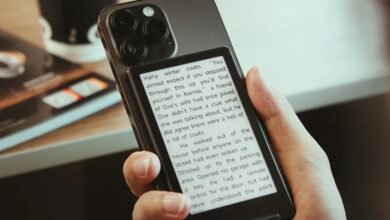
Boox Palma 2 Pro Review: A Mixed Bag of Upgrades and Compromises

▼ Summary
– The Boox Palma is a smartphone-sized device with an E Ink screen and full Android app access, designed for focused use like reading, listening, and note-taking.
– The new Palma 2 Pro adds features like a SIM card slot for data-only connectivity, a color screen, stylus support, and upgraded hardware, but its screen is a major downgrade.
– The color screen, based on E Ink Kaleido 3 technology, is dim, has low resolution making text hard to read, and produces fuzzy, inaccurate colors, making it worse than the black-and-white Palma 2.
– The SIM slot is a significant improvement, enabling reliable data connectivity for automatic updates and use as a backup phone via messaging apps, enhancing the device’s utility.
– Despite other upgrades like more RAM and Android 15, the Palma 2 Pro is not recommended due to the screen issues; the author suggests buying the Palma 2 instead for a better experience.
The Boox Palma 2 Pro represents the latest evolution in Onyx’s line of compact, E Ink-powered Android devices, aiming to blend smartphone convenience with the focused experience of an e-reader. While this new model introduces several anticipated upgrades, including cellular connectivity and a color display, it ultimately falls short of expectations due to a significant screen-related compromise.
Many users, myself included, rely on the Palma for a handful of core activities: reading ebooks and articles, listening to podcasts and music, jotting down quick notes, and occasionally using it as a remote control. It excels at these specific tasks rather than trying to be a full-fledged smartphone replacement, and its excellent battery life is a major advantage.
On paper, the Palma 2 Pro seems to have it all. Priced at $399.99, it is the most advanced and expensive Palma to date. It boasts a SIM card slot for mobile data, a color E Ink screen, an updated version of Android, increased RAM, stylus compatibility, and various new software capabilities. This feature set suggests it could finally be the ultimate minimalist, do-it-all gadget.
Regrettably, after extensive testing, I found this isn’t the case. The core concept remains brilliant, and the addition of cellular data and pen support are genuinely useful. However, one of its headline “improvements” is such a profound step backward that I quickly found myself using the Palma 2 Pro less than older models. The problematic color screen is a deal-breaker so severe that I cannot recommend this device. A better option is to purchase the standard Palma 2 or wait to see if Onyx releases a model that successfully combines all the right features.
The central issue is the display. The Palma 2 Pro uses a 6.13-inch color screen based on E Ink’s Kaleido 3 technology. This involves placing a color filter on top of a standard monochrome E Ink panel. While this technology is found in several gadgets, it has inherent limitations, notably a resolution of 150ppi, only half as sharp as a modern black-and-white E Ink screen, and generally poor brightness. Amazon, for instance, used Kaleido 3 in its Kindle Colorsoft but heavily modified the entire display system to improve sharpness and clarity, acknowledging the base technology’s shortcomings.
Amazon’s assessment was correct. The screen on the Palma 2 Pro is disappointing. It is so dim that the front light must be set much higher than on previous models just to read text comfortably. The low pixel density makes small fonts difficult to decipher, and everything has a persistent, slightly out-of-focus appearance. Despite spending considerable time adjusting the numerous display settings, I never reached a point where I enjoyed looking at it.
What do you gain for these sacrifices? The device renders in color, but the result resembles a faded impressionist painting rather than a sharp image. It claims support for 4,096 colors, yet most content takes on a strange, rusty red hue. While the screen’s refresh rate is relatively fast, making it somewhat functional for scrolling through comic book pages, the ghosting is pronounced and the overall image is fuzzy. In all my use, there was never a moment I preferred this color screen over the crisper, brighter, and more pleasant monochrome display of the Palma 2.
This screen flaw is especially unfortunate because the new SIM slot is a transformative addition. I inserted a $20 prepaid data-only SIM and enjoyed seamless connectivity without a second thought. Since the Palma isn’t used for data-heavy tasks like video streaming, a small data plan goes a long way. Having my reading lists and podcast feeds update automatically anywhere resolved one of the last remaining hassles of using the device.
I primarily use the Palma as a hybrid iPod and Kindle, but the cellular capability allows the Palma 2 Pro to function surprisingly well as a communication device. The microphone quality is decent, though it struggles with background noise, and the speaker is adequate. While not intended as a primary phone, you can easily make calls through messaging apps like WhatsApp or Telegram. It serves as an excellent backup or weekend phone, and when you consider it also replaces an e-reader, the $400 price becomes slightly more justifiable.
So, we have the device’s worst feature and its best. The rest of the experience is largely consistent with the Palma lineage. The build still feels somewhat plasticky. Performance benchmarks align with a mid-range phone from several years ago, and while the specs are slightly better than the Palma 2, the real-world difference is negligible. The camera remains best suited for scanning QR codes, and the battery still comfortably lasts for days.
There are a few other welcome upgrades. The 8GB of RAM and Android 15 are positive indicators for the device’s long-term usability, addressing previous concerns about aging hardware and software. The device is also compatible with Onyx’s $46 InkSense stylus, which writes smoothly and can be used for note-taking or even handwriting text messages. It’s not the finest stylus experience available, but it gets the job done.
Beyond the extensive customization settings, Boox includes its usual suite of built-in apps for reading and file management. Most can be ignored, as I do. The AI Assistant app is more intrusive and conflicts with the Palma’s promise of a distraction-free environment, but with some effort, it can be disabled to maintain a focused workflow.
In the end, the Palma 2 Pro, like most Boox devices, is defined by the combination of its components. Onyx’s strategy involves continuously reconfiguring parts and specifications to find the ideal mix. The fundamental Palma formula, a smartphone-sized E Ink device with full Android app access, is still a winning one. Adding a data connection makes it even better. A color screen should have been the final piece of the puzzle, but the one used here is a letdown. It compelled me to return to the Palma 2. It may be black and white and Wi-Fi only, but at least it’s a pleasure to use.
(Source: The Verge)