Apple Wallet Now Supports Digital IDs
▼ Summary
– Apple launched Digital ID, allowing users to create an ID in Apple Wallet using their U.S. passport information for secure presentation on iPhone or Apple Watch.
– Digital ID will initially be accepted in beta at TSA checkpoints in over 250 U.S. airports for domestic travel identity verification, with more use cases planned.
– It provides an option for users without a REAL ID-compliant driver’s license but cannot replace a physical passport for international travel or border crossing.
– Users can add Digital ID by scanning their passport’s photo page and embedded chip, taking a selfie, and completing facial movements for verification.
– Digital ID ensures privacy and security by encrypting data, requiring biometric authentication, and allowing users to review and authorize shared information without handing over their device.
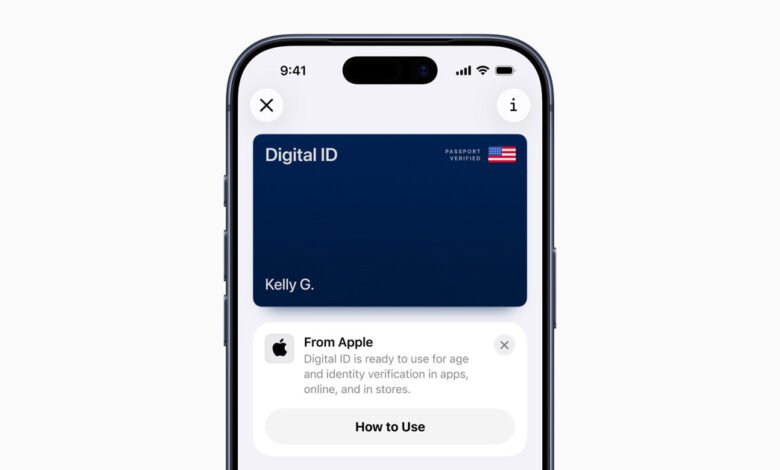
Apple has expanded its digital identification capabilities with the launch of Digital ID in Apple Wallet, offering a secure and private method for users to generate and present identification using their U.S. passport information. This new feature enables individuals to store a verified ID directly on their iPhone or Apple Watch, enhancing convenience while maintaining the high security standards Apple is known for. Initially, the system will enter a beta phase at TSA checkpoints in over 250 U.S. airports, where it will be accepted for in-person identity verification during domestic travel. Additional use cases for Digital ID are expected to be introduced in the coming months.
This innovation provides an alternative for people who do not possess a REAL ID-compliant driver’s license or state identification. It is important to note, however, that Digital ID does not replace a physical passport and cannot be used for international travel or border crossings.
Jennifer Bailey, Apple’s vice president of Apple Pay and Apple Wallet, emphasized the company’s commitment to user privacy and security. She stated, “We are thrilled to offer Digital ID as a new way for customers to manage and present their identity securely from their Apple devices. Since rolling out driver’s license and state ID support in Wallet back in 2022, we’ve received overwhelmingly positive feedback. Digital ID extends this trusted, convenient option to a broader audience by allowing them to create an ID using their U.S. passport details.”
This announcement builds upon the existing functionality that lets users add eligible driver’s licenses and state IDs to Apple Wallet. Even without a U.S. passport, individuals can still take advantage of Wallet’s ID features by adding their state-issued identification where supported.
To create and add a Digital ID, users begin by opening the Wallet app on their iPhone and tapping the Add button, usually found at the top of the screen. They then select “Driver’s License or ID Cards,” choose the Digital ID option, and follow the step-by-step instructions. The setup involves scanning the photo page of a physical U.S. passport with the iPhone’s camera. For enhanced security, the phone also reads the embedded chip on the passport’s back cover to confirm the document’s authenticity. Users are then guided to take a selfie and perform a series of facial and head movements as an additional verification step. Once this process is complete, the Digital ID is securely stored in the Wallet.
When it’s time to present the Digital ID in person, users can double-click the side button or Home button to open Apple Wallet, select their Digital ID, and hold their iPhone or Apple Watch near an identity reader. They can review exactly what information is being requested and authorize the sharing of data using Face ID or Touch ID. In the future, this capability will extend to other approved businesses and organizations, both in-person and for online verification.
Security and privacy are foundational to the Digital ID system. All ID information stored in Apple Wallet is encrypted, and the actual passport data remains on the user’s device. Apple does not have access to records of when, where, or what ID information is presented. The requirement for biometric authentication via Face ID or Touch ID ensures that only the device’s owner can present the Digital ID. Users maintain full control, reviewing and approving each request before any data is shared, and they never need to hand over their unlocked device to verify their identity.
The rollout of Digital ID complements the existing support for driver’s licenses and state IDs in Apple Wallet, which is currently available in twelve states and Puerto Rico. Recent expansions have included Montana, North Dakota, and West Virginia, and the feature made its international debut in Japan with the My Number Card on iPhone.
(Source: Apple)