Logitech MX Master 4 Review: Is It Worth It?

▼ Summary
– The MX Master 4 offers only minor improvements over the MX Master 3S and represents a missed opportunity to address major flaws of the previous model.
– Key design changes include a taller, chunkier shape with a translucent button coating and an additional side button that alters the button placement.
– New haptic feedback features like the Actions Ring and side squeeze controls are interesting but not revolutionary for productivity and add unnecessary weight.
– The mouse remains excellent for productivity with quiet clicks, comfortable palm grip, and long battery life, but its 125Hz polling rate makes it unsuitable for competitive gaming.
– Existing MX Master 3S owners have little reason to upgrade, as the core experience remains largely unchanged despite the new features.
For those seeking a top-tier productivity mouse, the Logitech MX Master 4 presents a familiar yet slightly refined experience, though its evolutionary changes may not justify an immediate upgrade for existing MX Master 3S owners. After two years of relying on the MX Master 3S as my daily driver, testing its successor revealed a mix of subtle design tweaks and new features that don’t always hit the mark.
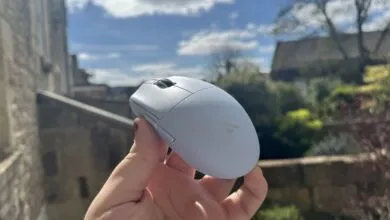
Physically, the MX Master 4 stands a bit taller and feels slightly longer and chunkier in the hand. A prominent rounded ridge now runs along the left side, housing the horizontal scroll wheel. The main buttons are encased in a semi-translucent coating, giving them an unusual appearance as if preserved in clear amber. While you can see through the button tips when held to light, this visual quirk is unnoticeable during normal use.
The texture of this new coating aims to enhance grip during intense clicking sessions, a problem I never encountered with the Master 3S. Although it does improve hold, the initial chalk-like sensation made my skin crawl whenever my fingertips brushed against it. Fortunately, this discomfort has diminished with use, though I still prefer the simpler finish of the previous model.
Other design changes prove more frustrating. The enlarged horizontal scroll wheel ridge sometimes presses uncomfortably into the webbing between my thumb and forefinger during palming. An additional side button brings the total to five thumb-controlled functions, including the wheel and a squeezable haptic control, but this pushes the standard side buttons further back. This repositioning caused several days of misfires where I accidentally clicked the forward button instead of back until my muscle memory adapted. New users might adjust quickly, but veterans of earlier models will find the reconfiguration slightly jarring.
Haptic feedback represents one of the most significant new features. Squeezing the rubberized side panel produces a subtle rumble under your thumb and summons the Actions Ring, a circular menu of configurable shortcuts around your cursor. Hovering over options triggers another vibration to confirm selection. While clever in theory, this system hasn’t revolutionized my workflow. The accompanying Logi Options software proves somewhat cumbersome to configure, and despite available plugins for Adobe Creative Suite applications and even ChatGPT integration through an AI prompt builder, I haven’t incorporated the Actions Ring into my daily routine. Additional haptic notifications occur during charging and power-on sequences, but overall the functionality feels limited for the added weight, the MX Master 4 weighs nine grams more than its predecessor.
Despite these criticisms, the MX Master 4 retains many strengths. The main chassis features an attractive textured carbon fiber-like finish that feels premium under the palm, while the thumb rest uses plush textured silicone. The mouse’s near-silent operation stands out as a major improvement, where the Master 3S produced a muted “thock,” the new model’s clicks are virtually inaudible. This makes it ideal for shared workspaces or late-night computing.
Gaming performance mirrors that of previous models. Logitech explicitly markets this as a productivity mouse, yet I frequently used the Master 3S for gaming due to its quiet switches. The MX Master 4’s 8,000 DPI Darkfield sensor paired with a 125 Hz polling rate can’t compete with dedicated gaming mice. While serviceable for slower-paced titles, it lacks the responsiveness needed for competitive twitch-shooters. Larger skates on the bottom provide smoother gliding, and the comfortable palm-fitting shape supports extended casual gaming sessions, but this remains a productivity tool first.
Battery life remains exceptional, delivering up to 70 days per charge thanks to the conservative polling rate. I’ve needed to charge it only once since making it my primary mouse. The MagSpeed infinite scrolling wheel continues to outperform virtually every competitor, and the horizontal scroll wheel maintains its excellent functionality.
Ultimately, the MX Master 4 serves as a competent productivity mouse with some questionable additions rather than a essential upgrade. If you own a Master 3S, the quieter clicks and potential utility of the Actions Ring might appeal, but the core experience remains largely unchanged. For newcomers to the series, it offers outstanding comfort and features for professional work, just don’t expect gaming-grade performance or revolutionary improvements over its predecessor.
(Source: PCGAMER)