Apple Adds Option to Reduce Liquid Retina Display Glare
▼ Summary
– Apple’s iOS 26.1 beta introduces a new option to tint Liquid Glass elements, allowing users to make them more opaque or frosted.
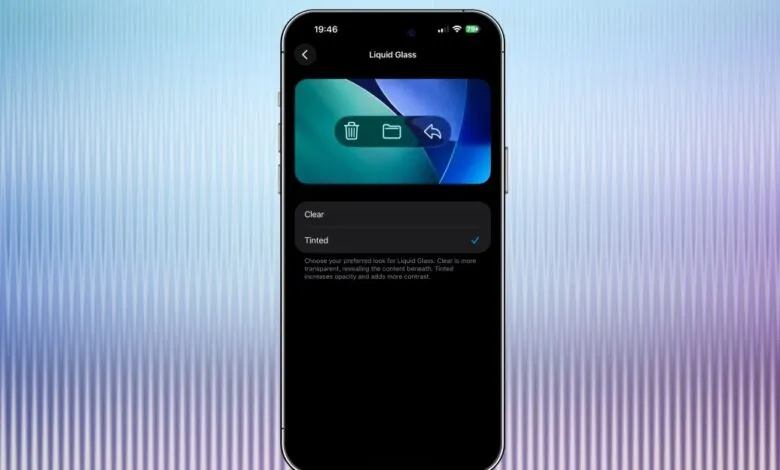
– The Liquid Glass tint setting is accessible in Settings under Display & Brightness and offers “Clear” or “Tinted” choices.
– This feature is also available in the latest iPadOS 26.1 and macOS 26.1 developer betas, as reported by MacRumors.
– The update includes a toggle to disable swiping to the camera from the lock screen, enhancing privacy by preventing unauthorized photo access.
– Users can turn off the lock screen camera swipe feature in Settings under Camera to restrict camera use without unlocking the device.
Apple’s latest iOS 26.1 beta introduces a valuable new feature for users seeking to reduce glare on Liquid Retina displays. This update allows individuals to adjust the transparency of interface elements, offering a choice between the standard clear appearance and a new tinted option that creates a more opaque, frosted effect. Since Apple first unveiled its Liquid Glass design language at WWDC earlier this year, the company has been refining its implementation to address initial concerns about readability in certain lighting conditions. The new setting puts control directly in the hands of users, enabling them to customize their visual experience based on personal preference and environmental factors.
Available in the current iOS 26.1 developer beta released this week, the display adjustment appears within the Settings application under Display & Brightness > Liquid Glass. Users can toggle between “Clear” and “Tinted” modes to instantly modify how system interfaces appear. According to reports, the same customization option has been extended to iPadOS 26.1 and macOS 26.1 developer betas, suggesting Apple intends to maintain visual consistency across its product ecosystem.
Side-by-side comparisons demonstrate the visual impact of both display modes. The left side of each comparison shows applications with the standard Clear Liquid Glass setting, while the right side displays the same content using the new Tinted option. Although the differences appear subtle at first glance, many users report preferring the tinted versions for their reduced glare and improved text legibility, particularly in brightly lit environments.
The Liquid Glass adjustment represents just one of several practical enhancements included in the newest iOS beta. Another significant addition gives users the ability to disable the camera shortcut on the lock screen. This prevents anyone with physical access to a device from taking photographs, even if they cannot unlock the phone. This privacy-focused option can be found in Settings > Camera > Lock Screen Swipe to Open Camera, providing an extra layer of security for those concerned about unauthorized camera usage.
These incremental improvements demonstrate Apple’s ongoing commitment to refining the user experience through customizable options that address both aesthetic preferences and practical concerns. The display tinting feature specifically responds to user feedback about visual comfort, while the camera lock screen restriction enhances privacy protections, both representing thoughtful additions to the iOS ecosystem.
(Source: The Verge)