Google’s Big Screen Recording Upgrades Coming to Android Tablets & PCs
▼ Summary
– Android’s native screen recorder was introduced in Android 11, replacing the need for third-party apps that had security risks and functional limitations.
– Recent updates have added features like single-app recording, a status bar chip, and external display support, with improvements aimed at larger devices and Android’s Desktop Mode.
– Google is developing a new toolbar UI for screen recording that includes a selfie camera toggle and redesigned audio options for a cleaner interface.
– A dedicated post-capture screen will be added, offering a video player with playback controls and options to retake, edit, delete, or share recordings directly.
– Future updates may include partial screen capture for both screenshots and recordings, though these features are not yet active and may debut in Android 16 QPR3 or Android 17.
Google is significantly upgrading the built-in screen recording tool for Android, with major enhancements designed specifically for tablets and upcoming Android-powered PCs. These improvements focus on creating a more intuitive and powerful recording experience, moving beyond the basic functionality that has been part of the operating system since Android 11. The overhaul includes a new user interface and a streamlined post-capture workflow, signaling a strong push to optimize Android for larger displays.
For years, Android users had no native way to record their screens. They depended on third-party applications from the Google Play Store or manufacturer-specific tools that came pre-installed on their devices. While these options provided a workaround, they came with notable restrictions. Third-party apps could only capture what the system permitted, and for a long time, this excluded internal app audio. More critically, these applications sometimes posed security threats, as malicious actors could exploit screen recording permissions to access private data. These concerns ultimately led Google to develop its own official screen recorder, which it integrated directly into Android 11 and distributed through the Android Open Source Project for all device makers to use.
The initial version of Google’s screen recorder was quite simple, only capable of capturing the entire display. Over time, it received incremental updates. Android 14 QPR2 introduced the ability to record just a single application. The first quarterly release for Android 15 then added a status bar indicator showing the recording duration and a method to stop recording without needing to open the notification panel. The Android 16 update, while not a major overhaul, did introduce support for recording external displays. This seemingly small addition hinted at Google’s broader strategy to enhance the feature for use with larger screens, likely in anticipation of Android’s expanding Desktop Mode.
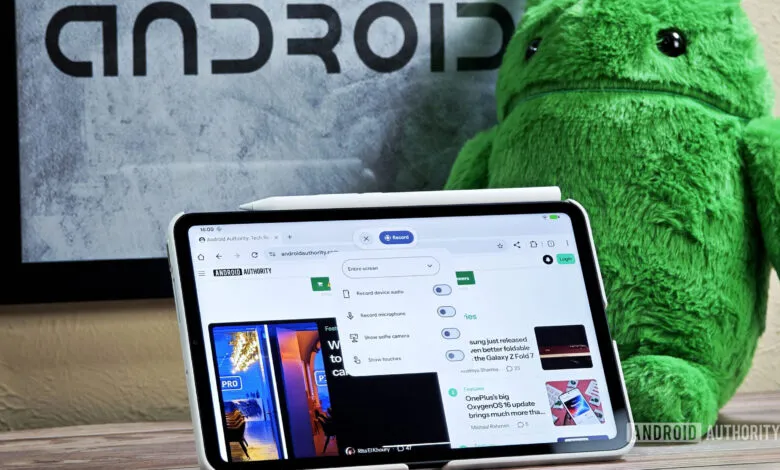
The most noticeable change in the upcoming redesign is the replacement of the old pop-up dialog box with a compact, floating toolbar. Activating the screen recorder via the Quick Settings tile will now bring up this toolbar, which overlays your current screen. Although it cannot be moved or resized in its current form, it occupies less visual space than the previous dialog, allowing you to see more of the content you are recording.
This new toolbar also introduces fresh capabilities, most notably a toggle to “show selfie camera.” This feature presumably enables picture-in-picture recording, letting you capture video from the front-facing camera simultaneously with your screen. Such a function would be incredibly useful for creating tutorial videos or recording gameplay commentary. The toolbar maintains the existing options for recording a single app, displaying touch interactions, and capturing audio. However, the audio settings have been refined, now presented as individual toggle switches instead of a dropdown menu, resulting in a cleaner and more straightforward interface.
Another substantial improvement addresses the experience after you finish a recording. Currently, Android simply sends a notification confirming the video has been saved. Tapping this notification typically opens the file in a separate video player app, as the system lacks a built-in viewer for screen recordings. A future update will change this by introducing a dedicated post-capture screen, similar to what already exists for screenshots. Tapping the “recording saved” notification will launch a new interface featuring a basic video player complete with a seek bar, play/pause controls, and a mute button. Below the player, you will find several action buttons: retake, edit, delete, and share.
These new options represent a significant leap in usability. The “retake” button allows for an instant do-over if you make a mistake, while the “delete” button offers a quick way to discard a recording without having to locate and delete it from your gallery app. To prevent accidental deletion, the system will request confirmation before permanently removing the file. The share button will open the standard system sharing menu, and the edit button will prompt you to open the video in a compatible editing application.
Beyond these visible changes, Google is also developing support for partial screen capture. Code found in the latest Android beta versions indicates that users will eventually be able to select a specific area of the screen to record, rather than being forced to capture the entire display. This functionality is expected to apply to both screenshots and screen recordings. A new, customizable keyboard shortcut for taking partial screenshots is also in the works.
While the underlying code for these features is present in the Android 16 QPR2 Beta 3, they are not yet active for users. This makes it improbable that they will be ready for the stable QPR2 release expected in December. The earliest possible release window for these enhancements would be the Android 16 QPR3 update scheduled for March, as they do not appear to require major changes to the software development kit. However, it would not be surprising if Google decides to hold these features back for a larger unveiling with next year’s Android 17 update.
(Source: Android Authority)