iOS 27 Brings Landscape Mode to More Apple Apps Ahead of ‘iPhone Ultra’
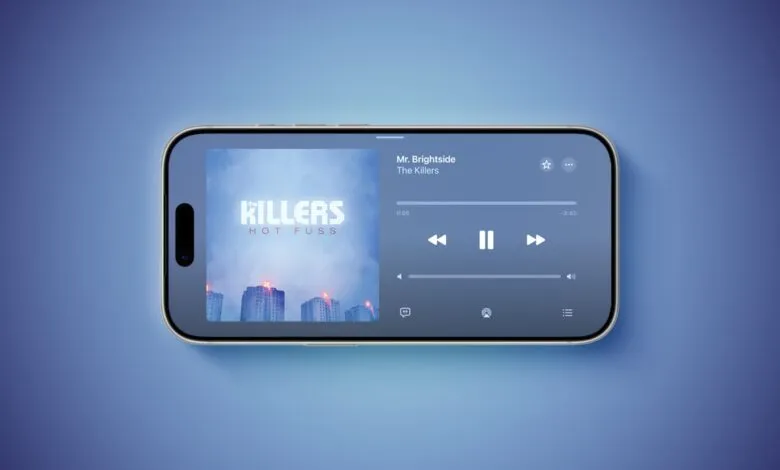
▼ Summary
– iOS 27 expands landscape mode support to many built-in apps, including Apple Music, Podcasts, Fitness, Health, Reminders, and others.
– In Apple Music and Podcasts, landscape support is limited to the audio player.
– Many apps now feature a left-aligned sidebar in landscape, and in Messages, the sidebar can be collapsed to show only names and profile pictures.
– This expansion may prepare for a rumored “iPhone Ultra” foldable device, and landscape support is also added for Live Activities in the Dynamic Island.
– iOS 27 is currently in beta, expected for release in September alongside the potential unveiling of the “iPhone Ultra.”
With iOS 27, Apple is significantly expanding landscape mode support across its native iPhone applications, bringing the feature to Apple Music, Podcasts, Fitness, Health, Reminders, Home, Shortcuts, Apple Watch, Find My, Weather, Voice Memos, Apple TV Remote, and several others. This update marks a notable shift in how users can interact with their device when held horizontally.
In Apple Music and Podcasts, the landscape orientation currently applies only to the audio player interface. For many of the other updated apps, a left-aligned sidebar appears when the device is rotated. The Messages app, which already worked in landscape mode on iOS 26 and earlier, now offers the ability to collapse that sidebar, showing just names and profile pictures for a cleaner view.
Prior to this update, landscape mode was already functional in apps like Apple Maps, Calendar, Files, Notes, and Mail on iOS 26. iOS 27 extends that capability to a much wider array of utilities. Industry observers see this as a strategic move that could be laying the foundation for the rumored “iPhone Ultra.” A foldable device with a larger display would benefit greatly from apps that adapt smoothly to landscape orientation.
Additionally, iOS 27 introduces landscape support for Live Activities displayed in the Dynamic Island. To rotate a supported app into landscape mode, simply turn your iPhone sideways. Just make sure Portrait Orientation Lock is turned off in Control Center.
This is something of a return to form. Landscape apps were far more common on iOS years ago. The Home Screen grid itself supported landscape orientation on the iPhone 6 Plus, iPhone 6s Plus, iPhone 7 Plus, and iPhone 8 Plus, but that functionality was removed with the arrival of the iPhone X.
iOS 27 is currently in beta and is expected to ship to the public in September. That same timeframe is when Apple is reportedly planning to unveil the “iPhone Ultra.”
(Source: MacRumors)