Google Pixel Transit Mode: How to Set It Up
▼ Summary
– The March 2026 Feature Drop for Pixel phones introduces two new features, Transit mode and enhanced At a Glance alerts, to help manage commutes.
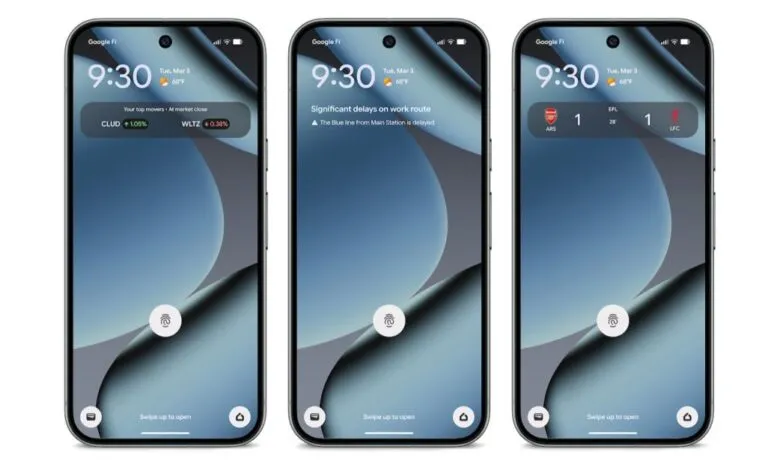
– The At a Glance feature provides real-time commute updates on the lock and home screen, such as specific transit delays, by learning from your Google Maps Timeline.
– Transit mode is a personalized setting within Modes that automatically adjusts phone settings like sound, Bluetooth, and notifications while you are on a train.
– Setting up these features requires configuring home/work locations and a commute profile in Settings, with Google Maps needing 2–3 weeks to learn your patterns.
– These features are available globally (except Europe and the UK) on Pixel 7 and newer devices, requiring a Google account and Google Maps connection.
Google’s latest Feature Drop introduces two powerful tools designed to streamline your daily travel. The new Transit mode and enhanced At a Glance commute alerts work together to personalize your journey, providing timely updates and automatically adjusting your phone’s settings while you’re on the go. These features aim to make commuting by public transportation a more seamless and less disruptive experience.
The first enhancement upgrades the existing At a Glance widget. It now surfaces real-time transit alerts directly on your lock screen and home screen. Instead of just showing traffic conditions, you might see a message like “Significant delays on work route,” with specific details such as “The Blue line from Main Station is delayed.” This provides immediate, actionable information the moment you glance at your phone.
The second, more involved feature is the personalized Transit mode. Integrated into the system-level Modes alongside options like Do Not Disturb, it allows you to configure a suite of settings that activate automatically when Google detects you’re on a train or bus. You can tailor several aspects of your device’s behavior for these periods.
For audio, you can set the volume to Sound on, Vibrate only, or Silent. Connectivity options include toggling Bluetooth on or off during your commute. Notification management is highly customizable: you can choose to allow all notifications, restrict them to specific contacts under People, or permit only certain applications listed under Apps. You also have control over Alarms & other interruptions.
It’s important to note that these features require some time to become fully functional. Google Maps needs a period to learn your regular travel patterns. According to support documentation, it may take 2–3 weeks for commute info to appear after initial setup. The system leverages your Maps Timeline and location history to accurately understand your commute.
Setting up both features is done through a unified process. Navigate to Settings > Modes > Transit > App Settings > Set up commute notifications. From there, you will be guided to input your home and work addresses, confirm your location settings are enabled, and build your personalized commute profile. This one-time setup configures both the automatic Transit mode switches and the At a Glance alerts.
Availability for these tools has specific parameters. The real-time transit information within At a Glance is currently exclusive to Pixel 7 and newer devices, excluding the Pixel Tablet. Furthermore, the service is available globally but is not offered in Europe and the UK at this time. Functionality requires a connection to your Google account and the Google Maps application.
(Source: 9to5 Google)