Folding Phones: The Laptop Replacement in Your Pocket
▼ Summary
– The author defines “Purse Computer” as a lightweight, portable workstation combining a foldable phone (like the Galaxy Z Fold 7) with a travel keyboard, designed as an alternative to a traditional laptop.
– A key challenge and focus has been finding the ideal portable keyboard, with the author settling on the Logitech Keys 2 Go for its thin, light design and full-size keys.
– Expert advice from Michael Fisher (Mr. Mobile) emphasizes using a kickstand case for the phone to simplify the setup and avoid carrying a separate stand.
– While promising, using a foldable phone as a computer requires patience and workarounds, as some Android apps don’t optimally use the large screen and battery life is limited compared to a laptop.
– The core utility of Purse Computer is enabling short, convenient work sessions away from home without the encumbrance of a full laptop, lowering the barrier to leaving the house to work remotely.
The idea of a folding phone as a laptop replacement is becoming a tangible reality for many, offering a compelling blend of portability and productivity. My own experiment began with a simple mistake: a forgotten keyboard that turned a confident walk to a café into a lesson in humility. After thumb-typing my way through that session, I became determined to see just how far a slim device like the Galaxy Z Fold 7 and a lightweight keyboard could go. This combination, which I’ve come to call a Purse Computer, isn’t about perfection. It’s about freedom from the weight and bulk of a traditional laptop, and once you experience that liberty, returning to the old way feels surprisingly difficult.
This concept isn’t entirely new. From iPad keyboard cases to the netbooks of yesteryear, the quest for a smaller, more portable computer has a long history. For me, the Purse Computer directly addresses the daily friction of my “Backpack Computer,” my company MacBook Air. While light for a laptop, it’s still an encumbrance. The real issue arises after work. Needing to make a quick stop at a store with a laptop in tow feels awkward and impractical. A folding phone and keyboard setup solves this by being something you can easily carry at all times, slipping into a regular bag without a second thought.
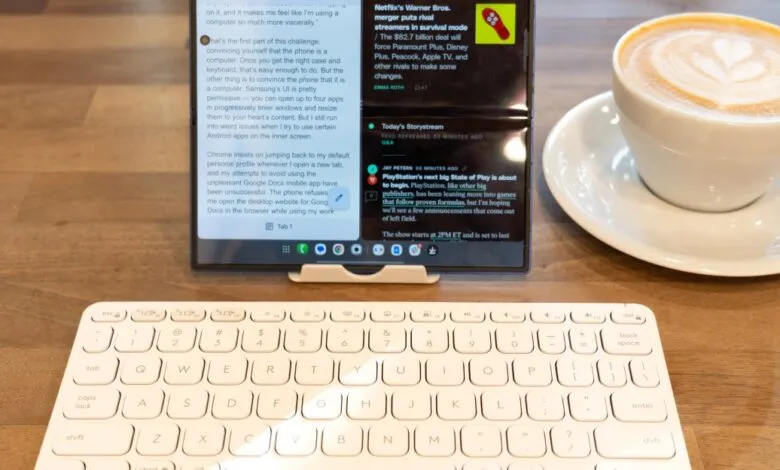
The journey hinges on finding the right keyboard. My search criteria demanded something nearly invisible in my bag yet capable of providing a genuine typing feel. After testing several options, including a bulky folding model and an unreliable cheap alternative, I landed on the Logitech Keys 2 Go. Its incredibly thin profile means I often forget it’s there, and the full-size keys make typing a pleasure. It lacks a built-in phone stand and uses coin cell batteries instead of USB-C charging, but the trade-off is worth it for the sheer portability. A separate, borrowed stand handles the phone positioning just fine.
For deeper insights, I turned to Michael Fisher, known as Mr. Mobile on YouTube and a longtime advocate of the folding-phone-as-computer idea. He coined the term “four-pocket laptop” and had crucial advice. His top recommendation was to invest in a kickstand case for the phone, eliminating the hassle of a separate stand. He noted that fiddling with extra components defeats the purpose of a streamlined setup. His own current rig with a Galaxy Z TriFold uses a niche kickstand case and a Nuphy keyboard, which he admits is slightly larger than ideal but offers an exceptional typing experience that mentally reinforces the “computer” feel.
That psychological shift is a significant part of the challenge. A physical keyboard is essential for getting into a productive headspace, but you also need to coax the phone into behaving like a computer. Samsung’s software allows for robust multi-window use, but some Android apps don’t fully utilize the large inner screen. I encountered frustrations like Chrome stubbornly reverting to my personal profile and an inability to force the desktop version of Google Docs in my work browser. Apps like Slack simply stretch their phone interface, wasting screen space. A clever workaround, courtesy of a colleague, is to run Slack within a Chrome tab on the inner display, bypassing the limited app version. It requires an extra step, but it works. While future integration between ChromeOS and Android may help, for now, these workarounds are part of the process.
This leads to the invisible ingredient in this setup: patience. This approach appeals to a specific kind of user, someone willing to troubleshoot a browser tab to optimize their workflow. The curious glances from others at the coffee shop confirm it’s not for everyone. Practical limitations exist, notably battery life. It can’t match a laptop’s endurance, making it best for shorter, focused work sessions of an hour or two rather than a full day without a recharge.
And that’s perfectly acceptable. The Purse Computer isn’t meant to be an all-day laptop. Its purpose is to be the effortlessly portable tool that removes the barrier to leaving the house. When the alternative is packing a backpack, the mental hurdle is real. But when it’s just the phone I always carry plus a slender keyboard that tucks anywhere, spontaneous trips to work remotely become simple. As Mr. Mobile summarized, you have to use it to understand its utility, and after that, other phones can feel primitive. My time with the Fold 7 is limited, but the upcoming Trifold promises even more opportunities to explore a life where the laptop often stays comfortably at home.
(Source: The Verge)