Android 17’s Blur, Screen Recorder & More Revealed in Leaked Gallery

▼ Summary
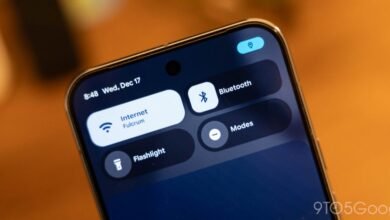
– Android 17 introduces a new blur effect for system UI elements, making backgrounds like the volume slider and power menu translucent and themed by Dynamic Color.
– The screen recording tool has been redesigned with a lighter interface and a floating control pill, offering options to record audio and show touches.
– After starting a screen recording, users can doodle on the screen with multiple colors and later access a preview screen to share or edit the recording.
– A new “Lock app” option appears when long-pressing an application, though this feature is not fully developed in the current build.
– The “Bubble” feature for notifications might be expanded beyond conversation apps in Android 17, according to the early build.
The latest preview of Android 17 reveals several user-facing enhancements, including a refined visual blur effect for system interfaces and a redesigned screen recording tool. These features, sourced from an internal build, highlight Google’s focus on both aesthetic polish and functional utility in the upcoming mobile operating system.
A standout visual change is the introduction of a sophisticated blur effect applied to various system UI components. This is most evident in the redesigned volume slider, which transitions from a solid background to a translucent material that dynamically adapts to your wallpaper colors. This blur treatment extends to other areas, such as the power menu, creating a more layered and visually integrated experience with the content on your screen.
Beyond aesthetics, the screen recording functionality receives a significant overhaul. The current pop-up menu is replaced by a lighter, floating control interface that provides clearer options. Users can choose to record the entire screen with accompanying device audio, microphone input, or a visual indicator for on-screen touches. Once recording begins, a persistent status bar icon shows elapsed time, and tapping it recalls the floating control pill for quick access to tools like on-screen drawing with multiple colors. After stopping, a preview screen immediately offers options to share or edit the captured video.
Additional tweaks spotted in this early build suggest further refinements to app management. A new “Lock app” option appears when long-pressing an application icon, though its functionality is not yet active. There are also indications that the “Bubble” feature for floating chat heads may expand beyond messaging applications, potentially allowing more apps to utilize this convenient overlay window.
(Source: 9to5 Google)