Capture the Northern Lights with Your Android Phone
▼ Summary
– An unusually strong geomagnetic storm is making the Northern Lights visible across large parts of the Northern Hemisphere, including the United States.
– The aurora is caused by charged particles from solar storms interacting with Earth’s atmosphere, often appearing more vivid to cameras than to the naked eye.
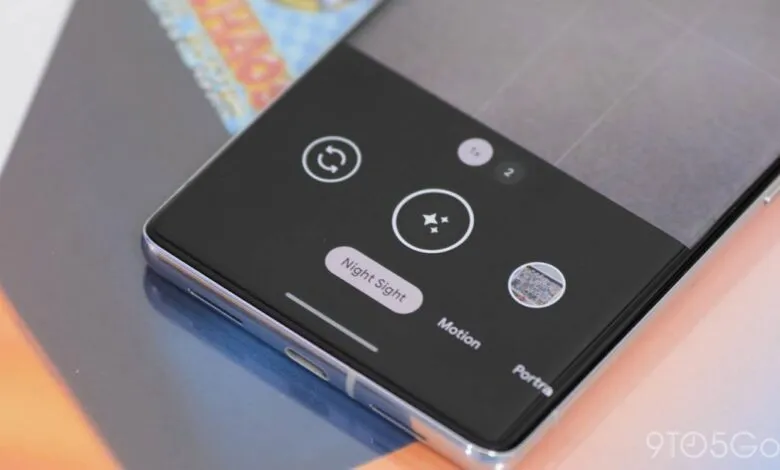
– To photograph them with a Google Pixel, use a tripod in a dark location and activate the astrophotography mode within Night Sight for a detailed, long-exposure shot.
– Other Android phones, like Samsung Galaxy devices, can capture the lights using a manual “Night” mode set to “Max” or a “Pro” mode with a long shutter speed, also requiring a tripod.
– The key requirements for successful phone photography of the aurora are a dark environment with minimal light pollution and a stable mount like a tripod.
The breathtaking spectacle of the Northern Lights, or aurora borealis, has recently become visible far beyond its typical Arctic range, thanks to intense geomagnetic activity. This phenomenon offers a rare chance for skywatchers across the United States and other regions to witness and photograph these celestial curtains. While the human eye may perceive faint colors or a subtle glow, a modern smartphone camera, using specialized modes, can often capture far more vivid detail and color. The key to success lies in using the right techniques and a stable setup.
Typically confined to high-latitude areas, the Northern Lights occur when charged particles from solar storms collide with gases in Earth’s atmosphere. Their recent southern expansion provides a unique photographic opportunity, though visibility depends heavily on local conditions like light pollution and cloud cover. To get a great shot, you’ll need two essential items: a dark location with minimal artificial light and a sturdy tripod to keep your phone perfectly still during long exposures.
For owners of Google Pixel smartphones, the built-in Astrophotography mode is an excellent tool. Start by mounting your phone on the tripod and opening the Camera app. Switch to ‘Night Sight’ mode. If the aurora is already bright and clear, a standard Night Sight shot may suffice. However, for maximum detail and a bonus time-lapse video, use the dedicated astrophotography feature. When the phone is perfectly still on the tripod, a small star icon will appear on the shutter button after a few seconds. Tapping it initiates a capture process that can last up to four minutes. The phone then processes the data, producing both a stunning still image and a dynamic time-lapse of the shifting lights.
Many other Android devices, like Samsung Galaxy models, can also capture impressive aurora images even without a dedicated astrophotography setting. Most phones will automatically engage a ‘Night’ mode in dark conditions. A useful guideline is that if you can clearly see the aurora with your naked eye, your phone’s standard night mode will likely capture it well. For fainter displays, you’ll need to manually access long-exposure settings.
On recent Samsung Galaxy phones, you have two primary options. Within the ‘Night’ mode, you can often switch the exposure setting from ‘Auto’ to ‘Max.’ For more control, switch to ‘Pro’ or ‘Manual’ mode and adjust the shutter speed, often labeled ‘Speed,’ to between 5 and 10 seconds. Crucially, a tripod is non-negotiable for these long exposures to prevent blurry images from camera shake.
This celestial event serves as a perfect reminder of the powerful photographic capabilities we carry in our pockets. With a bit of preparation and patience, you can create lasting images of one of nature’s most magnificent displays.
(Source: 9to5 Google)