Razer BlackWidow V4 Low-Profile TKL Review: Gaming Excellence

▼ Summary
– The Razer BlackWidow V4 Low-Profile Tenkeyless combines mechanical switches with a low-profile, tenkeyless design and offers both wired and wireless connectivity.
– It features three switch options (orange tactile, green clicky, yellow linear) and includes media controls like a clickable volume wheel, though some control buttons like the AI button are not very useful.
– The keyboard’s low-profile keys provide precise typing comfort for both productivity and gaming, but the tactile feel may not justify its $180 price for all users.
– While well-built with an aluminum frame and appealing aesthetics, it faces strong competition from alternatives like Logitech’s G515 which offers smoother operation and Hall effect switches.
– This keyboard suits users seeking an all-rounder for work and gaming who specifically want low-profile mechanical keys, but isn’t recommended if low-profile design isn’t a priority.
Finding a keyboard that excels for both work and play can feel like a quest. The Razer BlackWidow V4 Low-Profile TKL makes a compelling case for itself, blending a tenkeyless design with low-profile mechanical switches. It promises a versatile experience, though it faces significant competition from boards featuring newer analogue technologies.
The current gaming keyboard market presents a real choice. You can chase the latest trend with Hall effect switches, which offer customizable actuation and rapid trigger responses. Alternatively, you might prefer the familiar, proven performance of traditional mechanical keys, even if they lack some of that cutting-edge customizability. Razer’s newest offering, the BlackWidow V4 Low-Profile TKL, firmly plants itself in the mechanical camp. It pairs that classic tactile switch sensation with low-profile keycaps for a shorter travel distance. The keyboard supports both wired and wireless operation, includes three control buttons and a clickable volume roller, and boasts an impressive 980-hour battery life. Ultimately, the most defining characteristic is how the keys feel under your fingers.
This makes the keyboard a highly personal product to assess. The review unit came equipped with Razer’s proprietary orange low-profile mechanical switches, which are one of three available choices. The lineup also includes crisp and clicky green switches and a smooth and silent yellow variant. This provides a good range of tactile options. However, regardless of your switch preference, the low-profile design and the overall construction quality, from the backplate to the keycaps, are what truly shape the user experience.
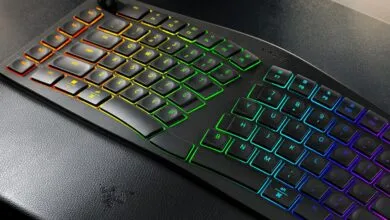
Personally, I found the typing sensation somewhat lacking. The keycaps felt a bit loud for being marketed as quiet, and the actuation had a slight flimsiness to it. This is unfortunate because the board has many tangible strengths, especially in its aesthetics. Razer isn’t the only company embracing an all-black design, but few execute it with the same visual polish as this “jolly green giant.”
Swipe to scroll horizontally Black Widow V4 Low-profile specs Size: Tenkeyless Connectivity: 2.4 GHz, Bluetooth, USB Type-C Keycaps: PBT Switches: Razer Low-Profile Clicky, Tactile, Linear (review unit: Tactile) Hot-swappable: No Media controls: Yes, clickable scroll wheel Lighting: Full RGB per-key Software: Synapse Price: $180/£170
Buy if… ✅ You want an all-rounder keyboard: This board transitions seamlessly from a productive workday to an intense gaming session. The low-profile keys promote comfortable and precise typing, while the gaming performance feels competitive enough for most players.
Don’t buy if… ❌ Low-profile isn’t a priority: The main selling point is the specific fusion of mechanical keys, a compact tenkeyless form factor, and low-profile actuation. If that particular feel doesn’t appeal to you, the other specifications may not justify the price.
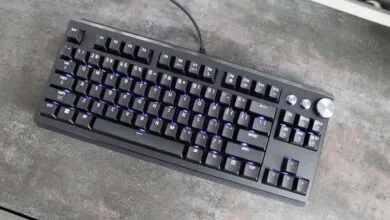
The design works exceptionally well within its sleek, compact tenkeyless chassis. Built around a brushed aluminium frame and featuring a pleasing mix of finishes, it manages to look like high-performance hardware without veering into overly “gamer-y” aesthetics. The layout is also well-considered. The angle and height of the key stacks feel perfectly positioned for my hands, and the volume scroller includes a useful click-down input, perfect for muting audio. Still, I’m not convinced this specific combination of low-profile actuation and mechanical feedback provides enough tactile satisfaction to warrant its mid-to-high-end price tag.
When does a low-profile design truly feel like an advantage? It’s subjective, but I find it significantly easier to type with precision on low-profile keys compared to traditional keycaps, especially with mechanical switches involved. For that reason, a board like this hits a sweet spot as an all-around device. It’s just as suitable for typing messages during the workday as it is for hammering the WASD keys late into the night in your game of choice.
In that specific use case, it delivers all the features I need and, unusually for a Razer product, feels refreshingly free of bloat. The philosophy of a sleek, high-performance form factor is reflected throughout the entire spec list. A wired/wireless toggle switch on the top-left lets you choose between zero-latency wired connectivity or Razer’s nearly-as-fast Hyperspeed wireless. If the battery ever runs low, you’re just one USB-C cable away from getting back to business.
I’m also a fan of the form factor. Since I don’t work in accounting or play many games that rely on a numpad, I don’t miss those extra keys. While 60% keyboards often feel too cramped, this compact layout remains ergonomic and spacious enough for comfortable use.
Truthfully, the three control buttons don’t offer much practical value. One is a dedicated AI button that feels like the result of a corporate mandate. Pressing it opens a pop-up in the Synapse app that directs you to ChatGPT or Copilot, a feature nobody really needs. Another button displays your battery status in a clever way, turning the number row into a charge indicator. It’s semi-useful and well-executed, but not a deciding factor. The final button is a programmable key for media controls, which is perfectly fine.
When it comes to pure gaming performance, the feature set and tactile feel meet my expectations without exceeding them. Compared to the construction and feel of a competitor like the Logitech G515, there’s a subtle but meaningful difference. The Logitech board makes typing and playing feel slightly smoother, sturdier, and more enjoyable. This is before you even consider that the G515 TKL features Hall effect analogue keys, allowing for actuation point customization, a functionality the BlackWidow V4’s mechanical switches simply do not offer.
It’s difficult to be overly critical of that last point. This is a mechanical board designed for people who appreciate the specific feel and reliability of mechanical keys, and it delivers on that promise. However, its price places it in a similar category as other low-profile boards that offer more advanced features, making it challenging to generate overwhelming enthusiasm for it.
(Source: PC Gamer)