iPhone’s Anti-Algorithm Camera: Better with a Little Processing
▼ Summary
– The author finds editing iPhone RAW photos cumbersome due to complex file transfers and inconsistent results in software like Lightroom, often defaulting to the phone’s native output.
– The native iPhone camera processing is criticized for excessive sharpening and shadow lifting, though the author uses built-in Photographic Styles to mitigate this.
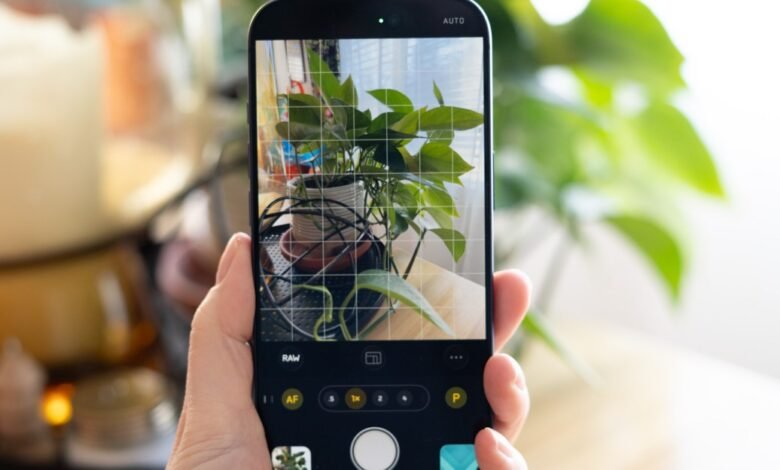
– Halide’s Process Zero mode aims to reduce this over-processing, delivering photos with deeper shadows and less sharpening straight from the camera.
– The new Process Zero v2 adds HDR support for greater contrast and the option to shoot Apple ProRAW files, providing a flexible, high-quality backup.
– The author notes that using Process Zero changes the photographic mindset, offering appealing results immediately and encouraging a more intentional photography experience.
There’s a familiar frustration for anyone who tries to treat their iPhone camera like a dedicated tool. You shoot a RAW file alongside the default, planning to edit it on a computer with professional software, only to hit a wall of technical hurdles. Transferring files between devices becomes a guessing game with HDR data and gain maps, often leading to edits that don’t match the original vision. The path of least resistance is to simply accept what the phone’s own processing delivers, saving the serious photographic work for a traditional camera.
This approach has clear trade-offs. Staying within the native camera ecosystem is undoubtedly simpler, but it means surrendering control to Apple’s algorithms, which are notorious for aggressive sharpening and artificially lifted shadows. While using built-in Photographic Styles like Rich Contrast helps mitigate this, many photographers seek more control through third-party apps. Halide’s Process Zero mode was created precisely for this purpose, promising to strip back the heavy computational processing for a more natural look with deeper shadows and subtler detail.
I was initially skeptical of this concept. Having endured the poor quality of pre-computational phone cameras, I value the clean, usable low-light images modern processing provides. A tweaked photo style usually gets me close to my preferred aesthetic, even if it feels more like computing than photography. However, the newly released beta for Process Zero version two introduced features that piqued my interest: HDR support and the ability to capture Apple ProRAW files simultaneously.
These additions might seem at odds with a “minimal processing” philosophy, and technically, some processing is always required to render sensor data into a viewable image. The key is in the implementation. The new HDR support doesn’t create a surreal, over-cooked image; instead, it allows the brightest areas to shine genuinely, forging a stronger, more realistic contrast between light and dark. This is the opposite of the flat, uniform look often generated for standard dynamic range screens. The option to shoot HEIC + RAW means you get the Process Zero JPEG alongside a ProRAW file that has benefited from Apple’s multi-frame noise reduction. This DNG serves as a perfect safety net, containing all the editable data without altering the primary Process Zero output.
A new feature called Tone Fusion also offers adjustable shadow boosting within the Halide app, giving you control that’s more restrained than the native camera’s aggressive tendencies. Even at maximum settings, it avoids the unnatural color shifts in highlights that iPhone processing can introduce.
Beyond technical specs, an underappreciated advantage of tools like Process Zero is the shift in creative mindset. While you could replicate the look by manually editing a ProRAW file, getting an appealing image directly from the camera changes the experience. It feels less like you’re capturing a problem to solve later and more like you’re making a finished photograph. This subtle psychological shift can even change how you interact with the world. On a recent walk, using a specialized camera app made me feel more like a photographer on a mission, leading me to explore a stunning historic train station hall I’d overlooked for years.
The results justified the approach. With ProRAW files as a backup, I found I didn’t need them. The Process Zero JPEGs were excellent on their own. In the station, late afternoon sun blazed through giant windows. The processing didn’t try to recover every highlight and shadow artificially; it let the bright areas clip naturally, keeping the focus on the interior ambiance. The HDR gain map made the sunlit windows glow, creating beautiful contrast with the softer golden light on the walls. It was a convincing demonstration of HDR used thoughtfully.
As part of a larger app update still in public preview, specifics may change. But the direction is compelling. Computational photography is a monumental achievement, enabling great photos in challenging conditions with tiny sensors. The evolution of Process Zero shows that you can selectively incorporate these technological benefits, like improved dynamic range, without sacrificing a minimalist, intentional aesthetic. It enhances the experience rather than detracting from it, and that’s a compelling enough argument to win over a skeptic.
(Source: The Verge)