GuliKit USB Dongle Connects PS5 Controller to Switch 2
▼ Summary
– The 8BitDo USB Adapter 2 is a recommended, affordable dongle that enables unsupported controllers like the DualSense and Xbox gamepads to work wirelessly with the Nintendo Switch 2.
– A key advantage of these dongles is cost savings, allowing gamers to use controllers they already own instead of purchasing new Switch-specific ones.
– The GuliKit Hyperlink Gen 2 is a smaller, cheaper alternative, but supports fewer controller models than the more extensive 8BitDo adapter.
– Both dongles have limitations, including no remote console wake-up, no wireless audio support, and the ability to connect only one controller per dongle.
– The 8BitDo adapter offers unique customization software for controllers, while the GuliKit dongle boasts a PC-exclusive low-latency mode and, in some games, superior rumble feedback.
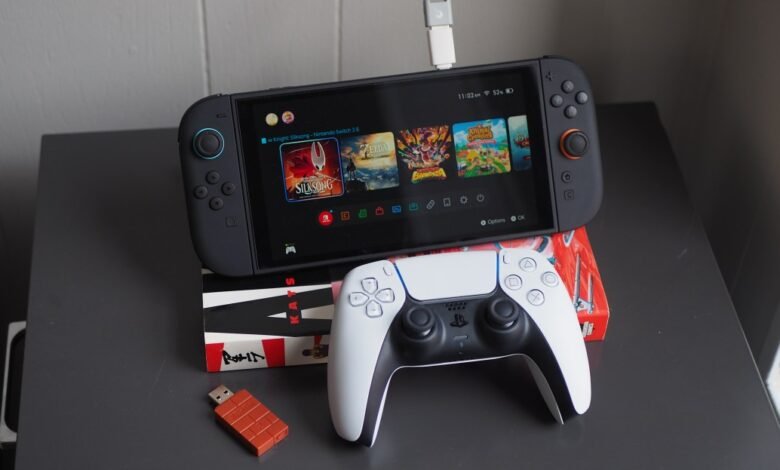
While dongles often get a bad rap for being expensive and inconvenient, a couple of clever adapters make it surprisingly easy to use your favorite controllers with the Nintendo Switch 2. The 8BitDo USB Adapter 2 is a standout, allowing you to wirelessly connect a Sony DualSense, a modern Xbox gamepad, and many others to the console. Simply plug the $20 dongle into the Switch 2’s dock, or use a USB-A-to-USB-C adapter to connect it directly. This approach saves money by letting you use hardware you already own, and the experience can be so seamless you might forget you’re not using a native controller.
A slightly cheaper and more compact alternative is the GuliKit Hyperlink Gen 2 USB-A adapter. Sold alone for $16.99 or bundled with GuliKit’s own controllers, it supports Xbox and PlayStation 4/5 pads for use with the Switch 2, PC, Steam Deck, and Android devices. However, 8BitDo supports a wider historical range of controllers, including models from the PS3 and Wii eras. Both options have limitations: neither supports remote console wake-up or wireless audio via the controller’s headphone jack, and each dongle can only pair with one controller at a time.
The 8BitDo adapter pulls ahead with its robust customization software. Its free Ultimate Software lets you remap buttons, create macros, and adjust vibration intensity, trigger sensitivity, and stick response for several non-8BitDo controllers. GuliKit currently lacks comparable software, though the company plans to release mobile apps with similar features in 2026. The 8BitDo dongle also supports multiple connection modes, like Xinput and Switch mode, activated via button combinations.
In terms of feel, the rumble performance can vary. In some titles, like Hollow Knight: Silksong, the GuliKit dongle delivered rumble that felt closer to high-quality HD rumble, while the 8BitDo’s effects felt less refined. In other games, the experience was similar, and some intense rumble effects, like those in Donkey Kong Bananza, felt poor on a DualSense regardless of the adapter used. Both dongles use a USB-A connector, designed primarily for PCs or the Switch dock.
GuliKit promotes the Hyperlink Gen 2’s PC-exclusive low-latency mode, which boosts the controller polling rate beyond typical console capabilities to reduce input lag. In practice, the latency improvement wasn’t as dramatic as hoped, though the setup was straightforward and the connection reliable, a trait shared by both featured dongles and many standard Bluetooth adapters.
For gamers who prefer a guaranteed, hassle-free experience, purchasing a dedicated Switch 2 controller is a solid path. But for those looking to maximize existing hardware, these affordable adapters offer a compelling and cost-effective solution.
(Source: The Verge)