Corsair Katar Pro XT Gaming Mouse Review: Is It Worth It?
▼ Summary
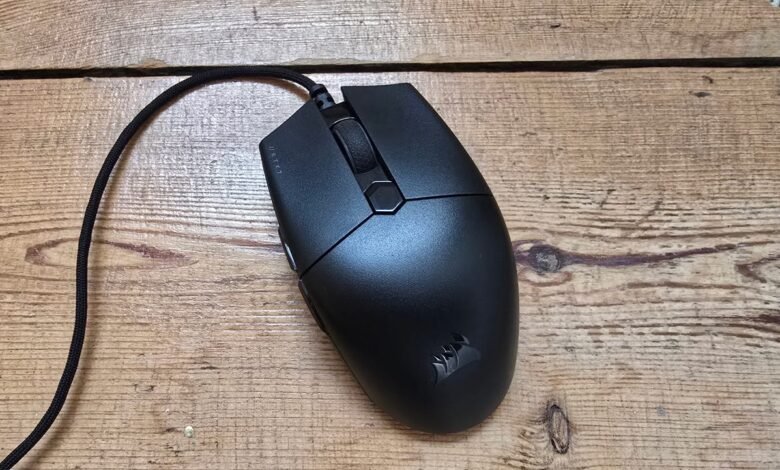
– The Corsair Katar Pro XT has a unique, alien shape with a straight front slope and sharply inward-sloping sides, designed for fingertip or claw grip but requiring adjustment.
– It features excellent rapid-fire main mouse buttons and a solid, high-performance sensor that provides precise, responsive tracking for gaming.
– The mouse has notable drawbacks, including scratchy and inconsistent mouse feet, mushy side buttons, and a stiff, rattling scroll wheel.
– Its comfort is highly grip-dependent, working well for fingertip grip and a specific three-finger claw grip, but not for palm grip or traditional two-finger claw grip.
– Priced at $35/£35 and often on sale, it offers good value for its core performance but has clear compromises typical of budget gaming mice.
Finding a capable and affordable gaming mouse often means choosing between performance and comfort. The Corsair Katar Pro XT presents a compelling case with its strong technical foundation, though its unconventional design demands careful consideration. Its silhouette is immediately distinctive, featuring a pronounced central hump that gives way to a remarkably straight, shelf-like front end. Unlike many mice that curve to cradle your hand, this model slopes downward in a dead straight line from its peak. The sides also angle sharply inward, a design choice intended to encourage your fingers to wrap around for enhanced control rather than resting flat.
This unique approach to ergonomics yields mixed results in practice. Achieving a comfortable grip required considerable experimentation. The shape feels like an exaggerated take on the popular “egg” design, with a flatter top and more aggressive side slopes. While I eventually found a position that worked, it felt like an acquired taste rather than an instant fit. This theme of balancing notable strengths with clear compromises defines the experience of using this mouse, especially given its accessible price point.
Rapid-fire mouse buttons and a reliable sensor form the core of its appeal. Corsair’s Quickstrike button technology delivers on its promise of speed. The mechanical switches are positioned directly beneath the mouse buttons, registering an input at the slightest downward pressure. This setup enables exceptionally fast, clean, and responsive clicking without accidental actuation during regular use. The optical sensor, a PMW3391 with a maximum 18,000 DPI, performs admirably. Paired with a standard 1,000Hz polling rate, it provides precise and consistent tracking across various game genres, from fast-paced shooters to detailed RPGs. Any minor inconsistencies in movement were attributable to the mouse feet, not the sensor itself.
However, those mouse feet present a notable drawback. They create uneven glide characteristics, with more friction on vertical movements than horizontal ones and variation between the top and bottom pads. This can cause the mouse to tilt slightly during swipes and produces louder noise on left-right movements. While these quirks didn’t drastically hinder in-game accuracy for me, they detract from the overall smoothness of the glide. The mouse’s 74-gram weight also feels more present as a result. Furthermore, the side buttons are disappointingly mushy and sit too flush with the body, making them awkward to press. The scroll wheel is stiff and exhibits a noticeable rattle when the mouse is shaken, which stands out because the main shell otherwise feels quite solid and resistant to flex.
Your enjoyment of the Katar Pro XT will likely hinge on how your hand interacts with its shape. Corsair deserves credit for deviating from generic designs, but this particular form has specific limitations. A traditional palm grip is essentially impossible due to the inward-sloping sides and the angle of the hump. For a fingertip grip, where the palm makes minimal contact, the mouse excels. The straight buttons offer ample clicking space, the inward slopes provide secure anchor points for the thumb and fingers, and the textured sides enhance grip, making the mouse feel nimble and highly controllable.
A standard claw grip proved uncomfortable for me, as the width forced an awkward cramping of the ring and pinky fingers. However, I discovered a comfortable modified claw grip using three fingers on top, index on left-click, middle on the scroll wheel, and ring finger on right-click, with the pinky braced on the side. This configuration offered excellent control and could be ideal for gamers who already prefer this hand placement. Those with smaller hands may struggle to find any comfortable position due to the mouse’s width.
Ultimately, the Katar Pro XT is a budget mouse that makes a few savvy investments in critical areas like its main buttons and sensor, while accepting compromises elsewhere. If you primarily use a fingertip grip or a three-finger claw grip and can find it on sale, its performance core is very appealing. For those seeking a more traditionally comfortable shape right out of the box, other options in the budget category may provide a smoother overall experience.
(Source: IGN)


