16 New Windows 11 Features Arriving by 2025
▼ Summary
– Microsoft is releasing a major Windows 11 update on December 9, 2025, featuring numerous visual improvements, bug fixes, and new settings integrations.
– Key visual and usability changes include a redesigned Widgets board, dark mode improvements for File Explorer, and a new “Share with Copilot” option in the Taskbar.
– The Settings app receives multiple updates, such as a new “Device info” card, a redesigned “About” page, and the integration of Mobile Devices and keyboard settings.
– The update expands the Xbox Full Screen Experience to more handheld gaming devices and extends Windows Studio Effects to external cameras on Copilot+ PCs.
– Several features, including Windows Recall and Click to Do, are exclusive to Copilot+ PCs, which require specific hardware and security settings like BitLocker and Windows Hello.
The final major update for Windows 11 in 2025 is set to deliver a substantial collection of enhancements, refining the user experience with visual tweaks, new settings integrations, and expanded feature availability. Scheduled for a gradual rollout starting December 9, 2025, this Patch Tuesday update addresses long-standing design inconsistencies while introducing fresh capabilities for both general users and owners of specialized hardware. While features can be subject to change, the current preview builds reveal a focused effort on polish and integration.
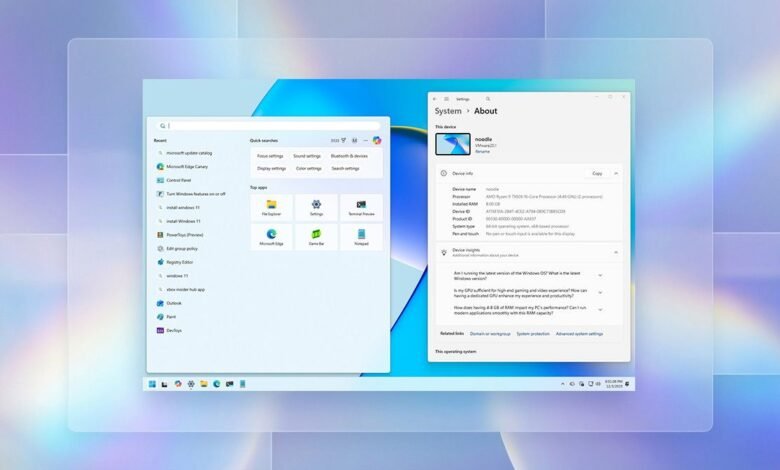
A key visual fix finally aligns the Windows Search panel with the updated Start menu height, creating a more cohesive look. The File Explorer receives significant dark mode improvements, extending consistent theming to operation dialogs, progress bars, and confirmation windows. However, users may initially encounter a brief white flash when launching File Explorer as this updated dark mode continues to be refined.
System settings are seeing considerable reorganization. The Settings app homepage gains a new “Device info” card displaying key system specifications like the processor and memory. Mobile Devices management is now fully integrated into the Settings interface, removing the need for a separate window. Furthermore, the legacy “About” page is redesigned with a cleaner layout, renaming sections to “Device info” and “Windows info.”
Several features previously managed in the Control Panel are making their way to Settings. A new “Virtual Workspaces” page centralizes control over virtualization features like Windows Sandbox and Hyper-V. Keyboard settings now include controls for character repeat rates and the ability to remap the Copilot key, while text cursor blink rate adjustments have moved to the Accessibility section.
New interaction methods are being added. A “Share with Copilot” option appears in taskbar app thumbnails for quick AI conversations. Users of dynamic desktop wallpapers via Windows Spotlight can now right-click the desktop for a “Next background” shortcut. For those who find it intrusive, a toggle to disable the Drag Tray flyout has been added to the Nearby Sharing settings.
The Widgets board is being redesigned with a navigation pane separating user widgets from the “Discover” feed and integrating settings directly into the panel. On supported touch devices, digital pens will provide haptic feedback during actions like closing windows.
For gaming handhelds beyond the ASUS ROG Ally, the update expands the Xbox Full Screen Experience (FSE), which transforms the desktop into a console-like interface optimized for controller navigation and conserves system memory.
Owners of Copilot+ PCs will see AI features extended to external cameras, allowing Windows Studio Effects to enhance video from USB webcams. The “Click to Do” context menu is also being refined on these systems, organizing actions into a single row for quicker access.
It is important to note that advanced AI features such as Windows Recall and Click to Do remain exclusive to Copilot+ PCs, which require specific hardware including a capable Neural Processing Unit (NPU) and security settings like Windows Hello to be enabled.
This update also includes the expected security patches and various smaller bug fixes, continuing Microsoft’s phased approach to delivering new functionality through its Controlled Feature Rollout (CFR) process.
(Source: Windows Central)