Speechify Chrome Extension Now Features Voice Typing & Assistant
▼ Summary
– Speechify is expanding beyond text-to-speech by adding voice detection features including voice typing and a voice assistant to its Chrome extension.
– The voice typing tool corrects errors and removes filler words but currently has a higher word error rate than competitors like Wispr Flow and Willow.
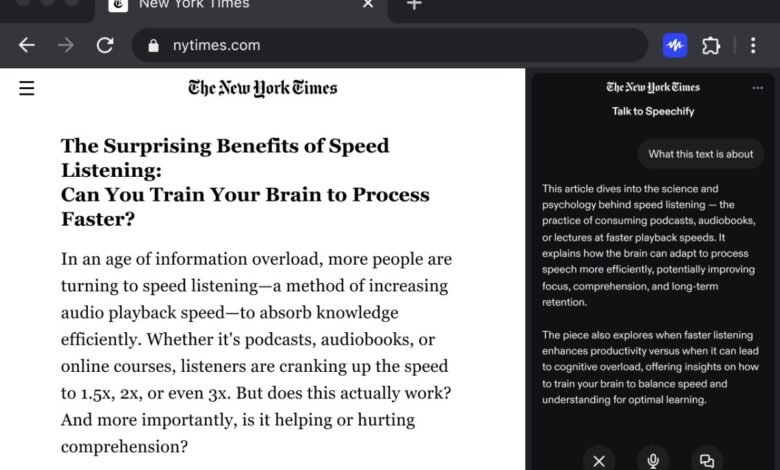
– Speechify’s new conversational voice assistant lives in the browser sidebar and can answer questions about website content.
– The company positions voice as its primary interface, contrasting with ChatGPT and Gemini where voice is secondary to text chat.
– Speechify plans to gradually roll out these features across all platforms and develop task-completing agents like making phone calls.
The Speechify Chrome extension has expanded its capabilities beyond text-to-speech, now incorporating voice typing and a conversational voice assistant. This update positions the tool as a more comprehensive productivity aid for users who prefer interacting with their devices through speech. While Speechify has long enabled users to listen to articles, PDFs, and documents, these new features mark a significant evolution for the platform.
Recent advancements in speech recognition technology have led to a surge in voice detection tools over the past year. Speechify is embracing this trend by launching its own dictation functionality, which currently supports English. Similar to competing products, Speechify’s voice typing automatically corrects mistakes and eliminates filler words to produce cleaner text.
Initial testing reveals that the tool performs reliably within Gmail and Google Docs, though it encounters challenges on platforms like WordPress. Activating voice dictation and ensuring smooth operation on certain websites can be problematic. The company acknowledges these issues and is progressively optimizing the extension for popular sites to enhance compatibility.
In terms of accuracy, Speechify’s word error rate currently appears higher than that of rivals such as Wispr Flow, Willow, and Monologue. However, the underlying model is designed to learn and adapt with continued use, which should lead to a gradual reduction in errors over time.
Alongside voice typing, Speechify is introducing a browser-based voice assistant accessible via a sidebar. This feature allows users to ask questions about webpage content, such as requesting key takeaways or simplified explanations. The company differentiates its assistant by making voice interaction the primary mode, rather than treating it as a secondary option.
According to Rohan Pavuluri, the company’s chief business officer, “We believe that chat will always be the default user experience in ChatGPT and Gemini when you open the apps. That’s what their users expect. Voice will always be secondary – and in many cases, an afterthought for ChatGPT and Gemini. We know from several years of building Speechify that there’s a large portion of the market, which includes our users, who want voice as the primary, default setting every time they open an app and talk to AI.”
One current limitation is that Speechify’s assistant does not function alongside browsers equipped with built-in sidebar assistants like OpenAI’s Atlas, Perplexity’s Comet, and Dia. The startup remains unfazed by this, as the extension is primarily tailored for Chrome and its extensive user community.
Looking ahead, Speechify intends to roll out both voice typing and the voice assistant across all its desktop and mobile applications. The company is also exploring the development of AI agents capable of performing tasks autonomously. While the full roadmap remains under wraps, one potential application involves having the agent make phone calls to schedule appointments or wait on hold with customer service, a goal shared by other firms like Truecaller and Cloacked.
(Source: TechCrunch)