Microsoft’s Windows is evolving into an ‘agentic OS’ with new taskbar features
▼ Summary
– Microsoft is integrating AI agents into the Windows 11 taskbar to act as assistants that can control your PC and perform tasks for you.
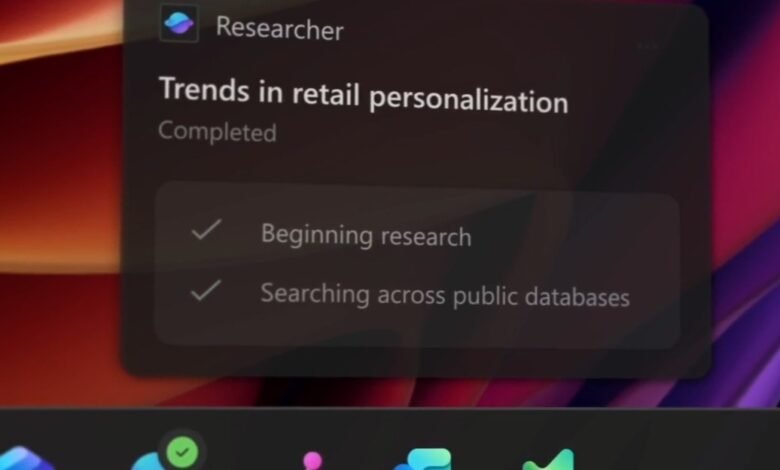
– These AI agents can run in the background to research data, access files, and automate tasks, with their status visible via the taskbar.
– The feature is opt-in, giving users control over enabling AI agents and ensuring they are part of the Ask Copilot taskbar integration.
– AI agents operate in a secure, separate workspace using the Model Context Protocol for standardized, auditable execution and security.
– Microsoft is expanding AI features across Windows, including in File Explorer and Copilot Plus PCs, blending local and cloud AI for enhanced functionality.
Microsoft is fundamentally reshaping the Windows operating system into an intelligent platform where AI agents act as proactive assistants, directly integrated into the Windows 11 taskbar. This transformation aims to make the OS a “canvas for AI,” empowering users with new capabilities that automate complex or tedious tasks. The initiative, described as creating an “agentic OS,” embeds these AI helpers directly into the core user experience, allowing them to control your computer and perform actions on your behalf with a simple click.
According to Navjot Virk, corporate vice president of Windows experiences, the company’s goal is to ensure every user can access the remarkable benefits of artificial intelligence. The integration extends beyond Microsoft’s own tools, like Microsoft 365 Copilot, to include third-party agents, making them a seamless part of the operating system. Windows chief Pavan Davuluri emphasizes that this is about weaving agents directly into the fabric of the OS, not merely adding them as separate applications.
These AI agents can operate in the background, conducting research or accessing files and folders to automate administrative work while you focus on other activities. Once you delegate a task, the agent minimizes to the taskbar, where it continues running. You can hover over its icon at any moment to check its current status and progress. This functionality is part of the new Ask Copilot feature, which merges the existing powerful local file search with the conversational abilities of Copilot, enabling you to launch AI agents directly from the taskbar.
Microsoft has introduced new visual indicators on the taskbar so you can instantly understand what an agent is doing. A floating window appears for interactions, avoiding the need to open a full application. When an agent requires your input or finishes a job, it sends a notification and updates its taskbar icon. Visual badges clearly show an agent’s status: a yellow exclamation point signals it needs assistance, while a green checkmark indicates a successfully completed task.
User control remains a priority; these AI experiences are entirely optional. Customers have full authority over when and how they interact with Copilot and the various agents, ensuring the feature is opt-in.
For developers, Microsoft is laying substantial groundwork at the platform level to support a wide array of agent use cases. The Model Context Protocol (MCP) is key, providing a standardized, secure framework that lets agents discover tools and communicate with each other through an on-device registry. This allows the Windows team to supply tools within an agentic framework for these AI helpers to utilize.
Security is paramount, so each AI agent operates within its own isolated workspace. This is a contained, policy-controlled environment that functions like a sandbox, with each agent using a dedicated Windows account. This separation safeguards your primary desktop session, especially important given that AI models can sometimes produce inaccurate results.
The taskbar is just one facet of Microsoft’s broader “agentic OS” vision. Copilot is also being integrated directly into File Explorer, offering highly contextual assistance in places users frequently visit. This allows for one-click document summarization, answering questions about files, or drafting emails based on a document’s contents without ever leaving the Explorer window.
On Copilot Plus PCs, the “Click to Do” feature is receiving significant upgrades. You can now convert any table visible on a webpage or elsewhere on your PC into an Excel document. After the conversion, you can freely manipulate the data and add new columns. This feature leverages local AI models on the device, and once the data is in Excel, you can further refine it using cloud-powered AI models via Copilot and its Agent Mode.
This hybrid approach, combining local AI processing on Copilot Plus PCs with the extensive power of cloud-based Copilot, represents the future direction for Windows AI. A new writing assistance tool is entering preview, enabling text rewriting and composition in any text box within Windows 11, with offline support available on Copilot Plus PCs.
Other Microsoft applications are also gaining AI enhancements. Outlook will feature AI-generated email summaries, and Word will automatically generate alt-text for images in Office documents. The company is also developing a “fluid dictation” feature for Windows that accurately converts speech to text with proper grammar and punctuation.
The blend of local and cloud AI is even more pronounced in Microsoft’s Windows 365 service. These cloud PCs, accessible via Windows 11, web browsers, or mobile apps, incorporate Copilot Plus features while maintaining full access to the primary cloud-powered Copilot capabilities.
For organizations and IT professionals less focused on AI, Microsoft announced several other updates. Hardware-accelerated BitLocker encryption is scheduled for release next year, though it will require next-generation Windows devices built on unannounced chip architectures, as the acceleration depends on specific silicon capabilities.
Additionally, Sysmon functionality will be integrated directly into Windows starting in early 2026. This integration will make security events readily available in the event log, simplifying management for security teams. Microsoft is also launching a visual refresh for Windows Hello and a new passkey manager that integrates with Microsoft Password Manager in Edge, as well as popular third-party services like 1Password and Bitwarden.
(Source: The Verge)


