Gemini in Chrome Expands to New Global Markets
▼ Summary
– Gemini in Chrome is expanding to Canada, India, and New Zealand, and now supports over 50 languages.
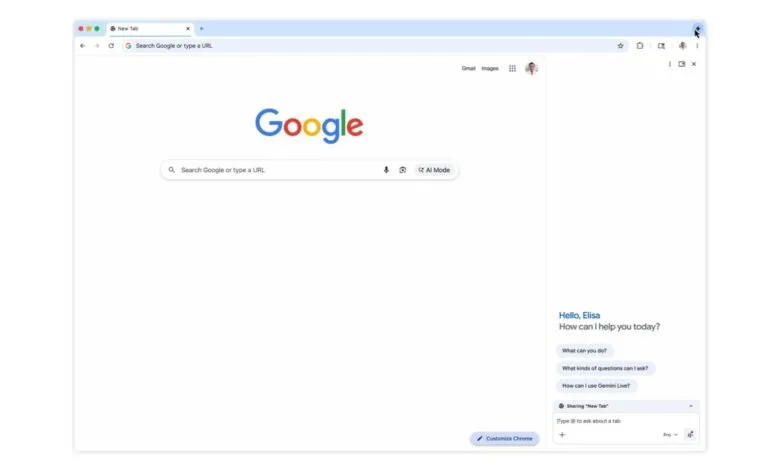
– The AI assistant can be accessed from multiple browser locations and appears as a floating window or docked side panel.
– It can use the context from up to 10 open tabs and integrate with Google apps like Gmail, Calendar, and Drive.
– A security feature requires user confirmation before performing sensitive actions like sending emails or adding calendar events.
– The expansion also makes Gemini in Chrome available on the iOS browser, in addition to Chromebook Plus, Mac, and Windows.
Google’s Gemini assistant is now expanding its reach within the Chrome browser, bringing its AI-powered features to users in Canada, India, and New Zealand. This global rollout follows its initial launch in the United States and a significant update earlier this year. The expansion is accompanied by a major leap in accessibility, with support now available for over 50 languages, making the tool useful for a vastly broader international audience.
Accessing Gemini in Chrome remains flexible and user-friendly. You can launch it directly from the browser’s top-right corner, use convenient keyboard shortcuts, or find it in the Mac menu bar or Windows system tray. Once activated, it operates as a versatile floating window or can be neatly docked as a side panel alongside your current tab, allowing for seamless multitasking.
A key strength of this integration is its ability to understand and utilize context from your open browser tabs, drawing information from up to ten of them simultaneously. Furthermore, Gemini can connect with a suite of popular Google applications, including Calendar, Docs, Drive, Maps, Search, and YouTube. One of the most practical integrations allows you to compose and send emails directly through Gmail without ever leaving the side panel, streamlining your workflow.
Alongside these core features, the update introduces new capabilities like Nano Banana 2. This function enables users to perform basic image edits directly within the browser interface, eliminating the need to upload files or open separate editing tabs.
Google has also emphasized user control and security for these powerful integrations. The system is designed to request explicit confirmation before taking sensitive actions, such as sending an email on your behalf or adding a new event to your calendar. This provides a necessary layer of oversight and prevents unintended automated actions.
The newly supported languages represent a significant step toward global inclusivity. The extensive list includes Afrikaans, Amharic, Bengali, Bulgarian, Catalan, Chinese (Simplified and Traditional), Croatian, Czech, Danish, Dutch, English (UK and US), Estonian, Filipino, Finnish, French, Galician, German, Greek, Gujarati, Hindi, Hungarian, Icelandic, Indonesian, Italian, Japanese, Kannada, Korean, Latvian, Lithuanian, Malay, Malayalam, Marathi, Norwegian, Polish, Portuguese (Brazil and Portugal), Romanian, Russian, Serbian, Slovak, Slovenian, Spanish (including Latin American variants), Swahili, Swedish, Tamil, Telugu, Thai, Turkish, Ukrainian, and Vietnamese.
This expansion also marks the arrival of Gemini in Chrome on a new platform: the iOS browser. Previously available on Chromebook Plus, Mac, and Windows systems, this move brings the AI assistant’s functionality to iPhone and iPad users directly within their mobile Chrome experience.
(Source: 9to5 Google)