My Best Purchase This Year: The Remarkable Paper Pro
▼ Summary
– The author initially criticized the Remarkable Paper Pro for its high price and limitations, but later purchased and now prefers it for focused work.
– Its primary value is as a single-purpose, distraction-free device with no apps or notifications, which fosters deep concentration.
– The expensive Type Folio keyboard case is praised as a worthwhile accessory for its comfort, portability, and stable typing experience.
– The tablet offers a paper-like writing feel with its stylus and color display, and notes sync across devices with a monthly subscription.
– While more capable and cheaper tablets exist, the author finds the setup’s focused experience justifies its premium cost for those seeking a digital break.
Finding a tool that genuinely enhances focus in our hyper-connected world can feel like searching for a unicorn. That’s precisely why, despite its significant cost, the Remarkable Paper Pro has become my most valued purchase this year. This isn’t a traditional tablet review; it’s an endorsement of intentional technology. A year ago, the consensus was clear: you probably didn’t need this device. With a starting price of $629 and an additional $229 for the essential Type Folio keyboard, the proposition seemed, frankly, absurd. For that combined investment, you could nearly secure a capable laptop like a MacBook Air on sale. The Paper Pro is not the best tablet, nor is it ideal for reading books, and its e-ink screen can feel deliberate, even slow. Its true value lies in its stubborn, beautiful single-purpose design: creating a space for undisturbed work.
This device provides a sanctuary from the digital noise that constantly fractures our attention. There is no Slack, no web browser, and absolutely zero notifications. It doesn’t push AI suggestions or algorithmic feeds; it simply presents a blank page. This enforced simplicity is its superpower. It carves out a narrow lane for deep work, eliminating the tempting detours into social media or endless video streams. For writing, planning, or sketching, it creates a rare environment where actual human thought can flourish without interruption.
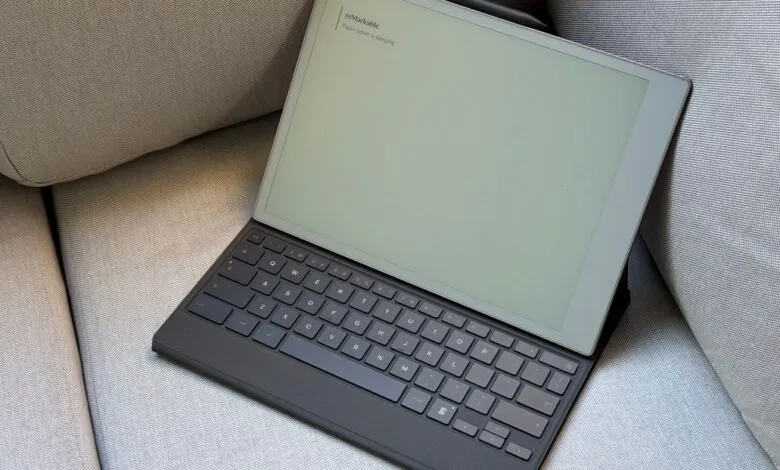
Pairing the tablet with the Type Folio keyboard transforms the experience from interesting to indispensable. Yes, the $229 accessory is pricey, but it integrates seamlessly, acting as both a protective cover and a surprisingly pleasant typing companion. It’s thin, light, and attaches magnetically. While folding the folio into its stand position takes a bit of practice, it’s stable enough for lap use. The keyboard itself is compact but comfortable, with satisfyingly clicky keys, a soft-touch finish, and helpful backlighting. It’s a joy for extended writing sessions.
For handwritten notes, the upgraded Marker Plus stylus (an extra $129 separately, or $50 as a bundle) glides across the textured glass of the 11.8-inch Canvas Color display with a convincing paper-like feel. You can scribble on blank pages or annotate PDFs directly, and built-in templates make it easy to use as a daily planner. Every note, whether typed or written, syncs automatically to Remarkable’s mobile and desktop apps, though this requires a $2.99 monthly Connect subscription.
I’ll admit I don’t use every feature, like the color display, to its fullest. The pen often stays magnetically attached to the tablet’s side as I primarily type. There are undoubtedly cheaper tablets that offer far more capabilities. But for me, the premium is justified by the profound lack of distractions. The Paper Pro and Type Folio combo isn’t about having more features; it’s about removing everything else. If you’re seeking a legitimate escape from apps and notifications, a dedicated tool for concentration beyond just putting your phone away, this setup is an exceptional, if luxurious, solution.
(Source: The Verge)