Turtle Beach Vulcan II TKL Review: Is It Worth It?

▼ Summary
– The Vulcan II TKL is an affordable tenkeyless mechanical keyboard featuring Turtle Beach’s Titan HS linear switches, which provide a smooth, consistent, and high-resistance typing sensation.
– It has a sturdy aluminum base plate that gives it a premium feel, but the board uses lightweight plastic and lacks standout visual features or a wrist rest.
– The keyboard includes a clickable volume wheel and customizable RGB lighting with AIMO technology, though the hot-swappable switches are difficult to replace in practice.
– Customization options are available through the Swarm software, allowing for profile switching, macros, and game mode settings, but these features may not be essential for all users.
– Despite some limitations, the keyboard is praised for its solid build quality and tactile feel, offering good value for its $120 price point.
For gamers seeking a high-quality mechanical keyboard that balances performance with value, the Turtle Beach Vulcan II TKL presents a compelling option. This tenkeyless model builds on its predecessor’s foundation, offering a familiar layout and a feature set aimed at both casual and dedicated players. While Turtle Beach may be better known for its audio gear, this keyboard demonstrates the brand’s growing ambition in the peripheral space, delivering a solid typing experience backed by thoughtful, if not groundbreaking, extras.
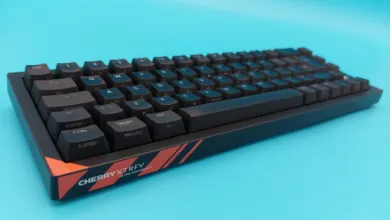
Upon unboxing, the Vulcan II TKL makes a strong visual impression. An aluminium base plate lends a premium look and feel, cleverly offsetting the use of lighter plastics in the overall construction. It’s a board that feels sturdy and well-put-together, especially considering its accessible price point.
The heart of any mechanical keyboard lies in its switches, and here the Vulcan II TKL employs Turtle Beach’s own Titan HS linear mechanical switches. These offer a smooth, consistent keystroke with more resistance and shorter travel than many competing linear switches. If you appreciate a quiet, uniform press without a tactile bump or audible click, you’ll likely enjoy the typing feel. The sensation is stable and precise, making extended gaming or typing sessions comfortable.
A clickable volume wheel sits conveniently in the top-right corner, providing easy media control without cluttering the design. The keyboard features full per-key RGB lighting, and while the shallow keycaps create an “open plan” look with light spilling between keys, the effect is vibrant. Through the accompanying Swarm software, you can sync lighting with in-game action using AIMO technology, a fun, if somewhat fleeting, novelty.
Turtle Beach emphasizes that the Titan HS switches are hot-swappable, meaning you can theoretically replace them without soldering. In practice, however, removing the switches is a fiddly process that may discourage frequent experimentation. While the inclusion of three spare switches is a nice touch for addressing failures, this board isn’t the best platform for avid switch modders.
The Swarm software allows for a degree of customization, letting you save up to five profiles with unique macro assignments and lighting schemes. A dedicated game mode enables additional input layers, though many users may find these advanced features go unused. The software itself is functional but unremarkable, getting the job done without standing out.
After extended use, the Vulcan II TKL’s greatest strength reveals itself in its dependable, enjoyable typing experience. The combination of a rigid chassis and those smooth, consistent linear switches makes for a keyboard that feels reliable and responsive. It may lack flashy visual distinctions, but its sensible tenkeyless form factor and focused performance are easy to appreciate.
Priced around $120, the Vulcan II TKL sits in a competitive segment. It doesn’t try to reinvent the wheel, but instead delivers a well-executed, no-fuss mechanical keyboard. If you prefer a high-resistance linear switch and a sturdy build without unnecessary extras, this board is an excellent choice. However, if you’re hunting for a barebones platform for extensive customization or require tactile feedback, you may want to look elsewhere. For many, the Vulcan II TKL will represent a smart, satisfying investment.
(Source: PC Gamer)