8BitDo Pro 3 Review: Is This the Ultimate Retro Controller?
▼ Summary
– The 8BitDo Pro 3 controller features a retro Nintendo GameCube-inspired design and includes a charging dock that stores the 2.4 GHz dongle.
– It offers multiple connectivity options (wireless 2.4 GHz, Bluetooth, and wired), Hall effect triggers, and four reprogrammable buttons for customization.
– The controller has a comfortable, narrow build similar to Sony’s DualShock, with a weight of 242.4 g and textured grips to prevent slipping.
– Key drawbacks include a low 250 Hz polling rate that limits competitive performance and the absence of a 3.5 mm headphone jack.
– It is best suited for casual use due to its ease of setup, aesthetic appeal, and long battery life, but not for competitive gaming where faster controllers are available.
Finding the perfect controller for both retro gaming sessions and modern PC play can feel like a quest, but the 8BitDo Pro 3 makes a compelling case for itself with its charming design and user-friendly features. While it may not boast the highest-end competitive specifications, its overall package offers a great deal of appeal for everyday gamers.
8BitDo has a reputation for creating products that are simply a pleasure to own. My desk is practically a showcase for their gear, from the convenient Retro R8 to the satisfyingly clicky mechanical keyboard. The Pro 3 continues this tradition, though it does make a few more noticeable trade-offs compared to its stablemates.
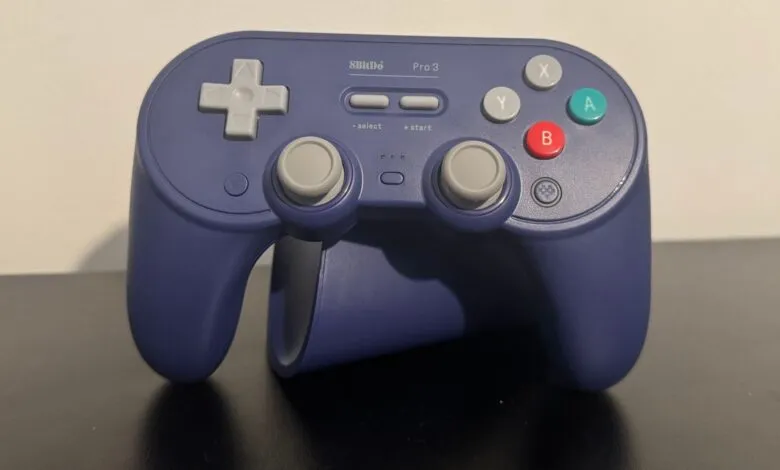
The unit I tested sports a vibrant purple shell with contrasting red and green face buttons, a clear and delightful nod to the Nintendo GameCube. Embracing a retro-futuristic look is 8BitDo’s specialty, and they execute it with more flair than just about anyone else in the market. The controller looks fantastic, whether it’s sitting on its dedicated charging stand or in your hands. This stand is more than just a pretty accessory; it features a clever compartment on the bottom to store the 2.4 GHz wireless dongle. Plugging the dock into your PC serves a dual purpose: it charges the controller and acts as a permanent wireless receiver. If you prefer not to use the dock, you can easily remove the dongle and plug it directly into a USB port.
Setting everything up is straightforward, requiring only the included USB Type-C cable for a wired connection. The controller slips effortlessly into the charging stand, locking into place with a reassuring click. A small indicator light glows at the base to confirm charging has begun. The entire experience is, in a word, polished.
In hand, the Pro 3 feels both comfortable and well-built. Weighing 242 grams, it sits comfortably in the mid-range for controller heft, and the weight is distributed perfectly. I’ve enjoyed several multi-hour gaming sessions without any hand fatigue. It typically connects to my PC in about a second after being removed from the charger.
Playing Doom: The Dark Ages, a title that feels tailor-made for a controller, was a smooth experience. The buttons are responsive, and the controller’s shape is ergonomic. As someone who tends to use an aggressive “claw” grip, I found the extra programmable buttons next to the bumpers and on the controller’s back immensely helpful for breaking that habit.
Hades 2 is another game that feels inherently right on a controller, and the Pro 3 delivers. The game relies on precise dodges and spellcasting, and the face buttons are not only tactile and clicky but also positioned for quick, easy access.
While the 8BitDo Ultimate 2C takes design cues from the Switch Pro or Xbox controllers, the Pro 3 feels much closer to a Sony design. Its overall weight, texture, and form factor are reminiscent of the PS3’s DualShock controller. This means it can feel a bit narrow if you’re accustomed to larger controllers. I usually prefer an Xbox-style pad, but the Pro 3’s rounded, textured grips provide a secure hold, eliminating any fear of it slipping during an intense moment.
The only minor build quality note is a very slight rattle near the top of the controller. You have to shake it deliberately to hear it, but I did notice the sound during some particularly animated gameplay.
I appreciate that the programmable buttons have a distinct auditory and tactile feedback compared to the triggers, bumpers, and face buttons. The bumpers produce a deep thock, while the programmable buttons offer a lighter tink. This satisfying difference isn’t just for show; it has genuinely helped me avoid accidental presses.
Beyond the four reprogrammable buttons, the Pro 3 features a small switch beside each trigger that alters its actuation. You can set it to a linear switch for rapid firing in shooters or flip it back to a traditional trigger for more nuanced control in racing games.
This adjustable trigger actuation proved especially useful in a rhythm-based shooter like Metal: Hellsinger. Reducing the time needed to press the triggers gave me a precious extra moment to prepare for subsequent attacks.
However, the 250 Hz polling rate feels like a significant shortcoming for a controller bearing the “Pro” name. Even the more affordable Ultimate 2C offers a 1,000 Hz polling rate. For the Pro 3’s higher price, you are getting superior build quality, an elegant charging stand, and advanced TMR thumbsticks. That said, the Gamesir G7 Pro provides a 1,000 Hz polling rate, TMR sticks, a charging stand, and swappable faceplates for just ten dollars more.
The 250 Hz rate is perfectly adequate for single-player adventures and passable in many multiplayer games, but it does put you at a slight disadvantage in highly competitive environments. Another notable omission is a 3.5 mm headphone jack. You cannot plug a headset directly into the controller, which somewhat limits your audio options and reduces freedom of movement with a wired headset.
The accompanying software allows for detailed customization, including independent adjustment of vibration intensity for the left and right grips. You can also fine-tune the maximum actuation distance for the triggers. The short-press mode for the triggers is a simple toggle, so its actuation point is not adjustable.
Consider buying the 8BitDo Pro 3 if:
- You value aesthetics and convenience: Its great look and functional charging dock make it a lovely display piece that’s also remarkably easy to use daily. Switching from mouse and keyboard is a matter of seconds.
- You prioritize ease of use: The setup is straightforward, and the seamless integration with the charging dock makes it a no-fuss peripheral.
You might want to look elsewhere if:
- You need a competitive edge: Despite the “Pro” branding, the 250 Hz polling rate means it will be slightly slower than many rivals in fast-paced, reaction-based games.
- You prefer a larger controller: The Pro 3 has a relatively narrow and compact form factor. It’s not uncomfortable, but it is smaller than the current standard offerings from Microsoft and Sony.
The approximately 20-hour battery life is impressive, especially since the attractive stand encourages you to dock the controller each night. While some may argue for replaceable batteries, particularly when features like TMR sticks and Hall effect triggers are designed for longevity, even 15 hours of playtime would be perfectly sufficient.
The package includes whimsical ball-top replacements for the thumbsticks, which swap the standard caps for a spherical design. You can also remove and replace the face buttons, though my review unit did not include spares. 8BitDo describes these ball tops as “purely for fun,” and that feels accurate. It’s a charming, slightly silly addition that adds personality.
This focus on enjoyment reflects the overall ethos of the 8BitDo Pro 3. It boasts a gorgeous aesthetic and makes several smart hardware choices, but it doesn’t fully live up to the “Pro” designation in terms of raw performance. You can find controllers at similar or even lower price points that offer more competitive specs, though the Pro 3’s pure usability is excellent.
The Pro 3 is set to become my daily driver thanks to its effortless operation and beautiful design, yet I can’t shake the feeling that I’m making a small sacrifice to my already average competitive skills in the process.
(Source: PC Gamer)