Nintendo Power Reveals the Secret Behind the A/B/X/Y Buttons
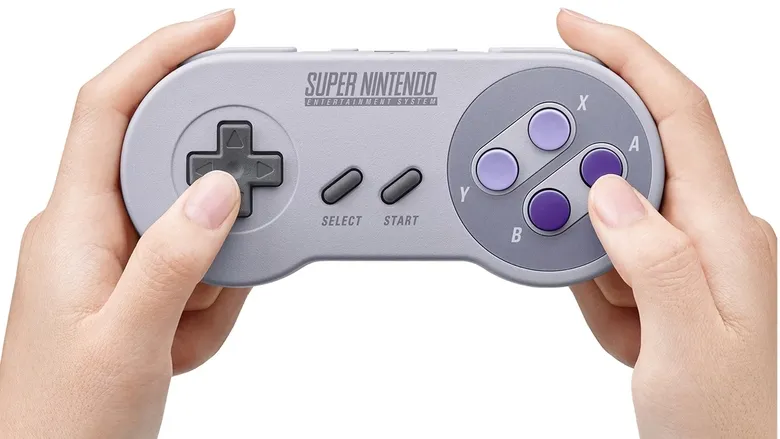
▼ Summary
– The Super Nintendo introduced significant controller upgrades with additional buttons compared to the NES.
– It added X and Y face buttons alongside the existing A and B buttons from the NES.
– This A/B/X/Y button layout has been consistently used by Nintendo in subsequent designs.
– Many modern gamers question why Nintendo chose the A/B/X/Y naming convention over alternatives like A/B/C/D.
– The explanation for this naming choice was revealed decades ago in an issue of Nintendo Power magazine.
The iconic A/B/X/Y button layout found on Super Nintendo controllers has become a standard in gaming, but its origins trace back to a clever design philosophy revealed in an old issue of Nintendo Power. This configuration, which replaced the simpler two-button setup of the original NES, was not an arbitrary choice. Instead, it reflected a deliberate strategy to enhance gameplay intuitiveness and player comfort.
When the Super Nintendo launched, its controller introduced several new inputs alongside the familiar directional pad and Start/Select buttons. The addition of the X and Y buttons provided developers with more options for in-game actions, allowing for greater complexity in titles without overwhelming the user. According to the magazine, Nintendo selected these specific letters to create a non-linear, diamond-shaped arrangement that felt natural under the player’s thumb. This ergonomic design encouraged a more fluid interaction with games, distinguishing it from a simple alphabetical sequence like A, B, C, D.
The reasoning behind the letters was both practical and symbolic. Using X and Y introduced a sense of symmetry and balance, making the controller easier to understand at a glance. This approach helped establish a visual and tactile language that has persisted across numerous Nintendo consoles and influences modern controller designs industry-wide.
(Source: Go Nintendo)