The Most Underrated Laptop Accessory: My SSD Enclosure Hack
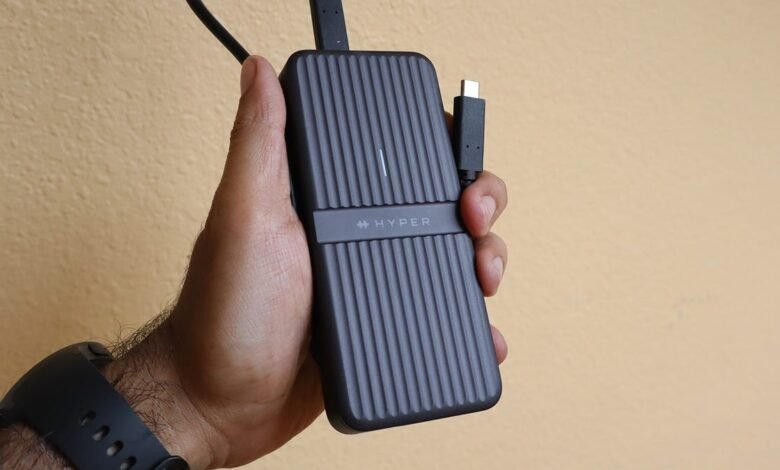
▼ Summary
– The HyperDrive Next USB4 M.2 PCIe enclosure is a $200 accessory that houses NVMe SSDs, effectively turning them into a high-speed external storage device.
– It delivers excellent performance, with tested read speeds around 4,000 MB/s and write speeds around 1,300 MB/s, enabling fast transfers of large files.
– The enclosure features a durable aluminum design with a cooling ridge system and an optional silicone sleeve for IP55-rated dust and water resistance.
– It is designed for professionals like videographers and AI developers, but requires both a compatible NVMe SSD and a computer with a Thunderbolt 4 (or later) port to function.
– The accessory is not recommended for average users, who may find basic flash drives or cloud storage more practical and cost-effective.
For professionals who regularly handle massive files, finding a storage solution that keeps pace with demanding workflows is essential. The HyperDrive Next USB4 M.2 PCIe enclosure transforms a high-speed NVMe SSD into a remarkably fast and portable external drive, offering performance that feels like an internal component. This sleek accessory is built for creators, developers, and archivists who need to move terabytes of data quickly and reliably, leveraging the full potential of a Thunderbolt connection.
In my experience testing laptop gear, this enclosure stands out. Its primary function is simple: it houses an SSD or a PCIe module, effectively creating a premium, high-capacity flash drive. With the right drive inside, it delivers exceptional file management speeds and even supports specialized hardware like machine learning accelerators.
What truly impresses is the real-world speed. Designed for professional use, the enclosure ensures your storage isn’t the bottleneck. To test it, I used an Acer Swift Edge 14 laptop with a Thunderbolt 4 port and loaded the enclosure with a 4TB Samsung 9100 Pro NVMe SSD. Using the benchmarking tool CrystalDiskMark, the drive achieved read speeds around 4,000 MB/s and write speeds near 1,300 MB/s. Accessing files was instantaneous, a large movie opened in a blink, and these results confirm the enclosure fully utilizes the Thunderbolt bandwidth without restricting the drive.
Practical file transfers were equally swift. Moving a 10GB movie took roughly 25 seconds, while a massive 98GB video game transferred in just over four minutes. It’s important to note that performance can vary based on your hardware; a laptop with a newer Thunderbolt 5 port would likely see even faster results.
Beyond speed, the design is both elegant and practical. The aluminum body feels durable, and when paired with its included silicone sleeve, it earns an IP55 rating for resistance to dust and water splashes. A series of ridges along the enclosure increases surface area to help dissipate heat, and thermal pads are provided to place on top of the SSD for additional cooling. Installation couldn’t be simpler: open the top, slide in your SSD until it clicks, and you’re ready to go.
This product is specifically intended for power users who already own or are willing to invest in high-performance storage. It’s an ideal tool for videographers, content creators, AI developers, and multimedia archivists. The enclosure supports multiple M.2 sizes (2230, 2242, 2260, and 2280) and features two Thunderbolt ports on the front: one for data and one for optional external power. While some high-performance SSDs might need that extra power to maintain peak speeds, in my testing, connecting it did not boost performance beyond the already excellent rates.
However, this isn’t an accessory for everyone. The HyperDrive enclosure itself is useless without an NVMe SSD, and SSD prices, particularly for high-capacity models like the 4TB Samsung 9100 Pro, can be steep. For most everyday users, a standard flash drive, external hard drive, or cloud storage is a more sensible and cost-effective choice for file management. This is a premium solution built for specialized, high-bandwidth needs.
The HyperDrive Next USB4 M.2 PCIe enclosure retails for $200. A crucial compatibility note: it requires a computer with a Thunderbolt 4 or Thunderbolt 5 port to function. This applies to compatible Windows 11 PCs, Macs, and even iPads. Apple users should ensure their Mac runs macOS 12.4 or later and their iPad runs iPadOS 13.4 or later for full support. Always verify your system’s ports before purchasing to ensure this powerful accessory will work for you.
(Source: ZDNET)


