Tiny E-Reader: Frustrating Yet Full of Potential

▼ Summary
– The Xteink X4 is an ultra-compact and affordable e-reader, notable for its very small 4.3-inch size and pocketable design.
– Its usability is hampered by a non-intuitive button-based interface, lack of touchscreen and lighting, and limited software that makes navigation and file loading frustrating.
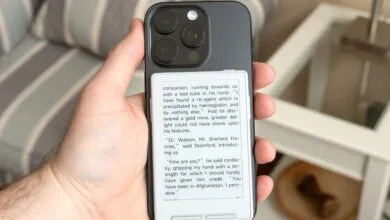
– A key advertised MagSafe feature is flawed, as the e-reader does not align properly on newer iPhones, extending past the bottom and making the attachment impractical.
– The device’s limitations are partially mitigated by an active user community creating improved, open-source firmware like CrossPoint Reader, which enhances the interface and functionality.
– Despite its compromises, the X4 serves as a highly portable, dedicated reading device for those who prioritize size and are willing to tinker with third-party software upgrades.
For those seeking the ultimate in portable reading, the Xteink X4 e-reader presents a fascinating paradox. It is one of the most compact and affordable dedicated reading devices available, yet its out-of-the-box experience is hampered by unintuitive controls and limited software. This device clearly prioritizes size and price above all else, creating a product that feels both exciting and unfinished. Its true potential seems to lie not with its manufacturer, but with a dedicated community of users developing alternative firmware to unlock a better experience.
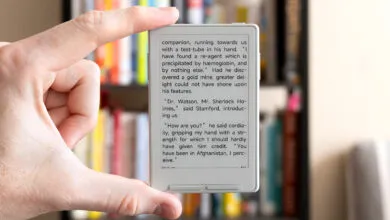
Holding the X4 for the first time is a genuine delight. Its 4.3-inch E Ink screen is housed in a chassis with remarkably slim bezels, making it significantly smaller than even the discontinued 5-inch Kobo Mini. It slips effortlessly into a pocket and adds almost no bulk to a daily bag. This initial joy, however, is quickly tempered when exploring its features. A key selling point was its MagSafe compatibility, allowing it to attach to the back of an iPhone. In practice, the magnet placement is misaligned on newer iPhone models, causing the e-reader to hang awkwardly off the bottom. The company acknowledges this, attributing it to testing with older iPhone models, and includes adhesive magnetic rings as a workaround. For most, it’s easier to simply use the X4 as a standalone ultra-portable reader.
The compromises for its $69 price tag are immediately apparent. The screen resolution is 220ppi, which is lower than the 300ppi standard on current Kindles and Kobos. While text doesn’t look razor-sharp under close inspection, it remains perfectly readable. A more significant omission is the lack of any front-light, meaning you’ll need an external light source to read in the dark. The most jarring limitation is the absence of a touchscreen. Navigation relies entirely on a series of unlabeled buttons along the right edge and below the display. To make matters more confusing, three of these buttons are two-sided, with each side performing a different function. Remembering which side of which button performs what action is a constant struggle.
Software is where the X4 feels most rudimentary. It is a focused reader with support for TXT, EPUB, and some image files, but lacks any built-in bookstore. You must supply your own DRM-free content. Loading books is itself a challenge. The device doesn’t mount as a drive when plugged into a computer, and its promised wireless transfer features are either non-functional or listed as “in development.” The most reliable method is to use the included microSD card, but the card slot is deeply recessed, making insertion and removal needlessly difficult without a tool.
The reading experience is functional but barebones. The dedicated page-turn buttons are welcome, but anyone accustomed to a Kindle or Kobo will miss robust formatting options. You get only two font sizes, three line spacing choices, and no margin adjustment. Images within books are not displayed, and most text formatting is ignored. Navigating to chapters or adjusting settings involves clunky menu diving with the confusing buttons. It’s a system you can learn to tolerate, but never one you’ll love.
Remarkably, the X4’s biggest strength is its openness. The company has not locked down the device, enabling a community of users to develop alternative firmware. Installing the open-source CrossPoint Reader software is a straightforward process that dramatically improves the experience. It adds on-screen button labels, provides more font and formatting control, and simplifies the interface. While it’s easy to revert to the original software, most users who try CrossPoint will likely never go back.
The Xteink X4 will not replace a full-featured e-reader like a Kobo Libra 2 for primary reading sessions. The lack of lighting, a touchscreen, and a polished ecosystem are too great. Yet, for the past few weeks, this tiny device has found a permanent place in my bag. It serves as a perfect, distraction-free alternative to my phone during short waits, despite its many frustrations. Recommending a device that needs a community fix is complicated, but if extreme portability is your top priority and you don’t mind a bit of tinkering, the X4’s unique charm and potential make it a curious gadget worth considering.
(Source: The Verge)