I Built a Mac App with Claude in 8 Hours: The Reality of AI Coding
▼ Summary
– Using AI coding tools like Claude Code is a force multiplier but requires extensive management, testing, and correction, similar to overseeing human programmers.
– The author successfully ported a custom iPhone app to Mac by leveraging shared iCloud data architecture but had to remove NFC and camera features due to hardware limitations.
– Developing the Mac app involved iterative prompting to fix performance issues and UI problems, such as implementing a thumbnail caching system for smoother scrolling.
– The process felt more like managing than coding, taking about 8 hours of project time spread over a month, but resulted in a functional, custom application.
– AI-assisted development is highly productive for experienced developers who can guide it, but it demands rigorous testing and feature-by-feature refinement, not a “magic wand” solution.
Building a functional Mac application in just eight hours might sound like a fantasy, but it’s a reality with modern AI coding assistants. The process, however, trades the creative flow of traditional programming for a role more akin to project management, requiring constant coordination and oversight. While the speed is undeniable, human judgment remains essential for navigating performance bottlenecks and crafting a polished user interface. The true power of AI emerges not from passive instruction, but when developers take relentless leadership, conducting rigorous testing and providing precise corrections.
Throughout my career, I’ve approached software creation in two distinct ways. The first involves writing code line-by-line, a deeply engaging practice that can lead to a satisfying state of flow. The second involves managing other programmers, which acts as a force multiplier but replaces creative immersion with continuous planning, guidance, and problem-solving. Using an AI like Claude Code to build an app feels strikingly similar to that second experience. It is an incredibly powerful tool that accelerates development, but you will spend most of your time directing, correcting, and untangling unexpected complexities.
Success with these tools greatly depends on your existing knowledge. Understanding the underlying technology allows you to guide the AI on architectural decisions, not just feature requests. This foundational knowledge helps you steer the project effectively, whether you are an experienced developer or a dedicated learner. It’s crucial to set realistic expectations; AI is not a magic wand that produces market-ready software without significant human input.
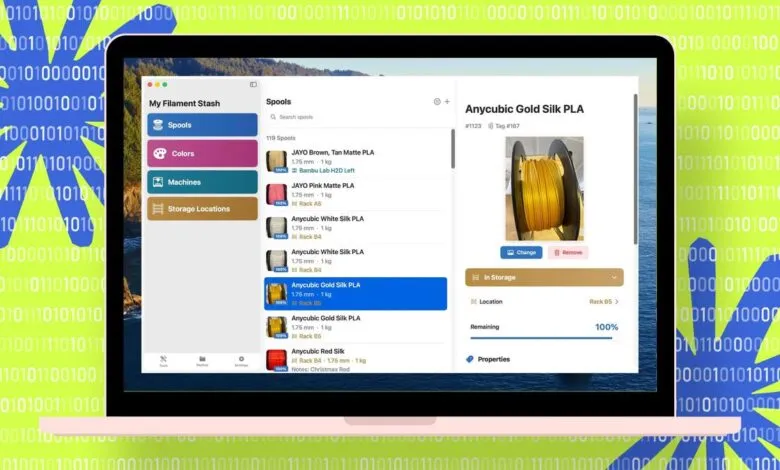
My project began with an existing iPhone app I built to manage over a hundred 3D printing filament spools across multiple printers and storage racks. The app uses NFC tags and the phone’s camera to track spool movements, and after two months of daily use, it had become indispensable. My goal was to port this utility to macOS, allowing me to check inventory directly from my desktop while initiating print jobs. Since I had already designed the iPhone app with Swift and SwiftUI in Xcode, using Claude Code in the terminal to assist with the Mac version was a logical next step.
Porting the application required considerable rework due to platform differences. My Mac lacks a camera and NFC capabilities, so those features could not be directly transferred. However, I had proactively built the iPhone app with iCloud data sharing, which became the critical link between the two platforms. After securing full backups and committing everything to Git, I instructed Claude to branch the repository and create a Mac version, explicitly noting which features to omit and which architecture to preserve.
The initial result, produced in about ten minutes, was functional but far from polished. The interface was unattractive, and the spool list loaded painfully slowly. Yet, reaching this first run represented a dramatic time saving compared to manual coding. The subsequent process became a cycle of building in Xcode, reviewing errors and warnings, feeding those back to Claude, and iterating.
A significant challenge involved adapting the interface for the Mac’s resizable windows, a concept the AI initially struggled to grasp. This highlighted the importance of building a shared knowledge base within the project. By instructing Claude to document lessons learned, like the necessity for dynamic UI scaling, that understanding became embedded in future instructions. I opted for a three-pane layout on the Mac, which required numerous iterative prompts to achieve a visually pleasing and logical arrangement.
This UI change inadvertently broke the iPhone app, a setback that underscored the value of programming experience. I deduced Claude was attempting to share screen code between platforms. The solution was to explicitly command it to create entirely new interface screens for the Mac and then repair the iPhone version separately.
We also tackled performance issues. The spool list lagged because it loaded full-resolution images for every item. The fix was implementing a thumbnail caching system that generates small, 128-pixel versions of photos, stores them locally, and creates them in the background. This allowed the list to scroll smoothly, even with hundreds of entries. Further refinements included optimizing list refresh behavior and adding data purging features.
This entire endeavor felt much more like management than hands-on coding. I adopted the mindset of overseeing a remote developer: assigning tasks, asking for opinions, pointing out errors, and conducting relentless testing. Claude performed on par with many human programmers I’ve worked with, displaying occasional stubbornness but ultimately delivering. While managing the AI lacked the personal satisfaction of deep coding work, the outcome was a fully functional, custom Mac app built to my specifications in roughly eight hours of focused project time, spread across several weeks.
For anyone considering a similar project, my advice is to proceed methodically. Introduce features one at a time and refine continuously. Once a basic version works, shift the majority of your effort to testing. Do not assume the AI has implemented every requirement correctly; I found several key features were omitted until I specifically identified the gaps. The productivity gains, however, are substantial. I now have a tailored tool that perfectly fits my workflow on both iPhone and Mac. The investment in an AI coding assistant has proven its worth, even if the app never becomes a commercial product. The next challenge awaits: adapting the application for the Apple Watch.
(Source: ZDNET)