Wavlink WL-UTD58 Thunderbolt 5 Dock Review: Sleek Upgrade, One Flaw
▼ Summary
– The Wavlink WL-UTD58 is a premium, aesthetically pleasing desktop docking station with a high-quality aluminum build and a focus on design.
– It features the latest Thunderbolt 5 technology, offering high-speed data transfer and the ability to charge a connected laptop with up to 140W of power.
– The dock has a well-thought-out port selection including multiple Thunderbolt 5, USB-A, SD card readers, and 2.5Gb Ethernet, but notably lacks HDMI or DisplayPort connections.
– It performs reliably with plug-and-play setup on both Windows and macOS, providing performance equivalent to direct connections for peripherals and fast storage.
– A significant drawback is the lack of complementary software for safely ejecting drives, which is a missed opportunity for a dock at this price point.
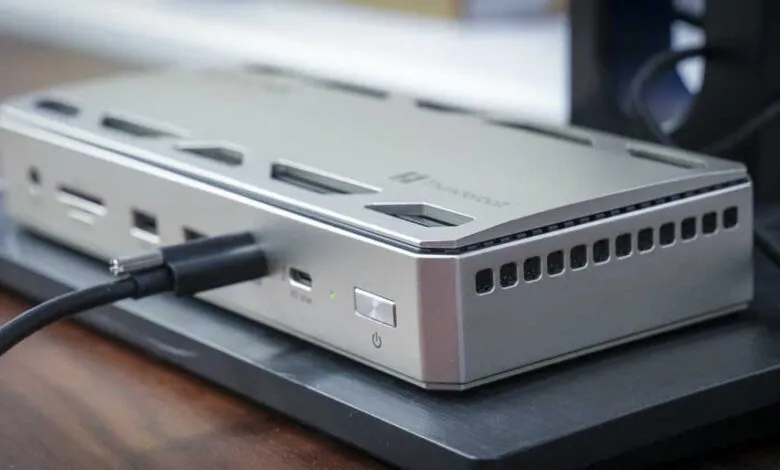
The Wavlink WL-UTD58 Thunderbolt 5 dock presents a compelling blend of high-end aesthetics and powerful functionality, designed for creative professionals who demand both style and speed. Its sleek anodized aluminum chassis immediately sets it apart from the typical boxy docking station, offering a futuristic yet professional look suitable for any studio or office. This device leverages the latest Thunderbolt 5 technology to deliver blistering data transfer speeds and robust power delivery, all managed through a single, clean cable connection to your laptop.
Setting up the dock is a hassle-free experience. It operates on a simple plug-and-play basis with both Windows 11 and macOS, requiring no additional software installation. The included 240W power adapter and a single Thunderbolt 5 cable handle everything. That one cable does the heavy lifting, supplying up to 140W of charging power to your laptop, enough for demanding machines like a MacBook Pro, while simultaneously managing data for all connected peripherals.
Port selection is thoughtfully arranged to support a creative workflow. The front panel offers convenient access with two USB-A 3.2 ports, a 3.5mm audio combo jack, and both SD and microSD card readers capable of fast 312MB/s transfers. A front-mounted Thunderbolt 5 port provides 30W of power for quick device charging. Around back, you’ll find two additional Thunderbolt 5 downstream ports (each with 15W PD), two more USB-A ports, a 2.5 Gigabit Ethernet port for high-speed networking, and the DC power input. The dock uses clever heat dissipation within its metal body, resulting in silent, fanless operation.
Performance in real-world use is impressive. Data transfer rates feel indistinguishable from a direct computer connection, making it ideal for video editors and photographers working with large files. The 2.5GbE port ensures reliable, fast network transfers to a NAS. For displays, the dock supports configurations like dual 4K monitors at 144Hz, which is perfect for color-critical work in applications like Photoshop or Premiere Pro. It can even drive a single 8K display at 60Hz.
However, the design philosophy comes with a couple of notable trade-offs. Perhaps the most significant omission is the lack of any HDMI or DisplayPort outputs. Connecting monitors requires a USB-C/Thunderbolt cable or potentially an adapter, which might be an inconvenience for some setups. Furthermore, the dock does not include any companion software. This means users must manually eject storage drives through their operating system before disconnecting the laptop, a step that some competing premium docks automate with a utility.
Physically, the dock itself is compact and stays securely in place thanks to rubberized feet, though it is accompanied by a sizable external power brick that needs to be tucked away. Build quality is excellent, with the aluminum construction adding a premium feel and effective weight.
Available for around $399, the Wavlink WL-UTD58 sits at the higher end of the market. Its value is clear for power users in creative fields who will fully utilize the ultra-fast Thunderbolt 5 connectivity and high-wattage charging. It future-proofs your setup with the latest port technology. Yet, for those with simpler needs or a collection of older monitors that rely on HDMI, this dock might be overkill, and the absence of management software is a curious shortcoming at this price point.
In summary, this dock excels as a powerful, elegant hub for a streamlined workstation. It delivers exceptional performance for data-intensive tasks and multi-monitor setups, wrapped in a design that looks as good as it performs. Just be prepared for the lack of traditional video ports and the manual process of safely removing drives.
(Source: techradar)